As Amazon Associates, we earn from qualifying purchases. This means we may receive a small commission at no extra cost to you if you click through and make a purchase.
- Brand
- Canon
- Buyer rating
- 4.2 out of 5
- Mostly positive, average of Amazon buyer ratings
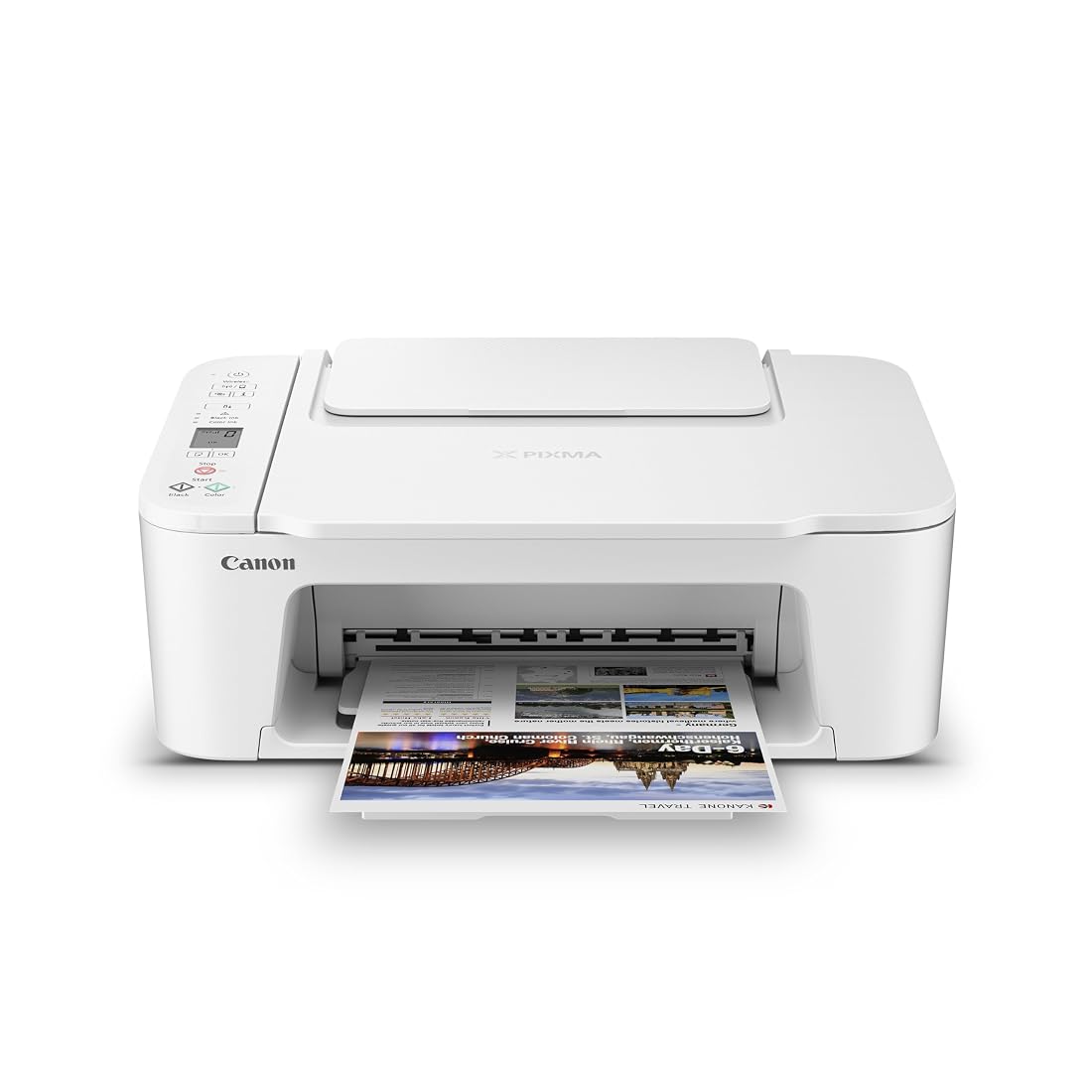
The Canon PIXMA TS3720 is an entry-level color inkjet designed for light-duty domestic workloads, student assignments, and occasional document scanning. For shoppers evaluating whether this hardware fits their workspace, the unit delivers a predictable, utilitarian footprint anchored by a two-cartridge print engine and dual-band networking. Buyers seeking an uncomplicated peripheral for intermittent correspondence, utility bills, and basic graphic forms will find that the hardware covers core tasks without technical friction, provided their expectations align with its single-sided output engine and modest page-per-minute ceiling.
Understanding the exact mechanical scope of the Canon PIXMA TS3720 specs helps determine whether this hardware matches your daily printing volume or if a high-capacity office unit is required. Across the following technical assessment, we examine the ISO print throughput speeds, dissect the physical construction of the two-cartridge hybrid ink block, evaluate dual-band wireless handshake stability, and inspect the optical flatbed scanning deck. This analysis provides an exhaustive breakdown of the printer’s operational parameters, hardware trade-offs, and consumable lifecycle dynamics.
What You Get With the Canon PIXMA TS3720
Unboxing the Canon PIXMA TS3720 reveals a straightforward hardware layout intended for minimal out-of-the-box physical configuration. The listing details the following integrated components, core capabilities, and bundled system features:
- Canon PIXMA TS3720 Wireless All-in-One Inkjet Printer unit in white chassis styling
- Two-cartridge FINE hybrid ink delivery architecture compatible with PG-275 and CL-276 units
- Integrated single-sheet flatbed optical scanner for document digitization and copying
- Top-mounted 1.5-inch segment LCD screen with localized physical control buttons
- Rear paper feed tray offering a holding capacity of up to 60 sheets of plain paper
- Dual-band wireless networking module operating on both 2.4 GHz and 5 GHz radio frequencies
- Mobile integration suite including the Canon PRINT app, Apple AirPrint, Mopria Print Service, and Chromebook compatibility
- Access to Canon PosterArtist Online web-based graphic layout and poster generation software
- Limited one-year hardware manufacturer warranty coverage with one-year EU spare part availability
Key Specifications
| Hardware Category | Manufacturer Specification |
|---|---|
| Device Architecture | All-In-One (Print, Copy, Scan) |
| Print Technology | Thermal Inkjet FINE Hybrid System (2 Cartridges) |
| ISO Print Speeds | Approximately 7.7 ipm (Black) / 4.0 ipm (Color) |
| Maximum Copy Throughput | Approximately 7.7 ppm (Monochrome) |
| Duplex Support | Single-sided printing only (Manual Duplex) |
| Consumable Standard | Canon PG-275 (Pigment Black) and Canon CL-276 (Tri-Color Dye) |
| Scanner Hardware | Flatbed Optical Scanner Platen |
| Paper Tray Capacity | Single rear tray, up to 60 sheets plain paper |
| Wireless Radio | Dual-Band Wi-Fi (2.4 GHz and 5 GHz), Easy Wireless Connect |
| Physical Dimensions | 17.2 inches deep by 12.9 inches wide by 5.8 inches high; 8.7 pounds |

Print Throughput and Engine Speeds
The mechanical engine driving this all-in-one device operates at an established ISO rating designed for personal productivity rather than demanding departmental batches. Specifically, the Canon TS3720 print speed registers at approximately 7.7 images per minute (ipm) for monochrome text documents and drops to approximately 4.0 ipm when rendering full-color files. Monochrome copy jobs match that 7.7 pages-per-minute pace. In practical terms, outputting a three-page school report or a return shipping label takes less than thirty seconds, but queued multi-page business briefs or extensive instructional packets require patient monitoring.
A defining engineering constraint of this platform is its output mechanism: the printer is engineered strictly for Canon TS3720 single-sided printing. There is no automated internal duplexer to flip the sheet within the feed rollers. Users who need double-sided reports must manually extract the printed sheet, orient the paper correctly, and reinsert it into the rear feed path. For users who routinely process 20-page double-sided forms, stepped-up hardware such as the brother work smart 1360 wireless color inkjet all-in-one printer provides automatic duplex mechanisms that eliminate manual sheet flipping.
Paper feeding is handled entirely by an upright rear paper tray that accommodates up to 60 sheets of standard plain paper. This rear-loading feed geometry offers an advantage over enclosed front cassettes when handling rigid media, as the paper travel path maintains a gentle downward curve rather than a severe 180-degree roller loop. The rear feed supports standard letter, legal documents measuring up to 8.5 by 14 inches, greeting envelopes, labels, and specialized high-resolution photo paper without complex adjustment.

Ink Cartridge Architecture and Consumables
At the core of the printing system is Canon’s two-cartridge FINE hybrid design. Canon PG-275 CL-276 cartridge compatibility forms the mechanical foundation of this setup, isolating the black channel into a dedicated PG-275 cartridge while clustering cyan, magenta, and yellow dyes into a single CL-276 tri-color unit. This hybrid layout deliberately pairs pigment-based black ink with dye-based color formulations. Pigment black delivers dense, smudge-resistant text characters with sharp edge definition on untreated bond paper, making invoices and typed documents exceptionally legible. Meanwhile, the dye-based color inks blend smoothly on coated media to produce rich, saturated graphics and snapshot photographs.
While the two-tank FINE system simplifies user maintenance by keeping cartridge swaps down to just two physical slots, it introduces an inherent mechanical trade-off. The CL-276 cartridge houses all three color reservoirs in a single sealed chassis. If your typical print run consumes significant quantities of cyan or yellow during document highlighting or graphic charts, the entire tri-color cartridge must be replaced once that single channel is exhausted, even if remaining chambers still contain ink. Users who print hundreds of color charts monthly might prefer bulk ink reservoirs like the ecotank et-2800 wireless color all-in-one cartridge-free supertank printer to bypass tri-color container waste.
For typical residential duties, configuring the Canon PIXMA TS3720 for home printing makes practical sense for individuals with low weekly output. The printhead nozzles are built directly into the replaceable PG-275 and CL-276 cartridges rather than mounted permanently inside the chassis. If an infrequent user leaves the printer idle for multiple months and experiences dried ink clogging inside the micro-fine nozzles, replacing the cartridge effectively installs a factory-fresh printhead, restoring original print definition without costly technician servicing.

Dual-Band Networking and Mobile Integration
Network reliability is often the primary failure point for entry-level home printers, but the inclusion of Canon TS3720 dual band WiFi significantly stabilizes wireless communication. Older entry hardware frequently relied solely on crowded 2.4 GHz frequency bands, leading to dropped spooling jobs in apartment complexes and suburban homes packed with smart home peripherals. The TS3720 incorporates radios for both 2.4 GHz and 5 GHz networks, allowing modern mesh routers to assign the printer to an uncongested 5 GHz channel with rapid data transmission rates.
Executing the initial Canon PIXMA TS3720 wireless setup does not require tethering a USB cable to a desktop computer. The onboard Easy Wireless Connect feature pairs the hardware directly to local access points via smartphone interaction. Operators monitor connectivity statuses using the built-in 1.5-inch segment LCD screen, which uses numeric and icon indicators to communicate network handshake strength, cartridge fill warnings, and error codes. While a basic segment LCD requires consulting the manual to decode alphanumeric error signals, it provides immediate physical confirmation of Wi-Fi pairing.
Local wireless dispatch is reinforced by comprehensive Canon TS3720 mobile app connectivity. The hardware integrates seamlessly with the Canon PRINT mobile app on iOS and Android smartphones, permitting mobile scanning, ink monitoring, and document dispatch from handheld tablets. Native wireless protocols including Apple AirPrint and Mopria Print Service operate straight out of the box without supplemental driver packages. Furthermore, native ChromeOS compatibility ensures that students working on Chromebook hardware can dispatch classroom assignments across the local network without complex driver installations. For broader cloud automation across hybrid setups, enterprise-leaning alternatives like the hp officejet pro 8138e wireless all-in-one printer – ai enabled incorporate advanced networked firmware, yet the TS3720 covers residential smartphone tasks cleanly.

Scanning Hardware and Media Versatility
Digitization tasks on this device are driven by the integrated Canon PIXMA TS3720 flatbed scanner. The flatbed glass platen supports standard letter-size documents, receipts, identification cards, and book pages that cannot pass through a mechanical roller feed. Because this model lacks an Automatic Document Feeder (ADF), scanning multi-page paperwork requires manually lifting the lid and replacing every single sheet. For casual household digitization—such as scanning a tax form, copying an insurance card, or preserving an old snapshot—the flatbed platen captures fine line details cleanly while preventing feed jams on delicate originals.
Media handling spans an array of creative and utility formats beyond standard copy paper. The rear feed supports borderless photo printing up to 5 by 7 inches, as well as distinct square 5 by 5-inch photographic paper stock. In addition, the engine accepts glossy photo sheets, envelopes, printable labels, and high-resolution presentation paper up to legal size (8.5 by 14 inches). Those exploring wide-format photographic art or dedicated 13-inch media creation might gravitate toward gallery units such as the epson ecotank photo et-8550 wireless wide-format color all-in-one supertank printer – scanner, copie, but for casual snapshots and holiday cards, the TS3720 produces pleasing color saturation.
Creative production is supplemented by Canon PosterArtist Online compatibility. This free, web-based design utility enables home users, small clubs, and educators to assemble signage, event flyers, banners, and presentation posters without needing expensive desktop publishing software. The software formats output specifically for Canon printing profiles, ensuring consistent color mapping when moving from the browser canvas to physical paper.
Canon PIXMA TS3720 Pros and Cons
Pros
- Dual-band Wi-Fi supporting 2.4 GHz and 5 GHz
- Compact chassis weighing under nine pounds
- Integrated printheads on replacement cartridges
- Seamless mobile printing via AirPrint and Mopria
- Supports borderless photos up to 5×7 inches
Cons
- Single-sided printing only with no auto-duplex
- Tri-color cartridge design risks premature replacement
- Modest color throughput of 4.0 ipm
- Flatbed scanner lacks automatic document feeder
Is the Canon PIXMA TS3720 Worth It
Determining whether the Canon PIXMA TS3720 is worth it depends on an honest assessment of your monthly print volume and workflow complexity. If your household requires an unobtrusive device for printing boarding passes, homework assignments, seasonal greeting cards, and scanning the occasional medical form, this model fits the brief admirably. Its compact dimensions of 17.2 inches deep by 12.9 inches wide by 5.8 inches high, paired with a lightweight 8.7-pound chassis, allow it to nestle on a shallow bookshelf or desk corner without overwhelming your living area.
However, the hardware quickly reaches its functional limits if placed in a high-volume telecommuting home office. The lack of an automatic duplexing engine means any two-sided document demands manual intervention, and the 60-sheet rear paper tray requires regular restocking during heavy print days. Furthermore, users generating dozens of full-color graphics weekly may find the CL-276 tri-color consumable design inconvenient when a single color reservoir depletes before the others.
In summary, the Canon PIXMA TS3720 excels as a low-demand, highly accessible utility machine. Its dual-band Wi-Fi system eliminates connection instability, mobile setup is simple, and the integrated printhead-on-cartridge architecture protects light users from permanent nozzle drying issues. For basic household routines, student projects, and casual document management, it delivers dependable utility.
FAQ
Does the Canon PIXMA TS3720 support automatic double-sided printing?
No. The Canon PIXMA TS3720 supports single-sided printing only through its automated feed mechanism. If you need to print on both sides of a page, you must manually flip and reinsert the sheets into the rear tray according to your operating system’s manual duplex print prompts.
Which ink cartridges work with the Canon PIXMA TS3720?
The printer uses Canon’s two-cartridge FINE hybrid system consisting of the Canon PG-275 pigment black cartridge and the Canon CL-276 tri-color cartridge (housing cyan, magenta, and yellow dyes). Both cartridges must be installed for the unit to function.
Can I print directly from my smartphone or tablet without a PC?
Yes. The Canon PIXMA TS3720 includes Easy Wireless Connect and works directly with the Canon PRINT mobile application for iOS and Android. It also natively supports Apple AirPrint and Mopria Print Service, allowing direct wireless printing from mobile phones, tablets, and Chromebook laptops without a computer.
What is the maximum paper capacity of the rear tray?
The rear paper feed tray holds up to 60 sheets of standard plain paper. When loading specialty media such as thick glossy photo paper, envelopes, or high-resolution presentation stock, smaller stack quantities should be inserted to ensure consistent sheet feeding.
Does the Canon PIXMA TS3720 have an automatic document feeder for multi-page scanning?
No, the printer features a flatbed optical scanner only and does not include an automatic document feeder (ADF). Scanning or copying multiple pages requires placing each original document sheet individually on the flatbed platen glass.
See the current listing on Amazon
Specifications on this page are read from the product listing. Ratings are the average left by Amazon buyers.