As Amazon Associates, we earn from qualifying purchases. This means we may receive a small commission at no extra cost to you if you click through and make a purchase.

As an Amazon Associate we earn from qualifying purchases. Links on this page are affiliate links.
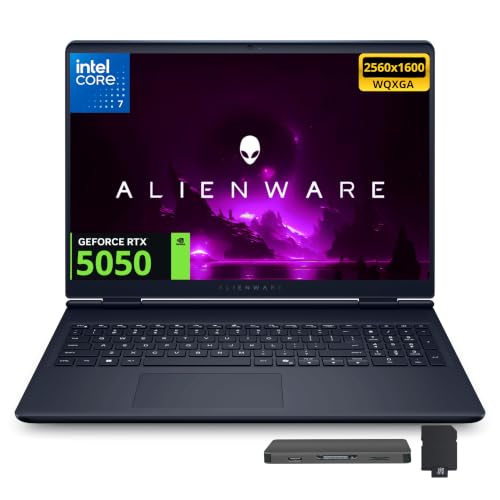
In this dell alienware 15 gaming laptop review, we examine a portable system built for 1200p gaming. The configuration centers on two key components: the AMD Ryzen 5 220 processor and the NVIDIA GeForce RTX 4050 graphics card with 6GB of dedicated memory. Dell pairs this setup with a 15.3-inch WUXGA display running at 165Hz, 16GB of system memory, and a 512GB solid-state drive. You also receive wired Ethernet, Wi-Fi 6, and dual USB-C ports with 100W Power Delivery.
- 15.3-inch WUXGA (1920×1200) screen with 165Hz refresh rate
- NVIDIA GeForce RTX 4050 GPU with 6GB dedicated memory
- AMD Ryzen 5 220 6-core processor boosting up to 4.9GHz
- Dual USB-C 3.2 ports with 100W Power Delivery and DisplayPort 1.4a
Good fit for
This machine suits esports players and everyday gamers who want smooth frame rates without complex setups. The 165Hz refresh rate and GeForce RTX 4050 graphics card handle fast-paced competitive titles well at 1920×1200 resolution. If you connect to an external monitor or wired network, the HDMI 2.1 port and RJ45 Ethernet port give you reliable desk connectivity. Its 16GB RAM handles multitasking between voice chat, web browsers, and games.
Who can skip it
You should skip this model if you install multiple massive modern games at once. The 512GB solid-state drive fills quickly after downloading a few large releases and Windows 11. Players who demand 1440p or 4K ultra gaming need a GPU with more than 6GB of video memory. In addition, streamers who require a sharp integrated broadcast camera might find the standard 720p webcam limiting for professional video capture.
Verdict
The Dell Alienware 15 delivers solid 1200p performance with its 165Hz display and RTX 4050 GPU. Its main limitation is the 512GB storage capacity, which requires careful management as your game library expands.
Key Specifications Explained for Buyers
Refresh Rate: 165Hz
A 165Hz refresh rate updates on-screen images 165 times per second. In everyday use, you get smooth animations when navigating desktop windows and reduced motion blur during fast gameplay. This suits players who focus on competitive multiplayer titles where quick visual feedback helps reaction timing. When shopping for laptops, compare this against base 60Hz panels or 120Hz mid-tier displays.
Display Resolution: 1920 x 1200
This WUXGA resolution provides a 16:10 aspect ratio with extra vertical screen space compared to standard 1080p panels. You can view more lines of text, browser content, and timeline tracks without constant scrolling. Everyday users and productivity-minded gamers benefit from this workspace layout. When evaluating laptops, compare this resolution with standard 1920×1080 screens or higher-density 2560×1600 alternatives.
RAM Capacity: 16GB
A 16GB system memory pool allows your laptop to run modern games while keeping background programs active. You can run Discord, browser tabs, and stream tools without severe memory bottlenecks or system stutter. This capacity suits general gamers and multi-app users who balance work with play. When looking across laptops, compare this configuration to basic 8GB setups or larger 32GB workstation capacities.
Storage Capacity: 512GB SSD
Solid-state storage at 512GB handles your Windows operating system and several modern game installs at once. In daily tasks, you experience fast boot times and rapid application launches compared to spinning hard drives. This setup suits players with a focused library of core titles. When shopping for laptops, compare this drive against 256GB entry options or expanded 1TB drives built for extensive game collections.
Chassis Dimensions and Physical Build Details
The laptop comes in a black finish, according to the listing. The chassis measures 13.8 inches wide, 9.85 inches long, and 0.9 inches thick. This profile accommodates the 15.3-inch display while keeping the footprint manageable on standard desks. At under an inch thick, the machine slides into typical laptop bags, though its width and depth require a dedicated mid-sized carrying compartment. You get a conventional gaming shell format that focuses on housing the internal hardware.
For controls, you interact with a white backlit keyboard. This single-color illumination helps you locate key bindings in dim environments without managing complex lighting software. Above the screen, the frame holds a 720p HD webcam paired with dual-array microphones, according to the listing. This integrated setup handles basic video meetings and in-game communication without external gear.
The physical port layout supports desktop workstation setups as well as portable use. You get two USB-A 3.2 ports for legacy accessories alongside two USB-C 3.2 connections. These USB-C ports include 100W Power Delivery and DisplayPort 1.4a capability, allowing single-cable charging and external monitor support. An RJ45 Ethernet jack ensures reliable wired local network access, while a dedicated HDMI 2.1 video output connects directly to high-bandwidth external displays.
Daily Setup and Hardware Connectivity
Initial setup begins with Microsoft Windows 11 Home. You complete user account creation, system preferences, and standard operating system updates during the first startup sequence. For network setup, you can connect wirelessly using the built-in Wi-Fi 6 card or attach an Ethernet cable directly to the RJ45 port for stable wired networking.
Everyday peripheral integration relies on several built-in connection points. You can connect accessories such as wired mice, external storage drives, or game controllers using the two USB-A 3.2 ports. For external video setups, the chassis provides one dedicated HDMI 2.1 port and two USB-C 3.2 ports. These USB-C ports incorporate DisplayPort 1.4a capability and Power Delivery up to 100W, allowing you to run external monitors and supply power through a single cable to supported hardware.
Daily collaboration and online use rely on the integrated 720p HD camera and dual-array microphones for video calls or team communication. When working in low-light environments, the white backlit keyboard ensures all key legends remain clearly visible. In terms of day-to-day capacity, the 512GB solid-state drive holds your operating system files and programs, while the 16GB of RAM supports running background utilities alongside your primary active windows.
Things to Check Before You Buy
You should assess your peripheral hardware before adding this machine to your workspace. The system provides one HDMI 2.1 port and two USB-C ports with DisplayPort 1.4a output, so check your external monitors for matching connections. If you plan to charge via USB-C on travel, ensure your adapter delivers up to 100W Power Delivery.
Storage management requires attention during ownership. The 512GB solid-state drive holds your operating system and active software, so you may need external drives plugged into the USB-A 3.2 ports for larger archives. For network upkeep, keeping drivers current preserves your RJ45 Ethernet and Wi-Fi 6 stability.
Across the 1 laptops evaluated this 2026, this model balances a 6-core AMD Ryzen 5 220 processor with an NVIDIA GeForce RTX 4050. It serves users who prioritize high-refresh 1200p video output and wired connectivity over expansive internal baseline storage.
Check before you buy
- Confirm your monitor accepts HDMI 2.1 or USB-C DisplayPort 1.4a connections.
- Check if a 512GB SSD accommodates your personal collection of programs.
- Ensure any travel USB-C charger supports 100W Power Delivery.
- Verify your desk accommodates the 13.8 by 9.85-inch chassis.

Dell Alienware 15.3" RTX 4050 Gaming Laptop
Best for: Entry-level high-refresh esports gaming setups
- Processor
- AMD Ryzen 5 220
- RAM Capacity
- 16GB
- Storage Capacity
- 512GB SSD
- Screen Size
- 15.3"
- Graphics Card
- NVIDIA GeForce RTX 4050 6GB
- Display Resolution
- 1920 x 1200
This Dell Alienware 15 is a portable gaming laptop built with an AMD Ryzen 5 220 processor and a dedicated NVIDIA GeForce RTX 4050 graphics card. You get a 15.3-inch 1920×1200 display running at 165Hz, alongside 16GB of memory. It suits you if you want high-refresh competitive gaming without stepping up to larger chassis sizes.
- 15.3-inch WUXGA display with a 165Hz refresh rate
- Dedicated NVIDIA GeForce RTX 4050 6GB graphics card
- Dual USB-C 3.2 ports with 100W Power Delivery and DisplayPort 1.4a
- Wired RJ45 Ethernet port alongside Wi-Fi 6 connectivity
- 512GB internal SSD limits total game installations
- Built-in webcam tops out at 720p resolution
- Six-core processor limits peak thread count for heavy CPU workloads
- You want a 165Hz high-refresh display for fast-paced gameplay.
- You need flexible port options, including 100W USB-C charging and Ethernet.
- You need more than 512GB of factory storage for your game library.
- You require a 1080p or higher webcam for video recording.
Verdict: Dell Alienware 15 RTX 4050 Gaming Laptop fits players who want 165Hz esports performance and versatile display outputs in a sub-one-inch chassis.
Specifications side by side
| Spec | Dell Alienware 15.3" RTX 4050 Gaming Laptop |
|---|---|
| Processor | AMD Ryzen 5 220 |
| RAM Capacity | 16GB |
| Storage Capacity | 512GB SSD |
| Screen Size | 15.3" |
| Graphics Card | NVIDIA GeForce RTX 4050 6GB |
| Display Resolution | 1920 x 1200 |
| Refresh Rate | 165Hz |
| Intended Use | Gaming |
| Resolution | WUXGA |
| Size | 16GB RAM | 512GB SSD |
| Dimensions | 9.85 × 13.8 × 0.9 inches |
| Color | Black |
Frequently asked questions
Who is the Dell Alienware 15 gaming laptop best for?
This laptop best fits players who focus on entry-level high-refresh esports gaming setups. The configuration delivers 165Hz performance paired with an AMD Ryzen 5 processor and dedicated graphics. It suits you if you run competitive multiplayer titles that benefit from fluid frame rates without needing top-tier workstation hardware.
What display resolution does this Alienware 15 laptop have?
This laptop features a WUXGA resolution display on its 15.3-inch screen. A WUXGA panel delivers 1920 by 1200 pixels in a 16:10 format. This spec gives you extra vertical workspace compared to traditional 1080p screens, which benefits both daily productivity workflows and on-screen gaming menus.
How much RAM and internal storage are included in this model?
The system includes 16GB of RAM and a 512GB solid-state drive. The 16GB memory capacity gives you sufficient headroom to run modern games and multitasking applications smoothly. The 512GB SSD stores your operating system, essential programs, and several game installations while providing fast data access speeds for quicker loading times.
What processor powers the Dell Alienware 15 laptop?
This laptop runs on an AMD Ryzen 5 processor. The processor handles core operating system tasks, background software, and game physics processing. Paired with the dedicated RTX 4050 graphics hardware, it supplies balanced compute performance for everyday productivity, media playback, and active gameplay without demanding extreme power from the chassis.
How thick and portable is the Alienware 15 chassis?
The laptop measures 0.9 inches thick, giving it a sub-one-inch profile. In addition, the black chassis spans 13.8 inches wide and 9.85 inches long. These dimensions allow the system to house a 15.3-inch display while remaining compact enough to slide into standard backpacks and fit on compact gaming desks.
Who should skip this Dell Alienware 15 gaming laptop?
You should skip this laptop if you require 4K visual fidelity or massive onboard storage. With a WUXGA panel and a 512GB solid-state drive, this configuration targets entry-level esports rather than heavy workstation loads. Users with extensive game libraries or demanding video editing tasks will quickly outgrow these specific hardware limits.
See also
See the current listing on Amazon
Specifications on this page are read from the product listing. Scores are out of 10, based on listed specifications and buyer feedback.