As Amazon Associates, we earn from qualifying purchases. This means we may receive a small commission at no extra cost to you if you click through and make a purchase.
As an Amazon Associate we earn from qualifying purchases. Links on this page are affiliate links.
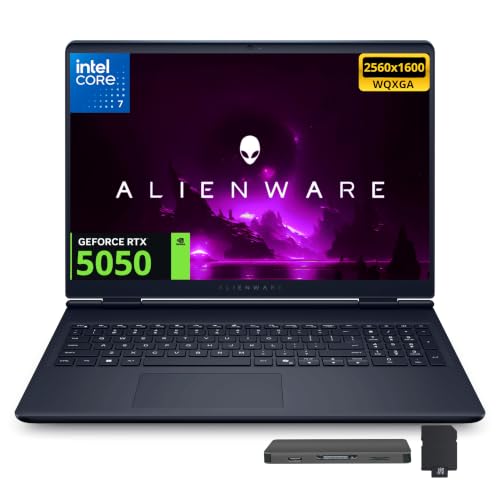
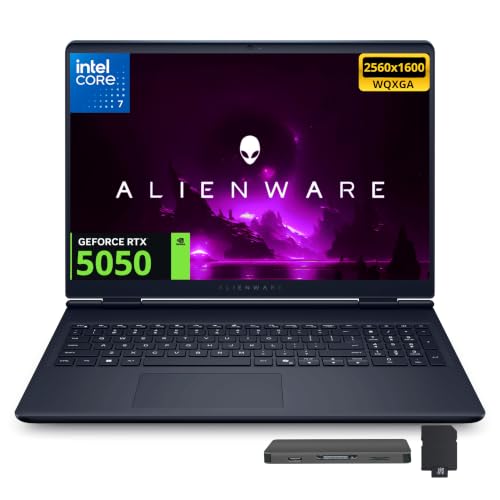
This dell alienware 16 64gb RAM gaming laptop review examines a 16-inch portable system designed for multitasking and modern gaming. The laptop pairs an Intel Core 7 240H processor with 64GB of DDR5 system memory. These two hardware specifications establish its focus on high-bandwidth computing and massive background memory headroom. Visual output runs through a 16-inch WQXGA screen with a 120Hz refresh rate, powered by an NVIDIA GeForce RTX 5050 graphics card. You also get a 2TB internal solid-state drive paired with an external 1TB docking station.
- 64GB DDR5 RAM supports heavy multitasking and memory-intensive workflows.
- 16-inch WQXGA display with a smooth 120Hz refresh rate.
- NVIDIA GeForce RTX 5050 graphics card with 8GB of GDDR7 memory.
- Storage setup includes a 2TB internal SSD plus a 1TB docking station.
Good fit for
This machine suits users who manage memory-heavy workloads alongside mainstream gaming. The 64GB DDR5 RAM and Intel Core 7 240H processor give you capacity for virtual machines, heavy tab sets, and content creation tools. Players running modern games at WQXGA resolution will appreciate the dedicated RTX 5050 GPU. It fits desk-based users who need rapid access to large project files through the 2TB internal SSD and bundled 1TB storage dock.
Who can skip it
Skip this laptop if you need a lightweight travel setup. At 5.49 pounds, it adds noticeable bulk to a backpack. Competitive esports players who prioritize 240Hz or higher refresh rates should also look elsewhere, as this display caps at 120Hz. If your priority is maximum graphical power for native 4K gaming, the entry-tier RTX 5050 graphics card with 8GB GDDR7 may limit your frame rates on high visual presets.
Verdict
The Dell Alienware 16 combines immense system memory and expansive storage with balanced mid-tier graphics for everyday productivity and steady gaming. It offers dependable 120Hz WQXGA output for desktop-oriented creators and gamers who value RAM capacity over maximum mobility.
Key Specifications and Hardware Details
NVIDIA GeForce RTX 5050 8GB GDDR7
This dedicated graphics card uses high-speed GDDR7 memory to process visual data. It renders games and multimedia tasks separately from the system processor. You get stable visual performance during content creation and modern 3D gaming. Shoppers who edit high-definition video or play modern titles benefit from dedicated video memory. When shopping for laptops, compare this dedicated GPU against integrated graphics or higher-tier RTX cards.
16" WQXGA 120Hz Display
The WQXGA panel offers higher pixel density than standard 1080p screens, while the 120Hz refresh rate updates the picture 120 times per second. Motion appears twice as smooth as standard 60Hz panels during fast gameplay and scrolling. You benefit if you prioritize sharp screen details and fluid visual tracking. Compare this resolution and refresh rate to 1080p 60Hz screens or higher 240Hz competitive esports displays.
2TB SSD
A solid-state drive with 2TB capacity provides high internal storage for large operating system files, game installations, and media libraries. Solid-state technology loads applications and boots the system faster than mechanical hard drives. You benefit if you maintain large project libraries without relying immediately on external drives. When evaluating laptops, compare 2TB to standard 512GB or 1TB configurations that fill up quickly with modern program files.
Wi-Fi 7 & Bluetooth 5.4
These wireless standards deliver modern connection speeds and reduced latency for wireless peripherals and networks. Wi-Fi 7 expands network bandwidth on supported routers, while Bluetooth 5.4 stabilizes links to wireless mice, headsets, and controllers. You benefit if you work or game on busy wireless networks and use multiple external devices. When reviewing laptops, compare this setup against older Wi-Fi 6 or Bluetooth 5.0 systems that offer lower transmission limits.
Chassis Dimensions, Ports, and Physical Build
According to the listing, the laptop comes in an Indigo finish and measures 14.05 inches wide, 10.45 inches deep, and 0.6 inches thick. It weighs 5.49 pounds. At over five pounds, this chassis is substantial, meaning you will feel its presence when carrying it in a standard backpack. However, the slim 0.6-inch profile allows you to slide the system into commuter bags or padded laptop sleeves without taking up excessive vertical space.
For physical controls, the chassis features a backlit keyboard designed to improve key visibility in low-light environments. This setup gives you clear illumination during late-night work or dim gaming sessions. The 16-inch display footprint provides ample surface area across the deck for palm resting during extended typing.
Physical connectivity includes two USB-A ports, two Type-C ports with DisplayPort output, an HDMI 2.1 port, an RJ45 network port, a power interface, and a 3.5mm audio jack. According to the listing, the package also includes a 7-in-1 docking station with 1TB of external storage. These built-in ports let you plug in wired internet, external displays, and flash drives directly, while the docking accessory supports a stationary multi-cable desk setup at home.
Setup, Connectivity, and Daily Operation
Setting up this laptop begins with the preinstalled Windows 11 Home operating system. Initial configuration requires you to connect to a network, which you can do wirelessly through Wi-Fi 7 or over a wired connection using the RJ45 port. Bluetooth 5.4 enables pairing with wireless peripherals such as mice, controllers, or headphones, while the 3.5mm audio jack supports wired audio equipment.
Your everyday connectivity expands through the included accessory package. The 7-in-1 docking station connects via the supplied Type-C data cable and adds 1TB of external storage alongside the internal 2TB solid-state drive. Combined with dual USB-A ports, dual Type-C ports with DisplayPort output, and an HDMI 2.1 port, the system lets you output to external monitors and connect desktop peripherals. The set also includes a 32GB MicroSD card with an adapter for removable media and a 3-in-1 charging cable.
In daily use, the 16-inch WQXGA display provides a 120Hz refresh rate that delivers fluid screen transitions for browsing, media playback, and office applications. The built-in backlit keyboard enables clear typing in dim surroundings. Routine physical upkeep is supported by the included suede cleaning cloth, which keeps the display free of dust.
Before Buying the Dell Alienware 16
Before you choose this laptop, evaluate your workspace and peripheral needs. The package includes a 7-in-1 docking station with 1TB of external storage, a 32GB MicroSD card with an adapter, and multiple cables. You need a dedicated desk area to manage these external accessories alongside the machine. For upkeep, use the included suede cleaning cloth to maintain the 16-inch WQXGA panel. Check compatibility with your external displays through the HDMI 2.1 port or dual Type-C connections with DisplayPort support. Verify your software requirements before committing to this high-memory configuration. This system provides 64GB of DDR5 memory and a 2TB internal solid-state drive. If your everyday tasks require less bandwidth or capacity, alternative configurations exist with 16GB or 32GB of RAM, plus 1TB or 4TB solid-state drives.
Check before you buy
- Verify your external monitors match the HDMI 2.1 or DisplayPort-capable Type-C ports.
- Measure your desk space to fit the laptop alongside the included 7-in-1 docking station.
- Confirm whether your applications need 64GB RAM or if a 16GB or 32GB model suffices.
- Check if your storage workflow requires the bundled external drive and MicroSD card setup.
Dell Alienware 16 64GB RAM Gaming Laptop
Best for: memory-intensive multitasking and moderate gaming
- Processor
- Intel Core 7 240H
- RAM Capacity
- 64GB DDR5
- Storage Capacity
- 2TB SSD
- Screen Size
- 16"
- Graphics Card
- NVIDIA GeForce RTX 5050 8GB GDDR7
- Display Resolution
- WQXGA
This 16-inch gaming laptop pairs an Intel Core 7 240H processor with 64GB of DDR5 RAM and an NVIDIA GeForce RTX 5050 8GB graphics card. You get a WQXGA display running at 120Hz alongside 2TB of internal solid-state storage. It fits you if you run memory-heavy multitasking, development workloads, or video editing alongside moderate gaming sessions.
- 64GB DDR5 RAM handles high-memory workflows
- 2TB PCIe SSD provides generous internal storage
- Wi-Fi 7 and Bluetooth 5.4 support modern wireless connectivity
- WQXGA resolution delivers sharp 16-inch screen detail
- 120Hz refresh rate is modest for a modern gaming screen
- Entry-level RTX 5050 GPU limits high-end gaming performance
- RAM and SSD upgrades are warrantied by SnowBell rather than Dell
- You need 64GB of system memory for demanding applications
- You want a high-resolution WQXGA screen with Wi-Fi 7 support
- You prioritize 2TB of fast internal storage over top-tier graphics power
- You require high-end GPU power beyond the RTX 5050
- You want refresh rates above 120Hz for fast-paced competitive games
- You prefer a factory-sealed laptop with unified manufacturer warranty coverage
Verdict: Dell Alienware 16 64GB RAM Gaming Laptop suits productivity-focused users who need massive system memory alongside secondary gaming capability. Its 64GB DDR5 RAM and 2TB SSD support data-heavy projects, while the RTX 5050 GPU handles mainstream visual tasks.
Specifications side by side
| Spec | Dell Alienware 16 64GB RAM Gaming Laptop |
|---|---|
| Processor | Intel Core 7 240H |
| RAM Capacity | 64GB DDR5 |
| Storage Capacity | 2TB SSD |
| Screen Size | 16" |
| Graphics Card | NVIDIA GeForce RTX 5050 8GB GDDR7 |
| Display Resolution | WQXGA |
| Refresh Rate | 120Hz |
| Intended Use | Gaming |
| Resolution | WQXGA |
| Dimensions | 22 × 13 × 3 inches |
| Weight | 11 pounds |
| Size | 64GB | 2TB PCIe SSD |
| Color | Indigo |
| Model | Dell Alienware |
Frequently asked questions
Who is the Dell Alienware 16 64GB RAM gaming laptop best for?
This laptop fits you if you handle memory-intensive multitasking and moderate gaming. The 64GB DDR5 RAM and 2TB PCIe SSD give you capacity for heavy data files. Its Intel Core 7 processor and RTX 5050 graphics card balance productivity workflows with mainstream visual computing.
What display resolution does the Dell Alienware 16 feature?
The Dell Alienware 16 features a WQXGA display on a 16-inch screen. This resolution provides a dense pixel count across the panel, which gives you crisp text and sharp image clarity. You get ample workspace for viewing complex spreadsheets, editing high-resolution media, and rendering gaming graphics clearly.
How much storage space comes built into this laptop?
You receive a 2TB PCIe SSD built directly into this configuration. That capacity gives you substantial local storage for large software suites, virtual machines, and gaming libraries without requiring immediate external drives. Fast PCIe data rates ensure your operating system loads swiftly and large project assets transfer quickly.
Which graphics processor powers the Dell Alienware 16?
An NVIDIA RTX 5050 graphics processor powers this system. It is designed to handle mainstream visual workloads and moderate gaming sessions. You can run modern software tools, edit digital content, and display smooth graphics, but users seeking competitive high-tier gaming frame rates might need a more powerful class of GPU.
Can the Dell Alienware 16 handle heavy multitasking?
Yes, this system excels at heavy multitasking due to its 64GB of DDR5 RAM. Paired with an Intel Core 7 processor, the massive memory capacity allows you to keep dozens of browser tabs, virtualized systems, and data-heavy applications active simultaneously without experiencing system slowdowns or background cache bottlenecking.
Who should skip the Dell Alienware 16 gaming laptop?
You should skip this laptop if your primary goal is ultra-heavy 3D gaming or ultraportable travel. The RTX 5050 GPU focuses on moderate gaming rather than top-tier graphical performance. Gamers wanting maximum frame rates at native resolution or frequent travelers seeking lightweight builds should consider alternate hardware configurations instead.
See also
See the current listing on Amazon
Specifications on this page are read from the product listing. Scores are out of 10, based on listed specifications and buyer feedback.


