As Amazon Associates, we earn from qualifying purchases. This means we may receive a small commission at no extra cost to you if you click through and make a purchase.

As an Amazon Associate we earn from qualifying purchases. Links on this page are affiliate links.
If you need the best panasonic laptops, you can select from rugged models built for demanding job sites. Panasonic offers standard rugged laptops and detachable 2-in-1 frames across 12-inch, 13.1-inch, and 14-inch screen sizes, with bright, daylight-readable displays.
The Panasonic Toughbook 14-Inch Rugged Laptop ranks as the top pick because it fits outdoor field work needing cellular connectivity. We compared 6 products using only the specifications published on the listings so you can review their hardware capabilities directly.
| # | Product | Best for | Price |
|---|---|---|---|
| 1 | Panasonic Toughbook 14-Inch Rugged Laptop Best overall | outdoor field work needing cellular connectivity | |
| 2 | Panasonic Toughbook 12-Inch Rugged Laptop Best budget | outdoor field work requiring GPS and LTE | |
| 3 | Panasonic Toughbook 13.1-Inch Rugged Laptop Best premium | extreme outdoor field operations needing 32GB RAM | |
| 4 | Panasonic Toughbook 12-Inch Detachable Rugged Laptop Also great | Field operations needing GPS and cellular data | |
| 5 | Panasonic Toughbook 14-Inch Touchscreen Laptop Also great | field technicians needing mobile cellular connectivity | |
| 6 | Panasonic Toughbook 14-Inch Rugged Touch Laptop Best 14" | memory-heavy fieldwork and outdoor tasks |
Comparing the Panasonic Toughbook Lineup
Panasonic organizes this lineup by chassis style and weight. The 14-inch clamshell models, such as the Panasonic Toughbook 14-Inch Rugged Laptop and Panasonic Toughbook 14-Inch Touchscreen Laptop, weigh 4.9 pounds and offer Full HD screens. You should choose these if you want a lighter build for mobile cellular connectivity.
For hybrid use, detachable units like the Panasonic Toughbook 12-Inch Rugged Laptop weigh 6.1 pounds and include standalone GPS. You should pick this design if you need 2-in-1 flexibility. If you tackle extreme worksites requiring maximum memory, the 10-pound Panasonic Toughbook 13.1-Inch Rugged Laptop provides an Intel Core i7 processor and 32GB RAM.

Panasonic Toughbook 14-Inch Rugged Laptop
Best for: outdoor field work needing cellular connectivity
- Processor
- Intel Core i7-8665U
- RAM Capacity
- 16GB
- Storage Capacity
- 512GB SSD
- Screen Size
- 14-inch
- Graphics Card
- Intel UHD graphics 620
- Display Resolution
- 1920 x 1080
This rugged Panasonic Toughbook features a 14-inch 1080p touchscreen with 1000-nit brightness for outdoor visibility. An Intel Core i7-8665U processor, 16GB of RAM, and a 512GB SSD handle daily field tasks. Built-in 4G LTE keeps you connected away from Wi-Fi. It suits mobile field professionals needing certified durability and outdoor screen clarity.
- 1000-nit 1080p touchscreen readable in direct sunlight
- Built-in 4G LTE multi-carrier mobile connectivity
- MIL-STD-810H certified and IP53 sealed construction
- 1080p webcam with privacy shutter and infrared Windows Hello
- Heavier chassis at 4.9 pounds and 1.3 inches thick
- Integrated Intel UHD Graphics 620 lacks dedicated video processing
- You work outdoors and need a bright 1000-nit display
- You require continuous mobile internet through cellular 4G LTE
- You need hardware with certified MIL-STD-810H and IP53 protection
- You need a lightweight laptop for frequent carrying
- You run demanding 3D rendering or graphics-heavy software
Verdict: Panasonic Toughbook 14-Inch Touchscreen Laptop fits field operators who require daylight readability, cellular connectivity, and certified drop protection.
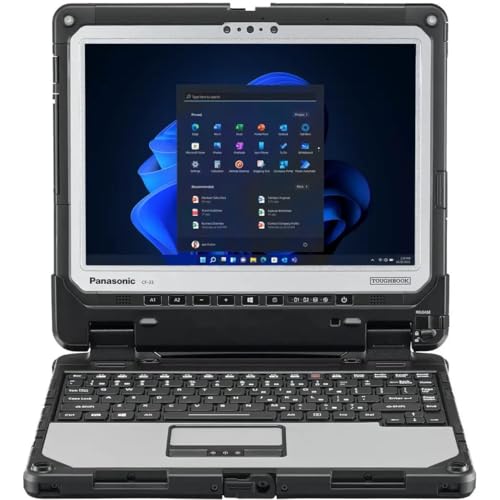
Panasonic Toughbook 12-Inch Rugged Laptop
Best for: outdoor field work requiring GPS and LTE
- Processor
- Intel Core i5-7300U
- RAM Capacity
- 16GB
- Storage Capacity
- 512GB SSD
- Screen Size
- 12 inch
- Display Resolution
- 2160 x 1440
- Operating System
- Windows 11 Pro
This Panasonic Toughbook 12-inch 2-in-1 detachable gives you rugged durability with an IP65 rating and MIL-STD-810G certification. Inside, an Intel Core i5-7300U processor pairs with 16GB of DDR4 memory and a 512GB SSD. The 1200-nit QHD display supports gloved multi-touch input outdoors. It suits you if you need field connectivity through 4G LTE and dedicated GPS in harsh environments.
- Bright 1200-nit 2160 x 1440 touchscreen with gloved input and digitizer support
- Built-in 4G LTE and dedicated u-blox NEO-M8N GPS
- Certified IP65 dust and water resistance and MIL-STD-810G drop protection
- Keyboard base includes serial, VGA, HDMI, SDXC, and USB ports
- Total weight reaches 6.1 pounds with the keyboard base attached
- Relies on an older 7th-generation Intel Core i5-7300U processor
- Compact 12-inch display offers less screen area than 14-inch alternatives
- You work outdoors in direct sunlight and need a 1200-nit gloved touchscreen.
- You require dedicated GPS and 4G LTE data connections in the field.
- You need direct access to serial and VGA ports on your laptop base.
- You need a higher-tier multicore CPU for processing-heavy software.
- You want an overall carrying weight lighter than six pounds.
- You prefer a larger 14-inch display for daily office multitasking.
Verdict: Panasonic Toughbook 12-Inch 2-in-1 Rugged Laptop equips field technicians with high screen brightness, legacy ports, and standalone GPS inside an IP65-rated detachable chassis.

Panasonic Toughbook 13.1-Inch Rugged Laptop
Best for: extreme outdoor field operations needing 32GB RAM
- Processor
- Intel Core i7-7600U
- RAM Capacity
- 32GB
- Storage Capacity
- 512GB SSD
- Screen Size
- 13.1"
- Operating System
- Windows 11 Pro
- Dimensions
- 12.3 × 1.8 × 11.4 inches
This fully rugged laptop pairs an Intel Core i7-7600U processor with 32GB of RAM and a 512GB solid-state drive. Its 13.1-inch XGA touchscreen reaches 1,200 nits for direct outdoor readability. You get IP65 ingress protection, built-in 4G LTE, and hot-swap battery capability. It suits field technicians needing high RAM in extreme environments.
- 32GB system memory for heavy field applications
- 1,200-nit sunlight-viewable touchscreen
- IP65, MIL-STD-810G, and MIL-STD-461F durability ratings
- Integrated 4G LTE and dedicated GPS hardware
- Heavy 10-pound total chassis weight
- Lower-resolution XGA display format
- Bulky 1.8-inch chassis thickness
- You need 32GB RAM inside a fully rugged field unit.
- You operate outdoors in direct sunlight where 1,200 nits brightness matters.
- You require built-in cellular data and dedicated GPS tracking.
- You need a lightweight laptop for frequent carrying.
- You require a high-resolution display for detailed graphics.
Verdict: Panasonic Toughbook 13.1-Inch Rugged Laptop equips field operators with 32GB RAM, integrated cellular data, and an ultra-bright display built for extreme worksites.

Panasonic Toughbook 12-Inch Detachable Rugged Laptop
Best for: Field operations needing GPS and cellular data
- Processor
- Intel Core i5-10310U
- RAM Capacity
- 16GB
- Storage Capacity
- 512GB SSD
- Screen Size
- 12”
- Display Resolution
- 2160 x 1440
- Operating System
- Windows 11 Pro
This 2-in-1 rugged machine pairs a detachable 12-inch QHD touchscreen with an Intel Core i5-10310U processor and 16GB of RAM. You get a sharp 2160 x 1440 display, 512GB SSD storage, and built-in 4G LTE with dedicated GPS. It suits field workers and technicians who need full tablet portability alongside legacy ports like Serial and VGA.
- Detachable 12-inch QHD (2160 x 1440) multi-touch display works with gloves
- Built-in 4G LTE and dedicated GPS for navigation in the field
- Extensive port layout including Serial, VGA, Ethernet, HDMI, and USB-C
- MIL-STD-810G and IP65 certified against dust, water, and four-foot drops
- Carries a Core i5 processor rather than the Core i7 chips on 14-inch models
- Weighs 6.1 pounds, which is hefty for a 12-inch display device
- You need both a standalone field tablet and a docked laptop workstation.
- You require integrated 4G LTE and dedicated GPS without carrying external dongles.
- You must interface with older equipment that relies on native Serial or VGA ports.
- You want a larger 14-inch screen for regular multi-window desk work.
- You need a faster Core i7 CPU for heavier computing tasks.
Verdict: Panasonic Toughbook 12-Inch 2-in-1 Rugged Laptop provides dependable hybrid versatility, outdoor display clarity, and built-in cellular hardware. It fits mobile utility workers and emergency crews who must gather data in harsh environments.

Panasonic Toughbook 14-Inch Touchscreen Laptop
Best for: field technicians needing mobile cellular connectivity
- Processor
- Intel Core i7-1185G7
- RAM Capacity
- 16GB
- Storage Capacity
- 512GB SSD
- Screen Size
- 14-inch
- Graphics Card
- Intel UHD Graphics
- Display Resolution
- 1920 x 1080
This rugged 14-inch laptop features an Intel Core i7-1185G7 processor, 16GB of RAM, and a 512GB SSD. It includes a 1920 × 1080 touchscreen, integrated 4G LTE cellular data, and Wi-Fi 6 connectivity. At 4.9 pounds with Gigabit Ethernet and HDMI 2.0, it gives you dependable field performance for diagnostics, mapping, and mobile reporting in demanding outdoor work environments.
- Integrated 4G LTE and Wi-Fi 6 wireless connectivity
- 14-inch Full HD 1920 × 1080 outdoor touchscreen
- Intel Core i7-1185G7 processor with 16GB RAM and 512GB SSD
- Native ports including Gigabit Ethernet, HDMI 2.0, and USB-A
- Uses integrated Intel UHD Graphics instead of a dedicated graphics card
- Chassis measures 1.3 inches thick and weighs 4.9 pounds
- You need integrated 4G LTE connectivity for remote field assignments.
- You require physical Gigabit Ethernet and HDMI ports directly on the device.
- You need dedicated graphics hardware for heavy 3D rendering.
- You want an ultraportable machine that weighs under four pounds.
Verdict: Panasonic Toughbook 14-Inch Touchscreen Laptop delivers Core i7 processing, 4G LTE data, and native Gigabit Ethernet for field technicians working on outdoor job sites.

Panasonic Toughbook 14-Inch Rugged Touch Laptop
Best for: memory-heavy fieldwork and outdoor tasks
- Processor
- Intel Core i5-1145G7
- RAM Capacity
- 64GB DDR4
- Storage Capacity
- 1TB NVMe SSD
- Screen Size
- 14”
- Graphics Card
- Intel UHD Graphics
- Display Resolution
- 1920 x 1080
This rugged laptop gives you a 14-inch Full HD touchscreen paired with an Intel Core i5-1145G7 processor. It carries 64GB of DDR4 memory and a 1TB NVMe solid-state drive for extensive local file handling. Built with Wi-Fi 6, physical Ethernet, and Thunderbolt connectivity, it serves field workers who require heavy multitasking memory in challenging environments.
- 64GB DDR4 system memory for heavy multitasking
- 1TB NVMe PCIe solid-state storage capacity
- 14-inch Full HD touchscreen with anti-glare day and night modes
- Thunderbolt-capable USB-C, HDMI, and dedicated LAN ports
- Intel Core i5 tier provides fewer processing threads than Core i7 options
- Integrated Intel UHD Graphics limits complex 3D workloads
- You need 64GB of RAM to run data-heavy applications on site.
- You require an outdoor-readable Full HD touchscreen display.
- You depend on legacy and modern ports including RJ-45 Ethernet and Thunderbolt.
- You need an Intel Core i7 processor for faster compute throughput.
- You require a discrete graphics card for visual rendering.
Verdict: Panasonic Toughbook 14-Inch Touchscreen Laptop fits field operators and technicians who prioritize high RAM capacity and wired connectivity over discrete graphics hardware.
Specifications side by side
| Spec | Panasonic Toughbook 14-Inch Rugged Laptop | Panasonic Toughbook 12-Inch Rugged Laptop | Panasonic Toughbook 13.1-Inch Rugged Laptop | Panasonic Toughbook 12-Inch Detachable Rugged Laptop | Panasonic Toughbook 14-Inch Touchscreen Laptop | Panasonic Toughbook 14-Inch Rugged Touch Laptop |
|---|---|---|---|---|---|---|
| Processor | Intel Core i7-8665U | Intel Core i5-7300U | Intel Core i7-7600U | Intel Core i5-10310U | Intel Core i7-1185G7 | Intel Core i5-1145G7 |
| RAM Capacity | 16GB | 16GB | 32GB | 16GB | 16GB | 64GB DDR4 |
| Storage Capacity | 512GB SSD | 512GB SSD | 512GB SSD | 512GB SSD | 512GB SSD | 1TB NVMe SSD |
| Screen Size | 14-inch | 12 inch | 13.1" | 12” | 14-inch | 14” |
| Graphics Card | Intel UHD graphics 620 | – | – | – | Intel UHD Graphics | Intel UHD Graphics |
| Display Resolution | 1920 x 1080 | 2160 x 1440 | – | 2160 x 1440 | 1920 x 1080 | 1920 x 1080 |
| Operating System | Windows 11 Pro | Windows 11 Pro | Windows 11 Pro | Windows 11 Pro | Windows 11 Pro | Windows 11 Pro |
| Form Factor | Rugged | Rugged | – | Rugged | Rugged | Rugged |
| Resolution | – | – | – | – | Full HD | Full HD |
| Dimensions | 10.7 × 13.6 × 1.3 inches | 12.3 × 11.4 × 1.8 inches | 12.3 × 1.8 × 11.4 inches | 12.3 × 9.6 × 0.9 inches | 10.7 × 13.6 × 1.3 inches | 13.6 × 1.3 × 10.7 inches |
| Weight | 4.9 pounds | 6.1 pounds | 10 pounds | 6.1 pounds | 4.9 pounds | – |
| Size | Laptop | i5-7th Gen | 16GB | – | – | – | – |
| Color | Silver | Silver | Silver | Silver | Silver | Silver |
| Model | FZ-55 MK1 | CF-33 MK1 | CF-31 MK6 | CF-33 MK2 | FZ-55 MK2 | Panasonic TOUGHBOOK FZ-55 |
Where Panasonic Laptops Fit Best
Panasonic suits you if your daily tasks happen on outdoor job sites. Form factors span from 12-inch detachable hybrids to 10-pound, 13.1-inch heavy-duty clamshells and lighter 4.9-pound designs. Screen visibility configurations feature daylight-readable panels and ultra-bright displays built for outdoor worksites.
You should note what this selection omits. You will not find displays under 12 inches or over 14 inches. Discrete graphics hardware is absent across all models. Panasonic avoids conventional, slim chassis, providing only rugged silver builds running Windows 11 Pro.
How to Choose a Panasonic Laptop
Select Your Processor
You should evaluate CPU power based on your field workload. An Intel Core i5 processor handles everyday mobile data logging and basic field software without difficulty. If you run heavy mapping tools, complex spreadsheets, or multiple diagnostic programs simultaneously, choose an Intel Core i7 configuration. The Panasonic Toughbook 14-Inch Touchscreen Laptop supplies an Intel Core i7 chip to keep system responses swift under sustained field tasks. Check your software requirements before picking your processor tier.
Check RAM Capacity
You must match memory capacity to the data loads you process in the field. Standard operations run smoothly on 16GB of RAM, which provides ample headroom for web browsers, active spreadsheets, and diagnostic utilities. If you work with large GIS datasets or heavy local databases, choose 32GB of RAM. The Panasonic Toughbook 13.1-Inch Rugged Laptop includes 32GB of memory, which prevents slowdowns during demanding multi-application sessions. Verify the memory configuration to avoid field bottlenecks.
Verify Ingress Protection
You should verify chassis sealing levels if you work in wet or dusty locations. Standard rugged laptops handle vibrations and drops, but certain worksites demand certified dust-tight and water-jet resistance. An IP65 rating confirms the enclosure protects internal components against water projected from a nozzle and harmful airborne dust particles. The Panasonic Toughbook 12-Inch Rugged Laptop features an IP65-rated chassis for wet outdoor environments. Choose an IP65 unit when rain or dust exposure happens frequently during your shifts.
Assess Mobile Connectivity
You need to confirm wireless hardware if your tasks take you far from office Wi-Fi networks. Integrated 4G LTE cellular modems let you transmit reports, sync field databases, and communicate without tethering to a smartphone. Dedicated standalone GPS hardware provides precise location tracking for asset management and navigation. The Panasonic Toughbook 12-Inch Detachable Rugged Laptop includes both GPS and cellular hardware directly on board. Prioritize integrated wireless radios if you operate in remote locations without local network access.
Evaluate Wired Ports
You should inspect physical ports before choosing a field computer. Field technicians often interface with industrial machinery, switches, or diagnostic tools requiring direct wired hookups. Choosing a machine with native Gigabit Ethernet ensures stable, high-speed local network configuration without dongles. Other models supply legacy ports for specialized equipment cables. The Panasonic Toughbook 14-Inch Rugged Touch Laptop prioritizes wired connectivity for technical field tasks. Confirm the port selection accommodates your external job site gear.
Frequently asked questions
Which operating system runs on Panasonic Toughbook laptops?
Every Panasonic Toughbook in this lineup runs Windows 11 Pro. This operating system provides enterprise security features and broad compatibility with industrial management utilities. Whether you choose a clamshell model like the FZ-55 MK1 or a detachable hybrid like the CF-33 MK1, you receive the same standardized software environment for your field operations.
Do Panasonic laptops include standalone GPS capabilities?
Specific Panasonic models include standalone GPS hardware for remote navigation. The Panasonic Toughbook CF-33 MK1 and CF-33 MK2 integrate dedicated GPS receivers alongside mobile cellular connectivity. This hardware setup allows you to track precise coordinates, log field data, and run mapping software reliably even when you travel outside conventional Wi-Fi coverage areas.
Which Panasonic Toughbook model offers a detachable 2-in-1 design?
The Panasonic Toughbook CF-33 series provides a detachable 2-in-1 form factor. Models like the CF-33 MK1 and CF-33 MK2 let you uncouple the 12-inch screen from the keyboard base. This design functions as a standalone handheld tablet for field inspections or connects back to the keyboard for standard stationary typing tasks.
Which Panasonic Toughbook has the highest memory capacity?
The Panasonic Toughbook CF-31 MK6 offers 32GB of RAM. That generous allocation provides headroom for data-heavy field operations, multitasking across demanding technical utilities, and compiling large field datasets. If you run complex software without secondary workstations, this heavy-duty 10-pound unit delivers the required system memory alongside an Intel Core i7 processor.
Can you connect Panasonic Toughbook laptops to wired networks?
Yes, several models feature native physical network ports. For instance, the Panasonic Toughbook FZ-55 MK2 integrates native Gigabit Ethernet directly into its chassis. This wired port allows you to plug into diagnostic machinery, local networks, or industrial control hardware on site without carrying external USB adapters or signal dongles.
What ingress protection rating do Panasonic Toughbook laptops have?
Selected units like the Panasonic Toughbook CF-33 MK1 carry an official IP65 ingress protection rating. This standard ensures total protection against dust penetration and safeguards internal electronics against low-pressure water jets from any direction. It gives you dependable operation during heavy rain, dusty construction environments, and damp industrial settings.
See also
See the current listing on Amazon
Specifications on this page are read from the product listing. Scores are out of 10, based on listed specifications and buyer feedback.


