As Amazon Associates, we earn from qualifying purchases. This means we may receive a small commission at no extra cost to you if you click through and make a purchase.

As an Amazon Associate we earn from qualifying purchases. Links on this page are affiliate links.
This dell alienware 16x rtx 5070 gaming laptop review covers a high-performance 16-inch portable machine built for demanding tasks and modern gaming. Two specs define this hardware: the 24-core Intel Ultra 9 275HX processor and the dedicated NVIDIA GeForce RTX 5070 graphics card with 8GB of GDDR7 memory. Dell pairs these core components with 32GB of RAM and a 2TB SSD for ample storage. You also get a 2560×1600 WQXGA display that runs at a fast 240Hz refresh rate. It arrives with Windows 11 Pro preinstalled.
- Intel 24-core Ultra 9 275HX processor
- NVIDIA GeForce RTX 5070 with 8GB GDDR7 graphics
- 16-inch WQXGA (2560×1600) 240Hz display with 100% DCI-P3 and G-SYNC
- 2TB SSD storage paired with 32GB RAM
- Port selection includes Thunderbolt 4, HDMI 2.1, and RJ45 Ethernet
Good fit for
This laptop suits competitive gamers and power users who need high refresh rates and substantial processing power at a fixed desk. The 240Hz WQXGA panel with G-SYNC benefits fast-paced games. Meanwhile, the 24-core Intel Ultra 9 processor and 32GB RAM handle heavy multitasking and production workloads. The 2TB SSD gives you ample onboard space for large installs, while the RJ45 Ethernet port ensures stable wired network connectivity.
Who can skip it
Skip this model if you travel frequently or need a lightweight setup. At 8.82 pounds and three inches thick, this chassis is heavy and bulky for daily bag carry. Users seeking a compact ultrabook form factor will find the physical footprint cumbersome. Additionally, buyers who require more than 8GB of VRAM for extreme graphical workloads might find the RTX 5070 configuration limiting.
Verdict
The Dell Alienware 16X delivers top-tier CPU power, a fluid 240Hz display, and generous storage for desk-bound gaming. Its 8.82-pound weight trades away portability in exchange for robust desktop-grade hardware.
Key Specifications and What They Mean
Display Resolution: 2560×1600
This 16:10 resolution gives you more vertical screen space than standard 1080p panels, making it easier to read documents and view editing timelines. Gamers and content creators benefit from sharper images without demanding as much graphics power as 4K screens. When shopping for laptops, compare this against standard 1920×1080 and 3840×2160 displays.
Refresh Rate: 240Hz
A 240Hz refresh rate updates the picture 240 times per second, which reduces motion blur and makes fast movement look exceptionally smooth. Competitive players in fast-paced titles benefit from the quicker visual feedback and lower input latency. When shopping for laptops, compare this against standard 60Hz office displays or mainstream 120Hz and 144Hz gaming screens.
RAM Capacity: 32GB
System memory holds active programs and files in temporary storage so your processor can access them instantly. Having 32GB lets you multitask across dozens of browser tabs while running heavy simulation software, virtual machines, or modern games without stutter. When shopping for laptops, compare this against standard 16GB configurations that may struggle under heavy workloads.
Storage Capacity: 2TB SSD
Solid-state storage provides fast read and write speeds, allowing your operating system to boot quickly and programs to launch without delay. A 2TB capacity provides ample space for users who store multiple large modern game installations or high-resolution video projects locally. When shopping for laptops, compare this with entry-level 512GB or 1TB drives that fill up quickly.
Weight: 8.82 pounds
This weight reflects the chassis and internal cooling structure required for high-draw hardware. You get a stable desktop-replacement platform suited for dedicated desk setups rather than daily commuting. Stationary workers and home users benefit most, as the bulk stays in place. When shopping for laptops, compare this against lightweight thin-and-light models that typically weigh between 3 and 5 pounds.
Chassis Design, Dimensions, and Port Selection
The Dell Alienware 16X comes in a black finish according to the listing. Its listed physical measurements sit at 21 inches in length, 12.5 inches in width, and 3 inches in height. The chassis registers a weight of 8.82 pounds according to the listing. These proportions indicate a large and heavy chassis. In practical use, an 8.82-pound build means you will likely keep this laptop parked on a desk rather than moving it between rooms or carrying it around during a daily commute.
For external connections, the laptop provides an assortment of standard ports. You receive two USB-A 3.2 ports alongside a USB-C 3.2 port for storage drives, mice, and modern accessories. The setup also incorporates a dedicated Thunderbolt 4 port, giving you high bandwidth for fast external storage or compatible docking solutions.
Video output and wired networking complete the layout. The hardware offers an HDMI 2.1 port, allowing you to route video straight to an external monitor without relying on adapters. You also get an RJ45 Ethernet port. This port lets you plug straight into your wired router for stable gaming connections where wireless signals might fluctuate.
System Setup and Everyday Practical Use
Setting up the Dell Alienware 16X begins with the preinstalled Windows 11 Pro operating system. You power on the machine to complete the standard account configuration and system updates. For stable downloads, you can plug directly into a local network using the dedicated RJ45 Ethernet port. The internal 2TB SSD provides substantial room out of the box, allowing you to install games and productivity suites without needing immediate external storage.
During daily use, the laptop accommodates common desktop setups through its available physical connections. You can plug standard accessories like a wired mouse or keyboard into the two USB-A 3.2 ports. The USB-C 3.2 port and Thunderbolt 4 interface handle modern high-speed peripherals and fast data transfers. If you need a multi-monitor arrangement, the HDMI 2.1 port outputs directly to external displays.
Everyday multitasking relies on the 32GB RAM, which lets you keep numerous browser tabs, background communication apps, and system utilities open simultaneously. The 16-inch display runs at a 240Hz refresh rate with G-SYNC, delivering fluid motion across both gaming sessions and standard window management. In addition, the 100% DCI-P3 color coverage ensures full color fidelity for creative projects and media viewing.
Before Buying the Dell Alienware 16X
Before you choose this laptop, plan your desk setup and daily accessories. The machine weighs 8.82 pounds and measures 21 by 12.5 inches, so you need a sturdy desk surface and an oversized bag for transport. If you plan to connect external screens, ensure your monitors accept HDMI 2.1 or Thunderbolt 4 video signals. You may also want an Ethernet cable to use the built-in RJ45 port for direct network connections. Routine upkeep involves regular driver updates for the NVIDIA GeForce RTX 5070 graphics and Intel Ultra 9 275HX processor to maintain performance. Keep the cooling vents clear to manage airflow during heavy computing. Across the 1 options in Laptops, this model fits users who want fixed workstation capability with 32GB RAM and 2TB storage rather than a slim travel notebook.
Check before you buy
- Measure your carrying bag to verify fit for the 8.82-pound chassis and wide dimensions.
- Confirm external displays support connection via HDMI 2.1 or Thunderbolt 4.
- Plan for a wired RJ45 connection if you require tethered network access.
- Check whether the 2TB SSD capacity covers your software and game library.
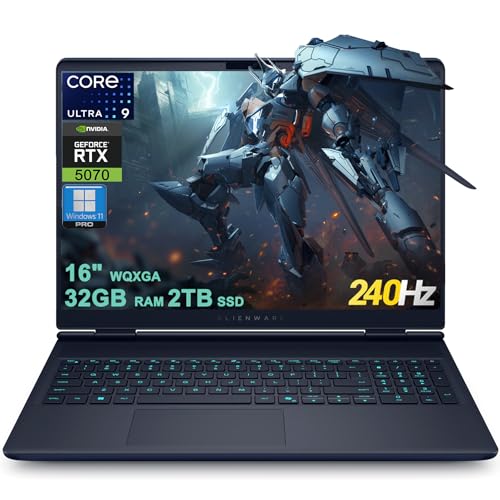
Dell Alienware 16X RTX 5070 Gaming Laptop
Best for: high-refresh esports and stationary desktop gaming
- Processor
- Intel Ultra 9 275HX
- RAM Capacity
- 32GB
- Storage Capacity
- 2TB SSD
- Screen Size
- 16"
- Graphics Card
- NVIDIA GeForce RTX 5070 8GB GDDR7
- Display Resolution
- 2560×1600
You get a dedicated gaming machine built around the Intel 24-core Ultra 9 275HX processor and an NVIDIA GeForce RTX 5070 8GB GDDR7 graphics card. Its 16-inch WQXGA screen runs at 240Hz with 100% DCI-P3 color coverage. Equipped with 32GB RAM and a 2TB SSD, this laptop suits competitive players needing high frame rates and ample local storage.
- Intel Ultra 9 275HX 24-core processor
- NVIDIA GeForce RTX 5070 8GB GDDR7 dedicated graphics
- 16-inch 240Hz WQXGA display with 100% DCI-P3 and G-SYNC
- 2TB SSD storage paired with 32GB RAM
- Thunderbolt 4, HDMI 2.1, and RJ45 Ethernet ports
- Heavy 8.82-pound listed weight limits mobile use
- Graphics memory is restricted to 8GB GDDR7
- You need a fast 240Hz WQXGA screen for competitive gaming.
- You want 2TB of solid-state storage and 32GB RAM out of the box.
- You rely on wired desk connections like Ethernet and Thunderbolt 4.
- You need a lightweight machine for daily travel.
- You require more than 8GB of video memory for graphics-heavy tasks.
Verdict: Dell Alienware 16X RTX 5070 Laptop delivers 24-core processing power and a 240Hz display for fixed-desk gaming setups. It serves players who prioritize high screen refresh rates and 2TB storage over portability.
Specifications side by side
| Spec | Dell Alienware 16X RTX 5070 Gaming Laptop |
|---|---|
| Processor | Intel Ultra 9 275HX |
| RAM Capacity | 32GB |
| Storage Capacity | 2TB SSD |
| Screen Size | 16" |
| Graphics Card | NVIDIA GeForce RTX 5070 8GB GDDR7 |
| Display Resolution | 2560×1600 |
| Refresh Rate | 240Hz |
| Operating System | Windows 11 Pro |
| Intended Use | Gaming |
| Resolution | WQXGA |
| Dimensions | 21 × 12.5 × 3 inches |
| Weight | 8.82 pounds |
| Size | 32GB | 2TB SSD |
| Color | Black |
| Model | B0FWCQ2B6J |
Frequently asked questions
What display refresh rate does the Dell Alienware 16X RTX 5070 feature?
The Dell Alienware 16X features a 240Hz display panel. This high refresh rate updates the on-screen image 240 times each second, which supports fast competitive gaming by keeping motion fluid and clear. You also get a WQXGA resolution paired with this 16-inch panel for sharp in-game visual clarity during fast-paced multiplayer matches.
How much RAM and internal storage does the Dell Alienware 16X have?
This laptop configuration comes equipped with 32GB of RAM and a 2TB solid-state drive. The 32GB memory capacity lets you handle demanding titles and background applications simultaneously without performance drops. Meanwhile, the 2TB SSD provides you with ample onboard space to store large game installations and personal media without needing external drives.
What screen resolution and size does the Dell Alienware 16X display provide?
The Dell Alienware 16X provides a 16-inch screen with a WQXGA display resolution. This resolution gives you a higher pixel density than standard full HD screens, creating sharper text and more detailed in-game graphics. The 16-inch form factor balances focused visual immersion on your desk with sufficient screen real estate for everyday multitasking.
What gaming use cases is the Dell Alienware 16X best for?
The Dell Alienware 16X is best for high-refresh esports and stationary desktop gaming. Its built-in 240Hz screen benefits competitive multiplayer games where frame rates matter to you. Because the machine prioritizes a 24-core processor and 2TB storage over portability, you get the best experience by keeping it in a permanent, stationary gaming setup.
How many processor cores are in the Dell Alienware 16X?
The Dell Alienware 16X comes with 24 processor cores. This 24-core configuration distributes computing tasks efficiently, providing enough core capacity to handle modern gaming alongside demanding background software such as streaming tools or voice chat. You get reliable performance stability during intense gaming sessions that require heavy CPU calculation without bottlenecking your graphics card.
Which operating system does the Dell Alienware 16X run?
The Dell Alienware 16X runs Windows 11 Pro right out of the box. This operating system supports direct integration with modern PC game launchers, anti-cheat programs, and peripheral software suites. You also gain native management tools and security features found in the Pro edition, ensuring your gaming setup remains stable and protected during continuous daily use.
What color and finish options are available for the Dell Alienware 16X?
The Dell Alienware 16X comes in a Black color finish. This dark chassis styling gives the machine a unified, subtle look on your battlestation while housing its dedicated gaming hardware. You can easily pair the black aesthetic with common desktop accessories, including external mechanical keyboards, gaming mice, and standard desktop monitors.
See also
See the current listing on Amazon
Specifications on this page are read from the product listing. Scores are out of 10, based on listed specifications and buyer feedback.


