As Amazon Associates, we earn from qualifying purchases. This means we may receive a small commission at no extra cost to you if you click through and make a purchase.

As an Amazon Associate we earn from qualifying purchases. Links on this page are affiliate links.
The Lenovo IdeaPad Flex 5i 14 pairs an Intel Core 3 N355 processor with a flexible 360-degree hinge and a 14-inch WUXGA touchscreen. If you are comparing lenovo ideapad flex 5i 14 alternatives, you may need hardware tailored to different software environments or physical demands. While the original excels at cloud multitasking with ChromeOS, 8GB of DDR5 memory, and a 5MP webcam, you might need a native Windows operating system or different local storage options.
You might also want a larger display, such as a 15.6-inch or 17.3-inch panel, or alternative processors like an Intel Core i5, Core i7, or AMD Ryzen. The 6 alternatives on this list were chosen because their specs overlap with the original. Each option balances portable dimensions, versatile screen formats, and external display outputs, letting you find the right processor, memory, and operating system for your routine in 2026.
How the Alternatives Compare
Acer Chromebook Plus Spin 514 14" 2-in-1
Acer Chromebook Plus Spin 514 matches the 2-in-1 convertible design of the IdeaPad Flex 5i 14 while upgrading the hardware underneath. You get an Intel Core i5 processor and a 512GB SSD, providing double the built-in storage of Lenovo's combined 128GB UFS and 128GB SD card setup. At 3.31 pounds, it is slightly lighter to carry. You give up the taller 1920×1200 screen aspect ratio for standard Full HD, and the chassis measures thicker at 0.82 inches versus 0.69 inches. Pick this model if you need more internal drive capacity on ChromeOS.
HP OmniBook 17.3-Inch Touchscreen Laptop
The HP OmniBook trades portable 2-in-1 flexibility for a stationary setup centered around a 17.3-inch Full HD touchscreen. It runs Windows 11 Home on an AMD Ryzen 5 processor, enabling you to install traditional desktop applications that ChromeOS cannot execute. At 4.43 pounds and 15.7 inches wide, it demands significantly more desk space and bag room than the 3.48-pound IdeaPad Flex 5i 14. You also lose the 360-degree hinge for tablet use. Choose the OmniBook if you prioritize expansive screen area and native Windows compatibility over folding mobility.
Dell Inspiron 15 Touchscreen Laptop
Dell Inspiron 15 offers a traditional clamshell workstation configured with double the memory and four times the storage capacity of the Flex 5i 14. Its 16GB of RAM, 1TB drive, and Intel Core i5 run Windows 11 Pro, which delivers corporate management tools absent on ChromeOS. The 15.6-inch Full HD touch panel provides more viewable area, though it lacks the 360-degree rotation of Lenovo's convertible design. At 3.66 pounds, it is slightly heavier than the 3.48-pound original. Pick the Inspiron if your workload demands native Windows software and generous local storage.
Lenovo Chromebook Plus 15.3" Touchscreen
This Lenovo Chromebook Plus keeps the ChromeOS platform and Cosmic Blue finish but moves to a larger 15.3-inch Full HD touchscreen. Despite having a wider footprint than the 14-inch Flex 5i 14, it actually weighs slightly less at 3.44 pounds compared to 3.48 pounds. However, you give up the 360-degree hinge, limiting use to a conventional clamshell orientation rather than tablet or tent modes. It also shifts from a 1920×1200 panel to standard Full HD. Pick this model if you want more display space for browser windows without adding carry weight.
Lenovo V15 15.6-Inch 16GB RAM Laptop
The Lenovo V15 swaps the convertible ChromeOS setup for a business-oriented Windows 11 Pro clamshell. Equipped with an Intel Core i5 processor, 16GB of RAM, and a 512GB SSD, it provides twice the memory and double the storage of the Flex 5i 14. You surrender the touchscreen interaction, the 360-degree folding hinge, and the sharper 1920×1200 resolution. The chassis is also larger and slightly heavier at 3.59 pounds. Choose the V15 if your routine centers on traditional office applications and data spreadsheets requiring Windows productivity over touch-first flexibility.
Lenovo V14 Gen 4 14" Laptop
The Lenovo V14 matches the 14-inch screen category while massively increasing computing resources. It features an Intel Core i7 processor, 40GB of RAM, and a 1TB SSD, running Windows 11 Pro. At 3.15 pounds, it is noticeably lighter than the 3.48-pound Flex 5i 14. In exchange for this computational power, you give up the touchscreen, the 360-degree convertible hinge, and the 1920×1200 panel in favor of standard Full HD. Select the V14 if you handle demanding multitasking or local processing that exceeds the memory and software limits of ChromeOS.
| # | Product | Best for | Price |
|---|---|---|---|
| 1 | Lenovo IdeaPad Flex 5i 14 2-in-1 Chromebook Best overall | cloud-first multitasking and video meetings | |
| 2 | Acer Chromebook Plus Spin 514 14" 2-in-1 Best budget | convertible touchscreen flexibility on ChromeOS | |
| 3 | HP OmniBook 17.3-Inch Touchscreen Laptop Best premium | large-screen desktop replacement multitasking | |
| 4 | Dell Inspiron 15 Touchscreen Laptop Also great | Windows productivity with a large touch display | |
| 5 | Lenovo Chromebook Plus 15.3" Touchscreen Also great | large-screen ChromeOS users wanting 120Hz touch visuals | |
| 6 | Lenovo V15 15.6-Inch 16GB RAM Laptop Also great | everyday office tasks and numeric data entry | |
| 7 | Lenovo V14 Gen 4 14" Laptop Best intel core i7 | heavy multitasking with high-capacity RAM |

Lenovo IdeaPad Flex 5i 14 2-in-1 Chromebook
Best for: cloud-first multitasking and video meetings
- Processor
- Intel Core 3 N355
- RAM Capacity
- 8GB
- Storage Capacity
- 256GB
- Screen Size
- 14"
- Graphics Card
- Intel Graphics
- Display Resolution
- 1920×1200
This 2-in-1 convertible laptop runs ChromeOS on an Intel Core 3 N355 processor with 8GB of DDR5 memory. You get a 14-inch 1920×1200 touchscreen with a 360-degree hinge, a 5MP webcam, and Wi-Fi 6E connectivity. It suits you if you need a flexible hybrid for cloud-based tasks, daily browsing, and video meetings.
- 14-inch 1920×1200 IPS touchscreen with 360-degree hinge
- High-resolution 5MP webcam with physical privacy shutter
- Wi-Fi 6E and Bluetooth 5.3 wireless support
- Supports up to three external displays via USB-C and HDMI
- Total storage combines 128GB internal UFS with a 128GB SD card
- Original packaging was unsealed to perform hardware modifications
- You work primarily within ChromeOS and browser-based web applications.
- You want a convertible form factor for laptop, tent, and tablet viewing.
- You participate in frequent video calls requiring a sharp camera.
- You need native Windows desktop applications.
- You prefer all internal storage on a single solid-state drive.
Verdict: Lenovo IdeaPad Flex 5i 14 2-in-1 Chromebook gives students and cloud workers a bright touchscreen and strong video setup for browser-centered productivity.

Acer Chromebook Plus Spin 514 14" 2-in-1
Best for: convertible touchscreen flexibility on ChromeOS
- Processor
- Intel Core i5-1334U
- RAM Capacity
- 8GB DDR5
- Storage Capacity
- 512GB PCIe NVMe M.2 SSD
- Screen Size
- 14"
- Graphics Card
- Intel UHD graphics
- Display Resolution
- 1920 x 1200
The Acer Chromebook Plus Spin 514 is a 2-in-1 convertible laptop running ChromeOS. You get a 14-inch 1920 x 1200 IPS touchscreen paired with a 10-core Intel Core i5-1334U processor and an upgraded 512GB SSD. With 8GB of DDR5 memory and up to 10 hours of battery life, it suits anyone who wants cloud-first productivity in a flexible tablet-convertible build.
- 360-degree hinge allows laptop, tent, and tablet modes
- 14-inch 1920 x 1200 IPS touchscreen display
- Intel Core i5-1334U 10-core processor with 8GB DDR5 RAM
- Connects up to three external 4K displays at 60Hz without a dock
- Resealed unit with SSD warranty handled separately from Acer coverage
- Integrated Intel UHD graphics instead of dedicated GPU hardware
- You want a 2-in-1 convertible touchscreen for everyday ChromeOS tasks.
- You plan to connect multiple external 4K monitors directly to the laptop.
- You require native Windows desktop applications.
- You need dedicated graphics hardware for intense 3D tasks.
Verdict: Acer Chromebook Plus Spin 514 14" 2-in-1 fits students and professionals who need a flexible ChromeOS touchscreen with fast multi-core computing. Its convertible hinge and triple 4K external display support make it adaptable across desk and mobile setups.

HP OmniBook 17.3-Inch Touchscreen Laptop
Best for: large-screen desktop replacement multitasking
- Processor
- AMD Ryzen 5 130
- RAM Capacity
- 16GB DDR5
- Storage Capacity
- 1TB SSD
- Screen Size
- 17.3"
- Graphics Card
- AMD Radeon 660M
- Display Resolution
- 1920×1080
This HP laptop pairs a 17.3-inch Full HD touchscreen with an AMD Ryzen 5 130 six-core processor, 16GB of DDR5 RAM, and a 1TB SSD. Unlike compact 14-inch convertibles, it provides a much larger anti-glare display and connections for up to three external 4K monitors. It suits you if you need expansive desktop-style multitasking, Windows 11, and generous local storage.
- Spacious 17.3-inch Full HD touchscreen with 300 nits brightness
- Generous 1TB PCIe SSD and 16GB DDR5 memory
- AMD Ryzen 5 130 6-core processor reaching up to 4.55 GHz
- Supports up to three external 4K displays at 60Hz via HDMI 2.1 and USB-C
- Heavier and larger footprint at 4.43 pounds and 15.7 inches wide than 14-inch alternatives
- Standard 1920×1080 resolution spread across a large 17.3-inch panel
- You want a large 17.3-inch touchscreen for multitasking without an external display.
- You need 1TB of built-in storage and 16GB DDR5 RAM for large files and spreadsheets.
- You plan to run up to three external 4K monitors from your laptop.
- You need a lightweight, compact 14-inch chassis for frequent travel.
- You prefer a 360-degree folding hinge for tablet-style operation.
Verdict: HP OmniBook 3 17.3" Touchscreen Laptop gives professionals and students an expansive desktop replacement with strong multitasking headroom and generous storage. It fits users who prioritize a large touchscreen and multi-monitor output over portable commuting.
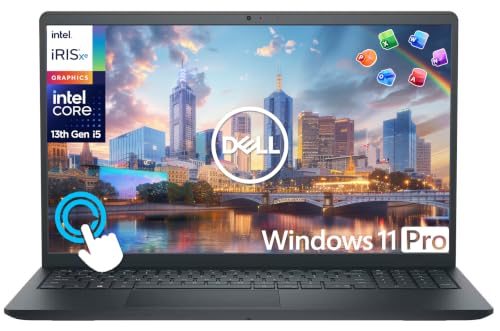
Dell Inspiron 15 Touchscreen Laptop
Best for: Windows productivity with a large touch display
- Processor
- Intel Core i5-1334U
- RAM Capacity
- 16GB
- Storage Capacity
- 512GB SSD
- Screen Size
- 15.6"
- Display Resolution
- FHD
- Operating System
- Windows 11 Pro
The Dell Inspiron 15 Touchscreen Laptop gives you a traditional clamshell alternative to 14-inch convertibles. It features a 15.6-inch Full HD touch display, a 10-core Intel Core i5-1334U processor, and 16GB of DDR4 memory. With Windows 11 Pro and a 512GB SSD, it suits you if you want a larger workspace, full Windows software compatibility, and bundled desktop accessories.
- 10-core Intel Core i5-1334U processor with up to 4.6GHz boost clock
- 15.6-inch Full HD IPS touchscreen display
- 16GB DDR4 RAM and 512GB PCIe NVMe SSD
- Windows 11 Pro operating system pre-installed
- Includes 6-in-1 USB-C docking station and 500GB external drive
- Relies on an external drive to achieve 1TB total storage instead of an internal 1TB SSD
- Uses DDR4 RAM rather than faster DDR5 memory
- Clamshell design lacks a 360-degree convertible hinge
- You want a 15.6-inch Full HD touchscreen paired with a 10-core Intel processor.
- You need Windows 11 Pro for professional workflows and desktop applications.
- You want an included USB-C docking station and extra external drive for desktop work.
- You need a 360-degree 2-in-1 form factor that flips into a tablet.
- You want an internal single-drive storage capacity of 1TB or higher.
Verdict: Dell Inspiron 15 Touchscreen Laptop delivers a spacious touch display, 16GB of memory, and Windows 11 Pro. It serves students and professionals who need a traditional clamshell workstation with comprehensive ports and accessories.

Lenovo Chromebook Plus 15.3" Touchscreen
Best for: large-screen ChromeOS users wanting 120Hz touch visuals
- Processor
- Intel Core 3 N355
- RAM Capacity
- 8GB
- Storage Capacity
- 256GB (128GB UFS + 128GB SD Card)
- Screen Size
- 15.3"
- Graphics Card
- Intel Graphics
- Display Resolution
- 1920×1200
This Lenovo Chromebook Plus gives you a 15.3-inch 120Hz touchscreen display with a 1920×1200 resolution and 400 nits of brightness. Inside, you get an Intel Core 3 N355 processor, 8GB of RAM, and ChromeOS. It suits you if you prioritize larger screen space, high refresh rates, and web-centered workflows over traditional Windows laptop functionality.
- 15.3-inch WUXGA 120Hz display with 400 nits and 100% sRGB
- 5MP webcam with physical privacy shutter
- Tested to MIL-STD 810H durability standards
- Up to 11 hours of rated battery life with fast charging
- Total 256GB storage splits across 128GB internal UFS and a 128GB SD card
- Packaging resealed to apply system modifications
- You want a fast 120Hz touchscreen for ChromeOS productivity.
- You need a sharp 5MP camera and MIL-STD 810H build durability.
- You prefer a 15.3-inch screen over standard 14-inch panels.
- You rely on native Windows desktop software instead of ChromeOS.
- You prefer single-drive internal SSD storage over an SD card split.
- You need a 360-degree convertible hinge for tablet use.
Verdict: Lenovo Chromebook Plus 15.3" 120Hz Touchscreen fits students and remote workers who want smooth visuals, long battery life, and cloud-first productivity on a larger display. It gives you capable ChromeOS performance if you do not depend on native Windows applications.

Lenovo V15 15.6-Inch 16GB RAM Laptop
Best for: everyday office tasks and numeric data entry
- Processor
- AMD Ryzen 3 7320U
- RAM Capacity
- 16GB LPDDR5
- Storage Capacity
- 256GB SSD
- Screen Size
- 15.6"
- Graphics Card
- AMD Radeon 610M
- Display Resolution
- 1920 × 1080
This Lenovo V15 is a standard clamshell laptop featuring a 15.6-inch Full HD anti-glare screen and an AMD Ryzen 3 7320U processor. It pairs 16GB of fast LPDDR5 memory with a 256GB solid-state drive and Windows 11 Pro. You get a built-in numeric keypad and gigabit ethernet, making it suitable if you prioritize spreadsheet work and traditional business connectivity.
- 16GB LPDDR5 5500MHz memory handles multiple open apps smoothly
- Built-in Gigabit Ethernet port provides direct wired networking
- Full-size keyboard includes an integrated numeric keypad
- Supports dual external 4K displays at 60Hz via HDMI and USB-C
- 256GB SSD provides limited onboard storage space
- AMD Ryzen 3 7320U quad-core processor suits only basic tasks
- HDMI video output is limited to standard 1.4
- You need Windows 11 Pro tools like BitLocker encryption and Remote Desktop.
- You type numbers frequently and need an integrated numeric keypad.
- You rely on a wired Ethernet jack for network stability.
- You require more than 256GB of factory SSD storage.
- You run demanding software requiring a higher-tier processor than the Ryzen 3.
Verdict: Lenovo V15 15.6" Ryzen 3 Laptop fits spreadsheet workers and students who need Windows 11 Pro, 16GB RAM, and wired connectivity. It delivers the essential ports and full keyboard layout required for daily office tasks.

Lenovo V14 Gen 4 14" Laptop
Best for: heavy multitasking with high-capacity RAM
- Processor
- Intel Core i7-13620H
- RAM Capacity
- 40GB
- Storage Capacity
- 1TB SSD
- Screen Size
- 14"
- Graphics Card
- Intel UHD graphics
- Display Resolution
- 1920×1080
This Lenovo V14 is a 14-inch clamshell laptop built for heavy productivity. You get a 10-core Intel Core i7-13620H processor paired with 40GB of DDR4 memory and a 1TB solid-state drive. It weighs 3.15 pounds and includes Windows 11 Pro. It suits you if you run memory-intensive office software, large local files, and multiple applications simultaneously.
- 10-core Intel Core i7-13620H processor with 40GB DDR4 RAM
- 1TB PCIe NVMe M.2 SSD storage
- Preinstalled Windows 11 Pro with BitLocker and Remote Desktop
- Dedicated Ethernet port alongside HDMI and USB-C
- 45% NTSC color gamut on the 1080p panel
- Webcam resolution is limited to 720p
- You need 40GB of memory and a 10-core processor for heavy multitasking.
- You require Windows 11 Pro administrative and security tools.
- You want a physical Ethernet port without using external adapters.
- You need a 2-in-1 convertible hinge or touchscreen functionality.
- You require wide color coverage beyond 45% NTSC for visual work.
Verdict: Lenovo V14 14-Inch Core i7 Laptop provides high-capacity memory and 10-core processing for office workers who need Windows 11 Pro management rather than a folding touchscreen.
Specifications side by side
| Spec | Lenovo IdeaPad Flex 5i 14 2-in-1 Chromebook | Acer Chromebook Plus Spin 514 14" 2-in-1 | HP OmniBook 17.3-Inch Touchscreen Laptop | Dell Inspiron 15 Touchscreen Laptop | Lenovo Chromebook Plus 15.3" Touchscreen | Lenovo V15 15.6-Inch 16GB RAM Laptop | Lenovo V14 Gen 4 14" Laptop |
|---|---|---|---|---|---|---|---|
| Processor | Intel Core 3 N355 | Intel Core i5-1334U | AMD Ryzen 5 130 | Intel Core i5-1334U | Intel Core 3 N355 | AMD Ryzen 3 7320U | Intel Core i7-13620H |
| RAM Capacity | 8GB | 8GB DDR5 | 16GB DDR5 | 16GB | 8GB | 16GB LPDDR5 | 40GB |
| Storage Capacity | 256GB | 512GB PCIe NVMe M.2 SSD | 1TB SSD | 512GB SSD | 256GB (128GB UFS + 128GB SD Card) | 256GB SSD | 1TB SSD |
| Screen Size | 14" | 14" | 17.3" | 15.6" | 15.3" | 15.6" | 14" |
| Graphics Card | Intel Graphics | Intel UHD graphics | AMD Radeon 660M | – | Intel Graphics | AMD Radeon 610M | Intel UHD graphics |
| Display Resolution | 1920×1200 | 1920 x 1200 | 1920×1080 | FHD | 1920×1200 | 1920 × 1080 | 1920×1080 |
| Refresh Rate | – | – | – | – | 120Hz | – | – |
| Operating System | – | – | Windows 11 Home | Windows 11 Pro | – | Windows 11 Pro | Windows 11 Pro |
| Intended Use | Business, Home, Students | Business, Home | Business, Home, Students | Business, Home, Students | Business, Home, Students | Business, Home, Students | Business, Home |
| Form Factor | 2-in-1 | 2-in-1 | – | – | – | – | – |
| Resolution | Full HD | Full HD | Full HD | Full HD | Full HD | Full HD | Full HD |
| Dimensions | 12.3 × 8.94 × 0.69 inches | 12.6 × 9.05 × 0.82 inches | 15.7 × 10.1 × 0.65 inches | 14.1 × 9.27 × 0.75 inches | 13.5 × 9.52 × 0.75 inches | 14.1 × 9.25 × 0.74 inches | 12.8 × 8.47 × 0.78 inches |
| Weight | 3.48 pounds | 3.31 pounds | 4.43 pounds | 3.66 pounds | 3.44 pounds | 3.59 pounds | 3.15 pounds |
| Color | Cosmic Blue | Gray | Glacier silver | Carbon Black | Cosmic Blue | Black | Black |
| Model | Lenovo Chromebook plus 83LN | Acer Chromebook Plus Spin 514 | OmniBook 3 | Dell Inspiron 15 Laptop 2025/2026 | Lenovo Chromebook Plus | 83CQ | 83A0 |
| Size | – | 512GB SSD | – | 16GB RAM + 1TB Storage | – | 16GB RAM|512GB SSD | 40GB|1TB |
Frequently asked questions
Which alternative offers the lightest build for travel?
The Lenovo V14 Gen 4 is the lightest option on this list at 3.15 pounds. It pairs a 14-inch Full HD screen with an Intel Core i7 processor and 40GB of memory. You get solid portability in a traditional clamshell chassis, weighing less than the convertible designs.
Which alternative provides the largest screen?
The HP OmniBook offers the largest display on this list with a 17.3-inch Full HD touchscreen. Powered by an AMD Ryzen 5 processor and Windows 11 Home, it weighs 4.43 pounds. You get an expansive workspace tailored for desktop replacement setups rather than daily commuting.
Which models include a 2-in-1 convertible hinge?
The Lenovo IdeaPad Flex 5i Chromebook and the Acer Chromebook Plus Spin 514 both offer 2-in-1 convertible form factors. Each laptop features a 14-inch Full HD touchscreen. The Acer model weighs 3.31 pounds with an Intel Core i5 processor, while the Lenovo alternative weighs 3.48 pounds.
Which alternative has the most RAM for multitasking?
The Lenovo V14 Gen 4 provides the highest memory capacity with 40GB of RAM. It features an Intel Core i7 processor and a 1TB drive running Windows 11 Pro. This configuration gives you substantial headroom for dense spreadsheets, virtual machines, and demanding local multitasking tasks.
Which alternatives come equipped with Windows 11 Pro?
The Dell Inspiron 15, Lenovo V15, and Lenovo V14 Gen 4 all come with Windows 11 Pro installed. These machines use Intel processors and Full HD screens. The Dell model includes a 15.6-inch touchscreen, while both Lenovo V-series laptops provide traditional non-touch displays for standard office duties.
Which alternative features a 120Hz touchscreen?
The Lenovo Chromebook Plus 15.3-inch model includes a 120Hz Full HD touch display. This higher refresh rate delivers smoother scrolling and responsive touch interactions. The unit weighs 3.44 pounds in Cosmic Blue and is tailored for cloud-centered productivity and web applications without traditional Windows software.
See also
See the current listing on Amazon
Specifications on this page are read from the product listing. Scores are out of 10, based on listed specifications and buyer feedback.


