As Amazon Associates, we earn from qualifying purchases. This means we may receive a small commission at no extra cost to you if you click through and make a purchase.
As an Amazon Associate we earn from qualifying purchases. Links on this page are affiliate links.
In this ist computers lenovo thinkpad l16 business review, you get a close look at a 16-inch productivity laptop built for office and remote work. Two central specifications anchor this machine: its 12-core Intel Core Ultra 5 225U processor and its 16-inch 1920×1200 anti-glare IPS display rated at 400 nits. The system runs Windows 11 Pro and features MIL-STD-810H durability certification. With dual Thunderbolt 4 ports, a numeric keypad, and fast charging that reaches 80 percent in one hour, this configuration targets dependable business computing.
- 16-inch WUXGA 1920×1200 IPS anti-glare display with 400 nits brightness
- Intel Core Ultra 5 225U processor with 12 cores and boost up to 4.8 GHz
- Dual Thunderbolt 4, HDMI 2.1, and RJ-45 Ethernet connectivity
- MIL-STD-810H tested durability with fast charging up to 80% in one hour
Good fit for
This laptop suits business professionals, accountants, and students who handle spreadsheets, administrative workloads, and multitasking. The dedicated numeric keypad and backlit keyboard serve data entry well. If you run multiple monitors, the HDMI 2.1 and dual Thunderbolt 4 connections support up to three external displays. Its 400-nit screen and 10-hour battery also fit users working in bright offices or traveling between client meetings.
Who can skip it
Skip this model if your daily workflow requires dedicated GPU power for advanced 3D rendering or heavy gaming, as it relies entirely on integrated Intel Graphics. Creative professionals who need resolutions beyond 1920×1200 or a touchscreen interface should consider other workstations. In addition, users who require a high-resolution webcam for client broadcasts may find the integrated 720p camera too basic for their visual standards.
Verdict
The Lenovo ThinkPad L16 provides a well-balanced business platform with a bright 400-nit screen, versatile Thunderbolt 4 connectivity, and reliable Core Ultra 5 processing. It delivers solid enterprise utility for users focused on office productivity and data tasks.
Key Lenovo ThinkPad L16 Specifications Explained
Weight: 3.96 pounds
At 3.96 pounds, this laptop remains manageable to carry in a work bag or backpack. You gain a large screen without the heavy bulk of older desktop replacements. Commuters and traveling professionals benefit when moving between desks, client sites, or home offices. When shopping for laptops, compare this figure against typical 16-inch models near 4.5 pounds and smaller 14-inch notebooks near 3 pounds.
High-brightness 400-nit anti-glare screen
A 400-nit luminance rating keeps text visible in well-lit rooms and outdoor spaces, while the anti-glare finish cuts harsh reflections. You can work comfortably near windows without straining your eyes. This feature benefits office workers, remote freelancers, and students who study in cafes. When evaluating laptops, compare this 400-nit rating to entry-level 250-nit or 300-nit screens, which struggle under bright sunlight.
MIL-STD-810H certified
MIL-STD-810H testing validates that the chassis withstands physical shock, vibrations, and temperature shifts during transit. You get a durable frame that handles daily commuting and frequent handling. Field technicians, traveling consultants, and campus students benefit most from this structural reinforcement. When shopping for business laptops, compare this certification with non-certified consumer devices, which often rely on standard plastic cases vulnerable to flex and rough transport.
2x Thunderbolt 4
Thunderbolt 4 ports supply high data bandwidth, fast device charging, and external video output up to 8K resolution. You can connect multiple monitors or external storage drives directly. Desk-bound professionals, financial analysts, and programmers benefit when organizing multi-screen workstations. When comparing laptops, check whether competing models include Thunderbolt 4 or settle for standard USB-C ports, which offer lower data transfer speeds and limited external display flexibility.
Lenovo ThinkPad L16 Design and Build
The Lenovo ThinkPad L16 features a black chassis measuring 14.1 inches long, 9.98 inches wide, and 0.77 inches thick. At this height and a weight of 3.96 pounds, the notebook fits standard work bags while accommodating a 16-inch screen. According to the listing, the laptop carries MIL-STD-810H certification, designed to handle demanding travel and fieldwork. This build specification protects hardware during daily transit, making it practical for work on the go.
The physical layout focuses on input controls for daily business. You get a backlit keyboard paired with a dedicated numeric keypad, which simplifies number entry and spreadsheet calculations in dim spaces. Integrated controls include a built-in fingerprint reader for password-free logins and a 720p webcam equipped with a privacy shutter to block the lens manually.
For peripheral connectivity, the chassis supplies two Thunderbolt 4 ports, two USB-A 3.2 Gen 1 ports, and one USB-A 2.0 port. It also incorporates an HDMI 2.1 port, an RJ-45 Ethernet port, and a headphone/mic combo jack. This physical interface selection allows you to connect wired internet, external monitors, and desktop accessories directly without carrying an external dock.
Setup and Daily Workflow Specifications
Setting up the ThinkPad L16 begins with Microsoft Windows 11 Pro. You configure built-in security tools like BitLocker drive encryption and Remote Desktop for enterprise access. For faster logins, the integrated fingerprint reader provides biometric authentication without entering passwords. Connecting to your office network happens either through the wired RJ-45 Ethernet port or wirelessly via Wi-Fi 6E.
Workspace setups connect through several physical ports. You can run up to three external displays without a docking station by using the HDMI 2.1 port and two Thunderbolt 4 ports. These connections support displays up to 4K at 60Hz over HDMI and 8K at 60Hz through Thunderbolt. For legacy accessories, you get two USB-A 3.2 Gen 1 ports, one USB-A 2.0 port, a headphone jack, and Bluetooth 5.3.
Daily tasks center on typing, calculation, and communication. You work on a backlit keyboard equipped with a dedicated numeric keypad for spreadsheet data entry. For video meetings on Teams or Zoom, the 720p webcam includes a physical privacy shutter for visual security. When working unplugged, the battery lasts up to 10 hours. Fast charging restores the battery to 80 percent within one hour.
Before Buying the Lenovo ThinkPad L16
Before purchasing the Lenovo ThinkPad L16, evaluate your peripheral and workspace requirements. The 16-inch display runs at 1920×1200 resolution and supports up to three external screens via HDMI 2.1 and dual Thunderbolt 4 ports. You need compatible USB-C or HDMI cables if you plan to connect 4K or 8K external monitors. The chassis includes a dedicated RJ-45 Ethernet jack, eliminating the need for separate wired network adapters. For video calls, the built-in webcam records at 720p, so you might consider an external high-resolution camera if your meetings require higher video quality. Upkeep involves routine wiping of the anti-glare screen and maintaining the keyboard and numeric keypad. Among the 1 laptops in this class, the ThinkPad L16 sits between entry-level business units and heavier enterprise workstations, delivering balanced input options, DDR5 memory scalability, and modern wireless connectivity with Wi-Fi 6E and Bluetooth 5.3.
Check before you buy
- Confirm your desk setup accommodates a 14.1-inch wide, 3.96-pound laptop footprint.
- Check if your monitors support HDMI 2.1 or Thunderbolt 4 display inputs.
- Verify whether a 720p webcam meets your personal video conferencing standards.
- Assess whether your daily workflow benefits from a built-in numeric keypad.
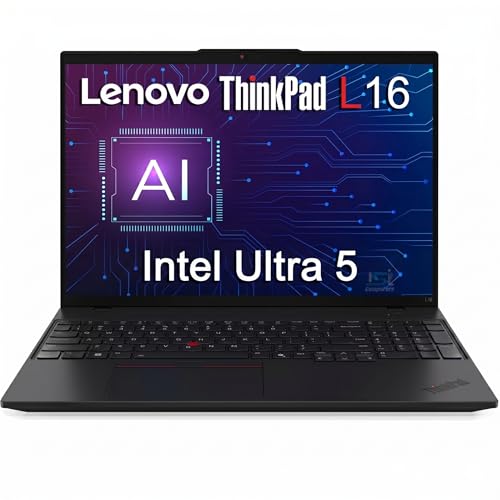
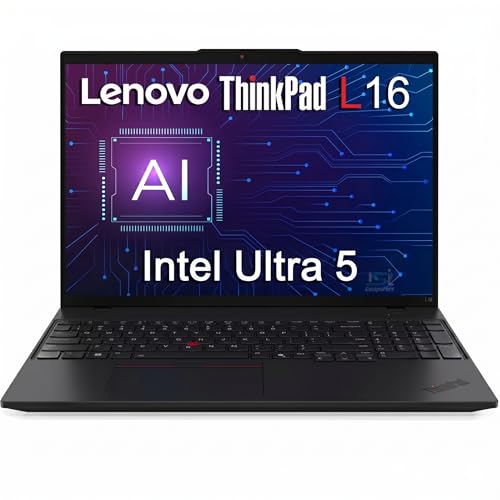
Lenovo ThinkPad L16 16-Inch Laptop
Best for: office multitasking and spreadsheet-heavy business workflows
- Processor
- Intel Core Ultra 5 225U
- Screen Size
- 16"
- Graphics Card
- Intel Graphics
- Display Resolution
- 1920×1200
- Operating System
- Windows 11 Pro
- Intended Use
- Business
This 16-inch business laptop runs on an Intel Core Ultra 5 225U 12-core processor and Windows 11 Pro. You get a 400-nit 1920×1200 anti-glare display, dual Thunderbolt 4 ports, and a dedicated numeric keypad. Weighing 3.96 pounds with MIL-STD-810H durability, it serves professionals and students who need a portable workstation for data analysis and office productivity.
- 400-nit 1920×1200 anti-glare IPS display
- Two Thunderbolt 4 ports supporting up to 8K video output
- Intel Core Ultra 5 225U 12-core processor
- MIL-STD-810H tested build with dedicated numeric keypad
- Webcam resolution is limited to 720p
- Relies on integrated Intel graphics rather than a discrete GPU
- Original packaging is resealed for third-party component upgrades
- You need a bright 400-nit screen for working in well-lit spaces.
- You connect multiple external displays via Thunderbolt 4 and HDMI.
- You work extensively with spreadsheets and need a dedicated numpad.
- You require a 1080p or higher resolution webcam for video conferencing.
- You need a dedicated graphics card for advanced 3D rendering or gaming.
Verdict: Lenovo ThinkPad L16 16-Inch Business Laptop suits office workers, accountants, and students needing strong multi-display connectivity and dependable typing ergonomics. Its integrated graphics and basic 720p camera make it less suited for dedicated creative production.
Specifications side by side
| Spec | Lenovo ThinkPad L16 16-Inch Laptop |
|---|---|
| Processor | Intel Core Ultra 5 225U |
| Screen Size | 16" |
| Graphics Card | Intel Graphics |
| Display Resolution | 1920×1200 |
| Operating System | Windows 11 Pro |
| Intended Use | Business |
| Resolution | Full HD |
| Dimensions | 14.1 × 9.98 × 0.77 inches |
| Weight | 3.96 pounds |
| Size | L16|Non-Touch |
| Color | Black |
| Model | 21SB |
Frequently asked questions
Does the Lenovo ThinkPad L16 have a touchscreen display?
No, this Lenovo ThinkPad L16 configuration features a non-touch screen. The 16-inch panel delivers a Full HD resolution designed for standard office productivity rather than finger navigation. If you need touch input or digital pen support, you must look for an alternative variant with interactive panel specifications.
Is the Lenovo ThinkPad L16 suitable for intensive creative production?
No, this laptop is not built for intensive creative production or video editing. It relies on integrated graphics and includes a basic 720p camera, which limits complex visual tasks. The hardware targets spreadsheet navigation, data processing, and day-to-day business multitasking powered by its Intel Core Ultra 5 processor instead.
Who is the Lenovo ThinkPad L16 best suited for?
The ThinkPad L16 is best suited for office workers, accountants, and students handling spreadsheet-heavy workloads. Its dependable typing ergonomics and multi-display support make it ideal for desk productivity. If you manage large datasets or run multiple business applications simultaneously, this machine provides the practical foundation you need.
What type of webcam does the Lenovo ThinkPad L16 have?
The laptop features a standard 720p camera built into the top display bezel. This webcam handles routine business video conferences, classroom participation, and remote team check-ins. If your daily workflow demands ultra-crisp video feeds or professional live streaming, you will need to connect a dedicated external camera to improve visual clarity.
Which model number corresponds to this Lenovo ThinkPad L16 configuration?
This specific laptop configuration is identified by model number 21SB. Verifying this model code ensures you receive the non-touch 16-inch Full HD display, the Intel Core Ultra 5 processor, and the black chassis styling. Matching the model number prevents confusion with other variations in the ThinkPad series that share similar names.
What operating system is installed on the Lenovo ThinkPad L16?
The notebook comes pre-installed with Windows 11 Pro to support business tasks. This edition offers essential tools for corporate IT environments, network management, and device security policies. You can integrate the computer into existing business networks immediately without having to perform an operating system upgrade or install third-party management tools.
See also
See the current listing on Amazon
Specifications on this page are read from the product listing. Scores are out of 10, based on listed specifications and buyer feedback.


