As Amazon Associates, we earn from qualifying purchases. This means we may receive a small commission at no extra cost to you if you click through and make a purchase.

As an Amazon Associate we earn from qualifying purchases. Links on this page are affiliate links.
This dell inspiron 15 3000 series 3511 laptop review examines a 15.6-inch Windows 11 Home notebook built for routine home tasks and multitasking. Two defining hardware specifications set this configuration apart: its generous 32GB DDR4 RAM allocation and a spacious 1TB PCIe NVMe solid-state drive. Dell combines these components with a quad-core Intel Core i5-1035G1 processor and integrated Intel UHD Graphics. The hardware also features a 1080p anti-glare WVA touchscreen. At 3.82 pounds and 0.74 inches thick, this chassis gives you large capacity in a manageable physical size.
- 32GB DDR4 RAM for managing multiple open programs and browser tabs without slowdowns
- 1TB PCIe NVMe M.2 SSD providing large local storage and fast boot times
- 15.6-inch Full HD 1920 x 1080 anti-glare narrow-border touchscreen
- Intel Core i5-1035G1 quad-core processor reaching clock speeds up to 3.60 GHz
Good fit for
This laptop fits users who run dozens of browser tabs, maintain extensive local files, and switch between productivity tools without memory lag. The 32GB RAM capacity prevents multitasking bottlenecks, while the 1TB SSD stores large files directly on your machine. If you need a 15.6-inch touchscreen with full 1080p resolution and legacy connections like USB-A and an SD card reader, this setup covers your daily home and office workflow.
Who can skip it
Skip this model if your workflow demands high-end graphics processing, 3D rendering, or intensive modern gaming. The laptop relies on basic integrated Intel UHD Graphics rather than a dedicated GPU. Power users looking for modern connectivity will also want to look elsewhere, as the port selection includes USB-A and HDMI 1.4 without any USB-C ports listed. Demanding creators will benefit from a system with dedicated graphics hardware.
Verdict
The Dell Inspiron 15 3511 provides an exceptional balance of 32GB RAM and 1TB SSD storage for everyday multitasking and media playback. Its older quad-core processor and integrated Intel UHD Graphics keep it focused strictly on general computing rather than heavy creative or gaming loads.
Dell Inspiron 15 3511 Specifications Explained
Intel Core i5-1035G1 Quad-Core Processor
This quad-core chip runs at a 1.0 GHz base clock and reaches 3.60 GHz under load. It handles general productivity tasks, web browsing, and office applications without delay. You benefit if you need dependable daily computing power. When shopping for laptops, compare this 10th-generation part with newer Core i5 or Ryzen 5 processors that deliver faster multi-threaded processing speeds.
15.6-inch FHD 1920 x 1080 WVA Touchscreen
This display pairs a 1080p resolution with touch input on a 15.6-inch panel. Full HD provides sharp text and clear media playback, while touch capability lets you navigate Windows directly by hand. You benefit if you prefer interactive control without a mouse. Compare this panel to non-touch screens or higher-resolution displays when you evaluate battery trade-offs and clarity.
Intel UHD Graphics
This integrated graphics solution shares system memory to drive the display. It manages standard video streaming, basic photo viewing, and casual monitor output reliably. You benefit if your daily routine centers on spreadsheets, web tasks, and video calls rather than 3D rendering. Compare it to dedicated graphics cards or Intel Iris Xe if you plan to play modern video games.
3.82 pounds
At under four pounds, this notebook remains light enough to move between desks or carry in a backpack. You benefit if you need a full-sized 15.6-inch screen without the heavy burden of older desktop-replacement machines. When shopping for laptops, compare this weight against ultraportable models near three pounds or heavier performance models weighing closer to five pounds.
Design, Build, and Port Layout
The Dell Inspiron 15 3511 comes in a Black finish, according to the listing. The chassis measures 14.1 inches in length, 9.27 inches in height, and 0.74 inches in width. At 3.82 pounds, the notebook provides a manageable weight if you need to move between work areas at home or pack your computer into a bag for travel. Its 0.74-inch thickness fits into standard bags without requiring extra clearance.
The display features a 15.6-inch Full HD panel with narrow borders, giving you broad screen space while controlling the overall footprint. Because the screen includes touch support, you can tap buttons, select text, and scroll through documents directly by hand. Dell also includes an integrated webcam positioned above the anti-glare screen for video calls.
Your wired connection options cover both routine accessories and external video displays. You get two USB-A 3.2 ports for fast data drives, alongside one USB-A 2.0 port for basic accessories like a wired mouse. An HDMI 1.4 port lets you output video to an external monitor or television. In addition, an SD card reader handles memory cards without adapters, and a combo headphone and microphone audio jack connects your headset.
System Setup and Everyday Practical Use
Initial setup begins with Windows 11 Home. You follow the operating system prompts to configure your user profile and settings. Windows 11 Home introduces dedicated window layout options to organize open programs side by side. It also brings improved multi-monitor functionality, support for a new videogame selection, and direct compatibility with Android apps.
Connecting external hardware relies on the integrated ports. You can plug peripherals into the two USB-A 3.2 ports and single USB-A 2.0 port. For an additional display, the HDMI 1.4 port connects directly to an external monitor. The SD card reader lets you transfer media files without an external card adapter, while the headphone and microphone audio jack connects your wired headset. The built-in webcam handles video capture for daily calls and virtual communication.
In everyday operation, you interact directly with the 15.6-inch Full HD WVA touchscreen. The touch layer allows you to tap icons, scroll through documents, and manipulate on-screen elements with your fingers. Its narrow borders frame the viewing area, and the anti-glare coating paired with LED backlighting helps manage overhead indoor lighting. In addition, the 1TB PCIe NVMe M.2 solid-state drive provides fast bootup times and swift data transfers for routine files.
Before Purchasing the Dell Inspiron 15
Before choosing this laptop, evaluate your peripheral setup. The chassis includes three USB-A ports, an SD card reader, and an HDMI 1.4 port. If you use USB-C cables, you will need compatible adapters to plug your hardware into these Type-A connections. The HDMI 1.4 output supports external monitors, but check your display refresh rate and cable standard beforehand. For daily maintenance, keep Windows 11 Home updated to maintain system security and stable driver operation. The 1TB PCIe solid-state drive provides ample room for files, yet regular housekeeping keeps high-speed storage running smoothly. Across the Inspiron 3511 line, Dell also offers a smaller 12GB RAM and 256GB storage configuration. Choosing this 32GB RAM model gives you substantially more capacity for intensive software demands without altering the external physical footprint.
Check before you buy
- Check external display compatibility with the HDMI 1.4 port specifications.
- Ensure your peripheral accessories connect using Type-A USB ports or standard audio jacks.
- Determine if 32GB of RAM aligns with your planned workload requirements.
- Compare your storage requirements against the alternative 256GB drive configuration.
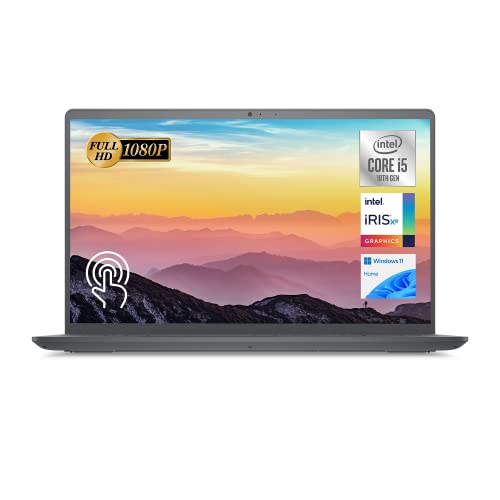
Dell Inspiron 15 Touchscreen Laptop
Best for: multitasking with high RAM and storage needs
- Processor
- Intel Core i5-1035G1
- RAM Capacity
- 32GB
- Storage Capacity
- 1TB SSD
- Screen Size
- 15.6"
- Graphics Card
- Intel UHD Graphics
- Display Resolution
- 1920 x 1080
This Dell Inspiron 15 configuration pairs an Intel Core i5-1035G1 quad-core processor with 32GB of DDR4 memory and a 1TB PCIe NVMe SSD. It features a 15.6-inch Full HD touchscreen with a 1920 x 1080 resolution. You get extensive capacity for running multiple background applications and storing large local file libraries, making it suitable for everyday home productivity and data-heavy multitasking.
- 32GB DDR4 RAM supports heavy multitasking
- 1TB PCIe NVMe SSD provides fast file access and ample local capacity
- 15.6-inch Full HD 1920 x 1080 touchscreen display
- Full-size SD card reader built into the chassis
- No USB-C ports included in the port selection
- Intel Core i5-1035G1 processor has a low 1.0 GHz base clock speed
- Intel UHD integrated graphics limits 3D rendering tasks
- You need 32GB of RAM to keep dozens of browser tabs and productivity tools open simultaneously.
- You store large local file collections and require 1TB of solid-state drive space.
- You want a 15.6-inch 1080p display with direct touch input.
- You need USB-C connectivity for modern docking stations or external accessories.
- You require dedicated graphics hardware for demanding 3D workloads.
Verdict: Dell Inspiron 15 Touchscreen Laptop fits home and office users who prioritize high RAM capacity and large solid-state storage over modern USB-C ports.
Specifications side by side
| Spec | Dell Inspiron 15 Touchscreen Laptop |
|---|---|
| Processor | Intel Core i5-1035G1 |
| RAM Capacity | 32GB |
| Storage Capacity | 1TB SSD |
| Screen Size | 15.6" |
| Graphics Card | Intel UHD Graphics |
| Display Resolution | 1920 x 1080 |
| Operating System | Windows 11 Home |
| Intended Use | Home |
| Resolution | Full HD |
| Size | 32GB RAM | 1TB SSD |
| Dimensions | 14.1 × 0.74 × 9.27 inches |
| Weight | 3.82 pounds |
| Color | Black |
| Model | 3511 |
Frequently asked questions
Does the Dell Inspiron 15 3511 have a touchscreen?
Yes, this Dell Inspiron 15 model includes a touchscreen display. The panel measures 15.6 inches across and runs at Full HD resolution. You interact directly with Windows 11 Home using finger taps and gestures. This hardware fits everyday navigation, document scrolling, and media browsing without relying solely on a touchpad.
What processor does the Dell Inspiron 15 3511 use?
This Dell Inspiron 15 3511 laptop features an Intel Core i5 processor. The CPU pairs with 32GB of RAM to handle routine multitasking and multiple concurrent office applications. Dell pairs this hardware with Windows 11 Home. You get adequate compute power for standard productivity workflows, streaming, web research, and home office spreadsheets.
How much RAM and storage come with this Dell Inspiron 15 model?
This configuration provides 32GB of RAM and a 1TB solid-state drive. High memory capacity prevents application slowdowns when you keep dozens of browser tabs open. The 1TB SSD gives you local capacity for documents, family photos, and operating system files. It supports heavy multitasking without requiring immediate external storage expansion.
What are the dimensions and weight of the Dell Inspiron 15 3511?
The Dell Inspiron 15 3511 measures 14.1 inches long, 9.27 inches high, and 0.74 inches wide. It weighs 3.82 pounds in a Black chassis. These physical specifications make it easy to transport inside a standard backpack. You can move the laptop between home desks or workspaces without dealing with excessive bulk.
Which operating system comes pre-installed on this laptop?
This Dell laptop comes with Windows 11 Home pre-installed. You receive the standard Microsoft interface designed for personal computing, school assignments, and office work. The operating system coordinates directly with the Intel Core i5 processor and 32GB RAM. You gain access to updated window management tools and integrated Microsoft security features right away.
Who should buy the Dell Inspiron 15 3511 laptop?
This laptop fits home and office users needing substantial RAM and internal storage for daily multitasking. If you run multiple demanding productivity programs at once, 32GB of RAM prevents slowdowns. However, users needing modern USB-C connectivity should skip this model, as the chassis relies strictly on standard legacy ports for your accessories.
See also
See the current listing on Amazon
Specifications on this page are read from the product listing. Scores are out of 10, based on listed specifications and buyer feedback.