As Amazon Associates, we earn from qualifying purchases. This means we may receive a small commission at no extra cost to you if you click through and make a purchase.

As an Amazon Associate we earn from qualifying purchases. Links on this page are affiliate links.
This asus vivobook s16 laptop review examines a 16-inch productivity machine designed around local artificial intelligence tasks and everyday workloads. The system pairs an AMD Ryzen AI 9 465 processor with a 16-inch WUXGA OLED panel. You also get 32 GB of system memory and a 1 TB solid-state drive for local storage. Built under the Copilot+ PC standard, its neural processing unit delivers up to 50 TOPS for AI workloads. At 0.7 inches thin and 3.59 pounds, it balances a large display footprint with a lightweight profile.
- AMD Ryzen AI 9 465 processor with up to 50 NPU TOPS for on-device AI tasks
- 16-inch 16:10 WUXGA (1920×1200) OLED display
- 32 GB memory paired with a 1 TB solid-state drive
- 70Wh battery with fast charging to 60 percent in 49 minutes
Good fit for
This laptop suits you if you need a large 16-inch workspace for multitasking and media consumption. The 32 GB of memory handles heavy browser tabs and background applications without slowdowns. If you rely on local AI acceleration, the 50 TOPS NPU matches current Copilot+ requirements. Its 3.59-pound weight and 70Wh battery also serve you well if you frequently move between workspaces throughout the day.
Who can skip it
You should skip this model if your workflow demands a dedicated graphics card for high-end 3D gaming or intensive GPU rendering. It relies strictly on integrated AMD Radeon Graphics. Additionally, visual creators who require higher screen density might find the 1920×1200 resolution limiting on a 16-inch panel. Users needing specialized workstation hardware or enterprise operating system features should look elsewhere, as it ships with Windows 11 Home.
Verdict
The ASUS Vivobook S16 delivers substantial memory, capable integrated AI processing, and a vibrant OLED screen in a lightweight chassis. It is a well-balanced everyday productivity notebook if you do not require discrete graphics.
Important Specifications Explained for Buyers
Storage Capacity: 1TB SSD
This drive holds your operating system, offline media libraries, and heavy application files without needing external drives. You benefit if you handle large spreadsheets, photo archives, or local projects regularly. When comparing laptops, baseline models often start at 512GB. Selecting a 1TB solid-state drive ensures twice the local room before you must archive data elsewhere.
70Wh battery
A watt-hour rating measures total energy storage capacity inside the chassis. A 70Wh pack powers components during extended disconnected sessions away from wall outlets. You benefit if you commute, attend back-to-back meetings, or study in spaces without nearby plugs. When evaluating portable laptops, standard configurations often carry smaller 50Wh to 60Wh cells, giving this system greater reserve capacity.
up to 50 NPU TOPS
TOPS measures trillions of operations per second processed by the dedicated neural processing unit. In daily use, this hardware accelerates background camera effects, live captions, and local assistant features without taxing the main processor. You benefit if your workflow includes regular video calls and automated productivity tools. Look for at least 40 NPU TOPS when shopping for AI-capable laptops.
Graphics Card: AMD Radeon Graphics
Integrated graphics share memory with the main processor to render video output, stream media, and handle general office graphics smoothly. You benefit if you prioritize cooler operation, lighter chassis weight, and productivity tasks over dedicated rendering muscle. When comparing machines, models with discrete GPUs offer higher 3D performance for gaming but consume significantly more battery power under active load.
Chassis Dimensions and Physical Build Details
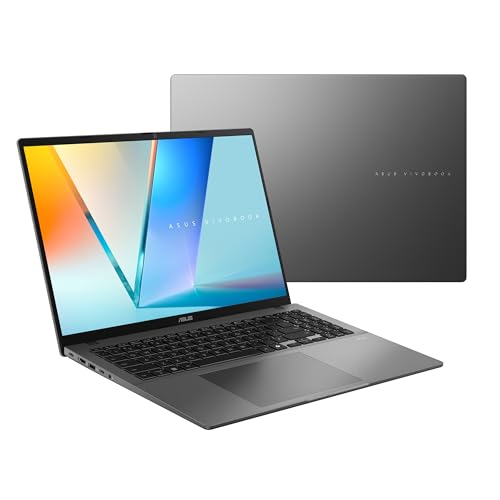
The ASUS Vivobook S16 comes in a gray finish with a minimalist profile. According to the listing, the chassis measures 14.1 inches long, 9.87 inches wide, and 0.7 inches thin, with a weight of 3.59 pounds. These dimensions give you a full-sized 16-inch workspace that remains thin enough to slide into standard laptop backpacks. The sub-four-pound weight means you can carry it between home, office, or classes without excessive strain.
The display uses a narrow-border design to house the 16-inch 16:10 panel in a compact footprint. Above the screen, you find an IR FHD camera paired with a physical privacy shutter. This setup allows Windows Hello facial sign-ins while giving you a manual control to cover the lens when you want privacy. For voice and audio, the build integrates an array microphone and built-in speakers supported by Dolby Atmos.
For physical connections, the laptop provides two USB 3.2 Gen 1 Type-C ports and two USB 3.2 Gen 1 Type-A ports. You also get an HDMI 2.1 TMDS port and a 3.5 mm audio jack. Having both Type-A and Type-C connectors directly on the frame means you can plug in standard flash drives, mice, and external monitors without carrying separate dongles.
Daily Setup and Everyday Operation
Setting up the laptop begins with the standard Windows 11 Home installation walkthrough. You configure identity protection through the integrated infrared Full HD camera, which uses Windows Hello for quick facial recognition sign-ins. A physical privacy shutter covers the lens whenever you finish video calls or want guaranteed optical privacy.
Connecting peripherals in daily use does not require separate docking adapters. The sides provide two USB 3.2 Gen 1 Type-C ports and two USB 3.2 Gen 1 Type-A ports for desktop storage, mice, and input devices. The HDMI 2.1 TMDS port links directly to external monitors or conference projectors, while the 3.5 mm audio jack supports wired headsets and external speakers.
Everyday collaboration utilizes a built-in array microphone designed to capture voice input clearly, paired with integrated speakers enhanced by Dolby Atmos and ASUS Audio Booster software. For productivity routines, the AMD Ryzen AI 9 processor provides up to 50 TOPS of NPU processing, allowing you to run local Copilot+ artificial intelligence tasks such as writing, organizing files, and system searches. Mobile work relies on the 70Wh battery, which is rated for up to 23 hours of runtime and reaches a 60 percent charge in 49 minutes via fast charging.
Important Factors Before Buying the S16
Before choosing this model, check how its hardware aligns with your current setup. The built-in ports cover USB 3.2 Gen 1 Type-C, Type-A, and HDMI 2.1 TMDS. If you rely on external Thunderbolt accessories or native DisplayPort monitors, you will need compatible adapters. Confirm that your everyday applications support Windows 11 Home and take advantage of AMD Ryzen AI hardware.
Routine upkeep keeps the system running smoothly. Configure screen timeouts and use dark backgrounds to preserve the 16-inch OLED panel during static desktop work. The internal 70Wh battery charges to 60 percent in 49 minutes, so pack a compatible Type-C charger for travel. Among the 1 laptops compared for 2026, this model suits users seeking a 16:10 OLED workspace and local NPU capability without carrying a heavier machine with dedicated graphics.
Check before you buy
- Check if your external monitors connect using HDMI 2.1 TMDS or require USB-C display adapters.
- Confirm your specialized software functions properly with Windows 11 Home and AMD processors.
- Verify that a 1920×1200 resolution suits your visual density needs on a 16-inch screen.
- Ensure your daily workloads do not require discrete GPU acceleration for heavy 3D rendering.
ASUS Vivobook S16 OLED Laptop
Best for: multitasking users wanting OLED and all-day battery
- Processor
- AMD Ryzen AI 9 465
- RAM Capacity
- 32GB
- Storage Capacity
- 1TB SSD
- Screen Size
- 16"
- Graphics Card
- AMD Radeon Graphics
- Display Resolution
- 1920×1200
This ASUS Vivobook S16 is a 16-inch laptop running Windows 11 Home on an AMD Ryzen AI 9 465 processor. It pairs 32 GB of memory with a 1 TB SSD and a 1920×1200 OLED display. With its 70Wh battery and 50 TOPS NPU, it suits you if you need sustained battery life and heavy multitasking capacity for productivity without dedicated graphics.
- 32 GB memory and 1 TB SSD storage
- 16-inch 16:10 WUXGA (1920×1200) OLED display
- AMD Ryzen AI 9 465 processor with 50 NPU TOPS
- 70Wh battery with 60% fast charging in 49 minutes
- Relies on integrated AMD Radeon Graphics instead of a discrete GPU
- Type-C and Type-A ports are limited to USB 3.2 Gen 1 speeds
- 1920×1200 resolution provides standard pixel density on a 16-inch panel
- You need 32 GB of RAM for memory-heavy productivity workloads.
- You want an OLED display paired with a 70Wh battery under 3.6 pounds.
- You run local AI features requiring up to 50 NPU TOPS.
- You require dedicated GPU hardware for heavy 3D tasks or modern gaming.
- You need USB4 or Thunderbolt transfer speeds for high-bandwidth peripherals.
- You want a resolution higher than 1200p on a 16-inch screen.
Verdict: ASUS Vivobook S16 16-Inch OLED Laptop combines a 50 TOPS NPU processor, 32 GB RAM, and an OLED panel for general productivity. It serves office and remote workers who need portability and high system memory without dedicated graphics.
Specifications side by side
| Spec | ASUS Vivobook S16 OLED Laptop |
|---|---|
| Processor | AMD Ryzen AI 9 465 |
| RAM Capacity | 32GB |
| Storage Capacity | 1TB SSD |
| Screen Size | 16" |
| Graphics Card | AMD Radeon Graphics |
| Display Resolution | 1920×1200 |
| Operating System | Windows 11 Home |
| Intended Use | Home |
| Resolution | WUXGA |
| Dimensions | 14.1 × 0.7 × 9.87 inches |
| Weight | 3.59 pounds |
| Color | Gray |
| Model | M3607GA-ES99 |
Frequently asked questions
Does the ASUS Vivobook S16 have a dedicated graphics card?
No, this model does not include a dedicated graphics card. It relies on the processor for visual processing and general productivity tasks. If you work primarily with spreadsheets, browser tabs, or standard office applications, the integrated hardware handles these workloads easily. For intensive 3D rendering or high-end video production, you may want dedicated graphics instead.
What operating system comes installed on the ASUS Vivobook S16?
The laptop comes preinstalled with Windows 11 Home. This operating system supports standard consumer software, productivity suites, and multitasking features out of the box. You can configure your user accounts, manage security preferences, and run compatible applications without needing to purchase or install a separate platform. It fits general home and remote work environments well.
How much memory does the ASUS Vivobook S16 M3607GA-ES99 offer?
This configuration includes 32 GB of system RAM. Having 32 GB gives you ample headroom to run demanding background services, maintain dozens of active browser tabs, and switch between productivity tools without experiencing memory slowdowns. It suits multitasking professionals who need to keep large data sets or multiple heavy applications loaded simultaneously during daily work.
What display technology does the ASUS Vivobook S16 screen use?
The laptop features a 16-inch WUXGA OLED display panel. OLED technology provides deep black levels, wide viewing angles, and rich contrast compared to standard LCD screens. The 16-inch viewable area gives you plenty of screen space for split-screen document editing, content viewing, and detailed project work while maintaining an expansive workspace for everyday tasks.
What is the AI processing capacity of the ASUS Vivobook S16?
The system includes an integrated neural processing unit rated at 50 TOPS. This NPU is designed to accelerate on-device artificial intelligence tasks efficiently without overloading the central processor. You benefit when running AI-assisted software features, background effect tools, and productivity assistants that take advantage of specialized local hardware processing in modern operating systems.
Who should skip the ASUS Vivobook S16 OLED Laptop?
You should skip this model if your workflow demands a dedicated discrete graphics processor. Heavy 3D animators, competitive gamers, and professional video editors who require standalone graphics acceleration will find this hardware limiting. Additionally, users who prioritize an ultra-compact screen size under 14 inches for frequent compact travel may prefer smaller chassis formats.
See also
See the current listing on Amazon
Specifications on this page are read from the product listing. Scores are out of 10, based on listed specifications and buyer feedback.