As Amazon Associates, we earn from qualifying purchases. This means we may receive a small commission at no extra cost to you if you click through and make a purchase.

- Brand
- Arlo
- Buyer rating
- 4.3 out of 5
- Mostly positive, average of Amazon buyer ratings
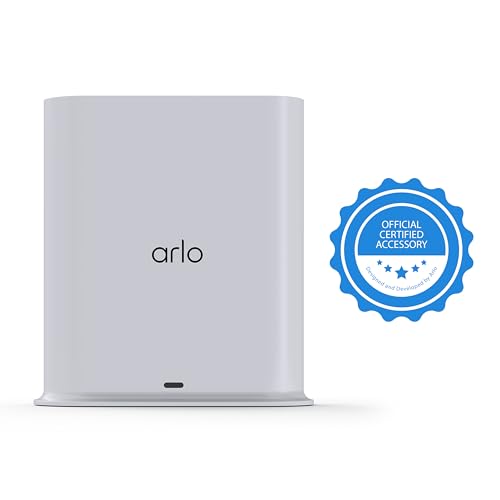
When designing a wireless surveillance setup incorporating a video doorbell or Pro series security cameras, determining whether to connect cameras directly to an access point or route traffic through a dedicated base station is a crucial architectural decision. For homeowners evaluating the Arlo Pro SmartHub, the hardware acts as an intermediate network controller intended to optimize wireless transmission range, conserve peripheral battery life, and establish an on-premises retention point for video clips. If you are configuring an Arlo Video Doorbell alongside cameras like the Arlo Pro 3, this hub operates as a proprietary wireless conduit, shielding your home router from high-bandwidth video streams while centralizing device management under a single hardware bridge.
This device is suited for security deployments requiring enhanced peripheral battery performance, unified smart platform routing, and local USB backup capabilities without completely relying on remote servers. In this breakdown, we examine the complete technical capabilities of the hardware, detailing the network architecture that differentiates it from standalone Wi-Fi connections, its USB local storage implementation, and its broader compatibility across modern security hardware. We will also inspect protocol readiness, setup workflows for video doorbells and camera systems, and whether investing in a standalone hub fits your surveillance requirements.
What You Get With the Arlo Pro SmartHub
The packaging for the Arlo Pro SmartHub provides the primary core gateway alongside the basic power and data infrastructure necessary to interface directly with an existing home network router.
- (1) Arlo Pro SmartHub gateway unit
- (1) Corded electric power adapter
- (1) RJ-45 Ethernet network cable
- (1) Quick start installation guide
- (1) Arlo window security decal
Key Specifications
| Specification Attribute | Technical Detail |
|---|---|
| Dimensions | 5.42 x 7.2 x 3.1 inches |
| Item Weight | 16 ounces (1.0 lb) |
| Form Factor and Placement | Box enclosure designed for indoor usage |
| Waterproof Rating | IP54 |
| Router Uplink Interface | Wired RJ-45 Ethernet port |
| Camera Wireless Connectivity | Wi-Fi 2.4 GHz, ArloRF ready |
| Smart Protocol Support | Z-Wave and Zigbee ready |
| Local Backup Storage | USB Type-A port |
| Internal Alert Hardware | Built-in smart siren |
| Power Specifications | Corded electric, 24 watts |
| Controller Compatibility | Apple HomeKit, Amazon Alexa, Google Assistant, IFTTT |
| Hardware Interoperability | Essential (1/2/3/3 XL), Pro (5S/6/6 XL), Ultra, Floodlight, Video Doorbell Cameras |

Network Architecture and Direct Wi-Fi Differences
Understanding the operational divergence between an Arlo Pro SmartHub and direct Wi-Fi configurations requires looking at how wireless payloads traverse a local area network. When security peripherals connect directly to a standard wireless router, each streaming camera competes for airtime on the primary wireless bands alongside mobile devices, televisions, and desktop computers. In contrast, the Arlo Pro SmartHub interfaces directly with the router via a physical Ethernet cable, creating an isolated wireless sub-network dedicated specifically to Arlo hardware. Unlike wired enterprise hardware such as the g4 doorbell pro poe kit, which relies on physical low-voltage cabling directly to each endpoint, this hub bridges a wired uplink to a targeted wireless downlink.
This distinct network topology directly impacts peripheral battery efficiency and signal stability. Because the smart hub manages radio frequency communication over a dedicated 2.4 GHz channel using proprietary ArloRF protocols, it can dynamically regulate the sleep states and transmission power of connected cameras and doorbells. Direct Wi-Fi connections force cameras to maintain ongoing keep-alive handshakes with a standard home router, which can lead to accelerated battery drain when access points fluctuate or experience interference. By offloading scheduling and video data transport to the hub, battery-powered peripherals like the Arlo Video Doorbell and Pro 3 cameras maintain longer operational periods between charges.
Furthermore, the hardware addresses band congestion through automated radio frequency management. The listing specifies that initial setup leverages the 2.4 GHz frequency band, and when connected to dual-band router environments, the system coordinates transmission transitions to optimize link quality. For properties requiring broader physical reach across multiple structures or large outdoor perimeters, the architecture supports expanding wireless coverage through additional base stations linked to the same user profile, ensuring that distant cameras maintain robust signal fidelity without degrading overall router performance.

Local Storage and USB Backup Mechanics
A central technical consideration for prospective buyers is the local storage architecture built into the hub. The base station features an integrated USB Type-A port positioned on the rear enclosure, allowing users to attach external USB mass storage drives for localized video clip capture. This physical interface acts as a continuous USB backup layer, capturing motion events and recorded triggers locally. This architectural feature addresses a major requirement for security-conscious users who want an on-premises record of camera footage that remains accessible even if upstream internet connectivity becomes intermittent.
The local storage system functions as a parallel archival pipeline alongside cloud services. When an Arlo Video Doorbell or paired camera detects motion, the encoded video stream is routed through the hub and written directly to the connected USB storage drive. Users can access these stored video files through the Arlo mobile application on smartphones and tablets, or by viewing the storage directory via a desktop or laptop computer. This workflow mirrors the local data retention concepts evaluated in our eufy doorbell camera s330 review, providing homeowners with local redundancy rather than relying solely on off-site cloud servers.
However, deploying local storage through the hub introduces operational boundaries that buyers must account for. The listing specifies that the hub includes the physical USB port for local recording, but it does not supply the external storage media in the box, requiring users to source their own compatible USB Type-A flash drives or hard drives. Additionally, while the hub acts as an on-premises recording target, specific advanced analysis features like object classification or cloud activity zones remain separate software capabilities. The USB backup functions strictly as a physical repository for video files, providing raw evidentiary capture stored directly within the physical security perimeter of your home.
Smart Home Protocol Support and Ecosystem Integration
For users constructing a comprehensive smart home, the protocol support defined in the hub specifications offers notable ecosystem flexibility. The hub serves as a hardware bridge that unlocks Apple HomeKit compatibility, enabling connected cameras and doorbells to appear within the Apple Home ecosystem. Through this interface, live video feeds and motion notifications can be surfaced across iOS devices, Apple TV, and compatible Apple displays. This level of bridge integration is critical for users who manage Apple-centric automation routines and require HomeKit-certified controller support.
Beyond Apple HomeKit, the controller architecture supports Amazon Alexa, Google Assistant, and IFTTT, allowing cross-platform automation triggers across a wide variety of third-party connected devices. In addition to standard Wi-Fi communication, the manufacturer specifications highlight that the smart hub is engineered with Z-Wave, Zigbee, and ArloRF readiness. This diverse protocol foundation gives the base station the foundational radio hardware necessary to communicate across low-power mesh networks, distinguishing it from basic wireless bridges that strictly operate on commercial Wi-Fi frequencies.
This broad controller compatibility allows the hub to orchestrate automated responses across connected hardware. For example, when a camera or doorbell registers an intrusion event, the hub can activate its internal smart siren to deter unauthorized visitors while signaling external automation routines through IFTTT or Amazon Alexa. While centralized commercial setups like the ubiquiti g4 doorbell pro utilize unified ecosystem controllers, the Arlo Pro SmartHub provides consumer-grade multi-protocol bridging across both open automation frameworks and proprietary camera lines.

Video Doorbell Setup and Multi-Camera Coverage
Implementing an Arlo Video Doorbell setup using the SmartHub establishes a direct, low-latency connection between the entryway and the local network core. Onboarding begins by connecting the hub to your home router using the included RJ-45 Ethernet cable and powering the unit via the 24-watt corded power adapter. Once the hub establishes a network handshake, the Arlo app on an iOS, Android, laptop, or desktop device detects the base station. From the app interface, pairing the Arlo Video Doorbell or camera units involves selecting the hub as the primary wireless host rather than entering your residential Wi-Fi credentials.
Evaluating hardware compatibility reveals extensive interoperability across Arlo hardware generations. The manufacturer listing notes that the hub works with Essential cameras across generations 1, 2, 3, and 3 XL, Pro series cameras including the Pro 5S, Pro 6, and Pro 6 XL, Ultra cameras, Floodlight fixtures, and Arlo Video Doorbell models. For users seeking a dedicated base station for Pro 3 cameras or reviewing entryway camera specifications, this backward and forward cross-compatibility ensures that disparate camera models deployed across an exterior boundary can all communicate back to a single centralized smart hub.
In physical deployments, the positioning of the base station plays a pivotal role in link reliability. Because the hub requires an indoor environment and corded electric power, placement is typically confined to a living room, office, or kitchen near the primary router. Despite carrying an IP54 enclosure rating, the listing specifies that the unit is designed for indoor usage. Its 5.42 x 7.2 x 3.1-inch form factor lacks built-in wall-mounting brackets, meaning it must sit flat on a desk, console, or shelf. If an expansive floor plan or masonry walls attenuate signals to outdoor cameras, integrating secondary base stations allows users to expand the RF coverage area seamlessly.
Arlo Pro SmartHub Pros and Cons
Pros
- Dedicated USB Type-A local backup recording port
- Apple HomeKit, Alexa, and Google Assistant compatibility
- Offloads camera video traffic from home Wi-Fi
- Broad compatibility across Essential, Pro, and Ultra lines
- Integrated smart siren for on-premises alerts
- Multi-protocol ready with Zigbee and Z-Wave support
Cons
- Requires wired Ethernet connection to router
- External USB storage media not included in box
- No built-in wall mounting brackets provided
Is the Arlo Pro SmartHub Worth It
Deciding if the Arlo Pro SmartHub is the right addition to your home security system depends on the density of your camera hardware and your specific retention requirements. If you operate multiple outdoor cameras alongside an Arlo Video Doorbell and want to consolidate traffic off your home Wi-Fi, the hub delivers undeniable networking value. It serves as an essential bridge for users seeking Apple HomeKit support, on-premises USB recording backup, and improved battery conservation for battery-powered cameras like the Pro 3 series.
However, for homeowners with only a single video doorbell or an isolated indoor camera who already possess a robust mesh Wi-Fi network, adding a dedicated base station may introduce unnecessary hardware overhead. The hub requires dedicated indoor physical space, consumes a continuous 24-watt corded power connection, and ties up an Ethernet port on your main router. Users who prefer entirely self-contained hardware without intermediary bridges might find that standalone alternatives, such as the direct-to-app workflow discussed in our eufy doorbell 2k evaluation, offer a simpler installation profile.
Ultimately, when evaluating whether this setup is worth it for your property, the investment makes the most sense for comprehensive, multi-point Arlo security deployments. By combining local USB video storage, dedicated RF communication channels, smart siren functionality, and deep multi-platform controller compatibility, the Arlo Pro SmartHub provides the technical backbone needed to operate high-resolution cameras and video doorbells with optimal reliability.
FAQ
Does the Arlo Pro SmartHub support local video recording without an active cloud plan?
Yes, the Arlo Pro SmartHub includes an integrated USB Type-A port that allows users to record and store motion events directly onto an external USB drive. While cloud-specific features such as remote subscription analytics remain tied to online services, the local USB backup functions independently to retain video clips on physical media.
Which Arlo cameras and doorbells are compatible with this SmartHub?
According to the product specifications, the Arlo Pro SmartHub is compatible with Arlo Essential cameras (generations 1, 2, 3, and 3 XL), Pro series models (including Pro 5S, Pro 6, and Pro 6 XL), Ultra series cameras, Floodlight cameras, and Arlo Video Doorbell cameras.
Can the Arlo Pro SmartHub connect to a router using Wi-Fi instead of an Ethernet cable?
No, the listing specifies that the SmartHub requires a wired Ethernet connection to your home router. It connects to the router via the included RJ-45 Ethernet cable and then broadcasts a dedicated wireless signal out to your Arlo cameras and doorbells.
How does Apple HomeKit integration function with the SmartHub?
The Arlo Pro SmartHub acts as an authorized hardware controller bridge. When connected to your network, compatible paired cameras and doorbells can be routed into the Apple HomeKit environment, allowing users to view camera feeds and receive motion alerts on iOS, iPadOS, and macOS devices.
What type of external storage hardware does the SmartHub accept?
The hub features a standard USB Type-A interface designed to accept external USB flash drives or compatible external hard drives. The storage media itself is not included in the retail box and must be supplied by the user.
See the current listing on Amazon
Specifications on this page are read from the product listing. Ratings are the average left by Amazon buyers.


