As Amazon Associates, we earn from qualifying purchases. This means we may receive a small commission at no extra cost to you if you click through and make a purchase.

- Brand
- Anycubic
- Buyer rating
- 4.0 out of 5
- Mostly positive, average of Amazon buyer ratings
For makers running high-speed prints on an Anycubic Kobra Camera equipped machine, monitoring print integrity without sitting beside the build plate has become an operational necessity. The primary question surrounding the Anycubic Kobra 2 family is whether adding the official first-party optical unit provides seamless plug-and-play visual tracking, especially across higher-tier variants like the Pro, Plus, and Max. While originally introduced alongside newer generations, this dedicated hardware accessory interfaces directly with select Kobra 2 machines to deliver remote surveillance, layer verification, and system status checks straight to mobile and desktop dashboards.
Understanding exact hardware integration requires looking past broad marketing claims and digging straight into verified compatibility data, interface protocols, and physical mounting parameters. This technical breakdown analyzes the verified Anycubic Kobra camera specs, evaluates firmware and OS behaviors across platforms, clarifies Anycubic Kobra 2 camera compatibility limits, and outlines what you can realistically expect when integrating this compact video peripheral into your workflow.
What You Get With the Anycubic Kobra Camera
The Anycubic Kobra Camera package delivers a dedicated monitoring assembly built around a lightweight optical housing with modular mechanical components. Based on the manufacturer listing, the hardware provides the essential imaging elements and mounting flexibility required for integration with compatible Anycubic machines, standalone Klipper hosts, and standard computer operating systems.
- Real-time and remote monitoring functionality linked to the Anycubic APP for checking layer adhesion and spotting filament jams
- Optical imaging sensor delivering ultra-clear resolution for print inspection
- Modular, replaceable DIY camera frame that allows users to swap or 3D print custom external housings
- Broad hardware compatibility supporting Kobra 3, Kobra 2 Pro, Kobra 2 Plus, Kobra 2 Max, Klipper printers, and desktop computers
- Cross-platform operating system communication supporting Windows 10, macOS, and Linux
- Host file handling framework compatible with standard 3D asset formats including STL, OBJ, and GCODE
Key Specifications
| Specification | Listing Detail |
|---|---|
| Brand & Manufacturer | ANYCUBIC |
| Model Number | FBA-S010215-NEW-3 |
| Hardware Weight | 1.44 ounces |
| Package Dimensions | 5.39 x 2.01 x 1.26 inches |
| Finish Color | Black |
| Optical Sensor Resolution | Ultra Clear Resolution (the listing does not specify numerical pixel dimensions) |
| Direct Hardware Compatibility | Kobra 3, Kobra 2 Pro, Kobra 2 Plus, Kobra 2 Max, Klipper printers, Computer |
| Supported Host Operating Systems | Windows 10, macOS, Linux |
| Supported File Formats | STL, OBJ, GCODE |
| Enclosure Design | Replaceable DIY Frame |

Anycubic Kobra 2 Series Compatibility and Hardware Setup
Evaluating Anycubic Kobra 2 camera compatibility requires close attention to the specific sub-models within the lineup. The official specifications explicitly state support for the Kobra 2 Pro, Kobra 2 Plus, and Kobra 2 Max. Crucially, the listing does not include the standard baseline Anycubic Kobra 2 or the entry-level Kobra 2 Neo. This distinction stems from the internal computing architecture: the Pro, Plus, and Max models feature high-speed mainboards running an embedded Linux-based Kobra OS with native USB host interfaces and network connectivity, whereas the base and Neo variants utilize basic 8-bit or 32-bit microcontrollers lacking the processing headroom or USB video class drivers required to encode and broadcast a video feed.
For owners configuring an Anycubic Kobra camera for Kobra 2 Pro installations, the setup utilizes a wired connection directly into the machine’s external USB communication port. Because the printer’s onboard firmware contains the pre-compiled driver libraries for this specific peripheral, recognition is essentially instantaneous once plugged in. The motherboard assigns the video device node and initializes the local streaming server, enabling the camera to relay frames directly through the printer’s active network connection without demanding additional hardware bridges or third-party breakout boards.
This closed-loop accessory ecosystem parallels the modular approach Anycubic uses across its specialized lines, such as dedicated curing and filtration modules seen on the Anycubic Photon Mono M7 Pro where machine-specific ports eliminate third-party configuration hurdles. When mounted to a Kobra 2 Pro, Plus, or Max, the camera draws its operating power directly from the host machine’s USB rail, minimizing messy wire routing across the printer’s structural extrusions while keeping the physical footprint remarkably clean.
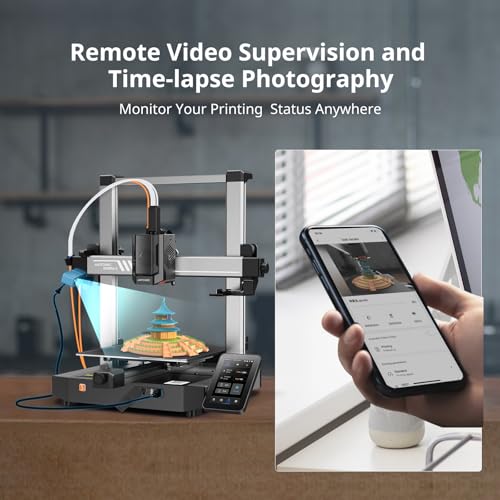
Remote Monitoring and Anycubic App Functionality
The primary operational objective when deploying this unit is Anycubic Kobra 2 remote monitoring via mobile devices. By binding the camera-equipped printer to the Anycubic APP, users gain real-time visual oversight of the build plate from outside the local network. The listing highlights that this continuous surveillance helps operators catch early-stage print failures, such as first-layer detachment, warping, or filament jams, before kilograms of material are wasted or the toolhead suffers damage from an expanding blob of plastic.
Optical performance is described in the listing as ultra-clear resolution, though the manufacturer does not specify the exact native sensor resolution in terms of standard pixel counts like 720p, 1080p, or 2K. In practice, the video feed prioritizes latency and stable transmission over extreme high-bitrate output, ensuring the Anycubic APP loads the live view promptly across mobile networks. The stream delivers sufficient clarity to distinguish layer lines, check surface finish quality, and inspect critical perimeter perimeters during active extrusion cycles.
When considering an Anycubic Kobra 2 timelapse setup, the camera works in tandem with the printer firmware’s job scheduling and slicing instructions. While the hardware captures sequential image frames, the Anycubic APP interface facilitates viewing print progression milestones. Users should note that because the technical sheet focuses strictly on real-time streaming and monitoring capabilities, advanced custom rendering features remain governed by the cloud platform rather than standalone camera firmware settings.

Klipper Printer Support and Operating System Integration
Beyond the proprietary Anycubic OS ecosystem, the listing confirms verified Anycubic camera Klipper support. This makes the camera an appealing standalone optical sensor for hobbyists running open-source Klipper setups via Raspberry Pi, Orange Pi, or repurposed x86 thin clients. Because the device communicates using standard USB Video Class (UVC) standards, generic Linux kernels recognize the hardware immediately without demanding proprietary compiled kernel modules.
Within a standard Klipper environment running service tools like Crowsnest, Moonraker, and web frontends such as Mainsail or Fluidd, the camera registers as a native video device. Users can adjust resolution profiles, frame rates, and stream formats directly inside their webcam configuration files. Furthermore, the listing certifies native driver communication across Windows 10, macOS, and Linux operating systems, meaning the unit can be plugged straight into a desktop computer to function as a basic webcam or diagnostic scanner for additive modeling workflows.
This hardware flexibility is advantageous for multi-printer workshops operating diverse machinery. Whether managing FDM workhorses alongside multi-color automated systems like the Anycubic ACE Pro 2 or monitoring dedicated prototype machines, having an optical peripheral that natively reads across multiple host operating systems prevents hardware lock-in and allows seamless redeployment across different workstations.

Physical Dimensions and Custom Frame Mounting
The physical footprint of the Anycubic Kobra Camera is exceptionally compact. The listing lists package dimensions of 5.39 x 2.01 x 1.26 inches and an item weight of just 1.44 ounces. This featherweight construction is an essential engineering characteristic for 3D printer cameras, as low mass reduces mechanical inertia when mounting the device directly onto moving axes, gantry brackets, or bed rails where added weight could introduce ghosting, ringing, or layer artifacts into high-speed prints.
A distinctive feature highlighted by Anycubic is the DIY replaceable frame architecture. The stock enclosure arrives in a standard black finish, but the external housing can be unclipped or unscrewed, allowing users to fabricate custom mounting brackets, articulating arms, or decorative shells. The listing explicitly references compatibility with STL and OBJ file workflows, encouraging makers to model bespoke enclosures tailored to their exact build volume angles or structural aluminum extrusion profiles.
This customizability solves one of the most persistent issues in additive manufacturing camera placement: achieving an optimal angle of view. Stock fixed mounts frequently struggle to capture both the nozzle tip and the wider build surface simultaneously. By utilizing the modular frame design, users can download or model extended gantry clips that position the sensor at the precise focal distance required for clean optical verification of first-layer calibration.
Anycubic Kobra Camera Pros and Cons
Pros
- Native Anycubic APP remote monitoring integration
- Plug-and-play support for Kobra 2 Pro, Plus, Max
- Driverless compatibility with Klipper, Windows, macOS, Linux
- Modular replaceable DIY frame for custom mounts
- Extremely lightweight 1.44-ounce total hardware weight
Cons
- Listing omits numerical resolution and framerate specs
- Not compatible with base Kobra 2 or Neo models
- Requires physical USB connection to host system
Is the Anycubic Kobra Camera Worth It
Determining if the Anycubic Kobra Camera is worth it depends entirely on your current printer model and your monitoring priorities. For owners of the Kobra 2 Pro, Kobra 2 Plus, or Kobra 2 Max who want native, friction-free remote surveillance within the Anycubic APP ecosystem, the accessory delivers immediate utility. It provides instant visual feedback, assists in early failure detection, and avoids the frustrating software configuration, network forwarding, or custom micro-controller scripting required by generic third-party webcams.
Similarly, users operating custom Klipper builds or multi-OS desktop environments will appreciate the plug-and-play driver support across Linux, macOS, and Windows. Its 1.44-ounce modular frame allows makers to iterate custom mounts quickly without stressing printer gantries. However, buyers should be aware that the listing does not specify numerical optical parameters like megapixels or sensor framerate, meaning users seeking cinema-grade high-bitrate timelapses might find the hardware more utility-focused than production-focused.
Conversely, if you own a standard base Kobra 2 or a Kobra 2 Neo, this camera is not a direct plug-and-play upgrade due to the lack of native Linux-based mainboard support on those machines. For workshops dedicated strictly to resin printing setups like the Photon Mono 4, optical monitoring requirements differ completely, making this FDM-targeted accessory unnecessary. But for compatible Kobra 2 series users, it represents a straightforward, lightweight visual monitoring solution.
FAQ
Does the Anycubic Kobra Camera work on the base Anycubic Kobra 2?
The official listing specifies compatibility with the Kobra 2 Pro, Kobra 2 Plus, and Kobra 2 Max, but it does not list the baseline Anycubic Kobra 2 or the Kobra 2 Neo. The base models lack the embedded Linux host architecture and dedicated USB interfaces required to power and stream video from this camera.
What is the exact resolution of the Anycubic Kobra Camera?
The manufacturer identifies the optical sensor as having ultra-clear resolution, but the listing does not specify exact numerical values such as 1080p, 720p, or sensor megapixel counts. It is engineered to provide sufficient optical fidelity for identifying print failures, layer bonding issues, and extrusion progress.
Can the camera detect print failures automatically?
According to the product specifications, the camera enables real-time and remote monitoring via the Anycubic APP so that users can timely identify and resolve issues like layer adhesion defects and filament jams. The listing does not specify fully automated, AI-driven print cancellation routines.
Does the Anycubic Kobra Camera require an active computer to operate?
No, when used with compatible machines like the Kobra 2 Pro, Plus, or Max, the camera connects directly to the printer’s onboard USB port and communicates over the printer’s internal network connection. It can also operate connected to a computer running Windows 10, macOS, or Linux if used as an external webcam.
What does the DIY replaceable frame feature mean?
The DIY frame feature indicates that the camera’s exterior housing can be detached and replaced. Users can utilize 3D asset files such as STL and OBJ models to print custom mounting brackets, protective enclosures, or articulating positioning arms tailored to their specific setup.
See the current listing on Amazon
Specifications on this page are read from the product listing. Ratings are the average left by Amazon buyers.


