As Amazon Associates, we earn from qualifying purchases. This means we may receive a small commission at no extra cost to you if you click through and make a purchase.

As an Amazon Associate we earn from qualifying purchases. Links on this page are affiliate links.
This alienware 16 aurora rtx 5060 laptop review looks at a gaming machine built for everyday play and productivity. Two primary specifications anchor this configuration: an NVIDIA GeForce RTX 5060 laptop graphics card and an Intel Core 7 240H processor. You also get a 16-inch WQXGA screen with a 2560×1600 resolution and a 16:10 aspect ratio. The system includes 16GB of RAM and a 1TB SSD for file storage. With Windows 11 Home preinstalled, Dell pairs modern hardware with a practical chassis design for home desk setups.
- 16-inch WQXGA display with 2560×1600 resolution, 120Hz refresh rate, and 300 nits brightness
- NVIDIA GeForce RTX 5060 laptop GPU powered by the NVIDIA Blackwell architecture
- Intel Core 7 240H processor paired with 16GB of RAM and a 1TB SSD
- Cryo-Chamber cooling design providing direct airflow without a rear thermal shelf
Good fit for
This laptop suits gamers who want a sharp 2560×1600 display with a smooth 120Hz refresh rate. Its Intel Core 7 240H processor and NVIDIA RTX 5060 GPU handle modern titles and multitasking. With 16GB of system memory and 1TB of solid-state storage, you have sufficient capacity for game libraries and daily productivity at home. It also fits users who value included one-year onsite hardware service.
Who can skip it
You should skip this model if you need a lightweight travel machine, as it weighs 5.49 pounds and measures 0.89 inches thick. Competitive players seeking display speeds above 120Hz may find the panel restrictive for fast esports. Additionally, the 300 nits brightness level is best suited for indoors rather than bright outdoor environments, and users needing 32GB of memory will require a higher configuration.
Verdict
The Alienware 16 Aurora balances an Intel Core 7 240H chip and an RTX 5060 GPU with a crisp 1600p screen for home gaming. It offers a solid core specification sheet if you do not require a high-brightness panel or lightweight chassis.
Alienware 16 Aurora Specifications Explained
Display Resolution: 2560×1600
A 2560×1600 resolution gives you sharp text and detailed graphics. The 16:10 aspect ratio adds vertical screen space for documents and timelines. Gamers and multitaskers benefit from extra clarity without the heavy rendering load of 4K displays. When shopping for laptops, compare this against standard 1920×1080 screens that show less content, or sharper 4K panels that draw more power.
Refresh Rate: 120Hz
A 120Hz refresh rate updates the screen 120 times each second. Motion looks fluid during fast gameplay and daily window scrolling. Action gamers benefit most through reduced motion blur and responsive visual feedback. When you evaluate laptops, compare 120Hz to basic 60Hz displays that can smear movement, or faster 240Hz options built for competitive esports.
RAM Capacity: 16GB
A 16GB memory capacity lets you run current games and keep background browser tabs open simultaneously without system stutter. Daily gamers, students, and office workers benefit from this balanced capacity during heavy multitasking. When you compare laptops, note that 8GB configurations often struggle with modern game releases, while 32GB setups serve specialized creators working on complex 4K video editing or 3D modeling.
Storage Capacity: 1TB SSD
A 1TB solid-state drive provides quick boot times and rapid game loading. It offers enough space for your operating system, multiple large game installations, and media files. Players with diverse game libraries benefit from keeping titles installed simultaneously. When shopping for laptops, compare 1TB to 512GB drives that require frequent file management, or larger 2TB drives meant for massive media collections.
Alienware 16 Aurora Design and Build
The Alienware 16 Aurora comes in a Blue finish according to the listing. In physical dimensions, the laptop measures 14.1 inches in width, 10.5 inches in length, and 0.89 inches in height. At 5.49 pounds, this machine carries substantial heft. You will need a dedicated backpack sized for 16-inch systems whenever you take it on the move. While the 0.89-inch profile remains relatively slim for a gaming laptop, the overall weight indicates a machine built primarily for stationary desk use.
The cooling architecture shapes the exterior form factor. According to the listing, the streamlined design delivers thermal support without requiring a rear thermal shelf. The chassis also incorporates a Cryo-Chamber cooling structure engineered to channel airflow directly to core components. Eliminating the rear shelf keeps the total length at 10.5 inches. For you, this means the notebook occupies less depth on your desk, leaving more space for an external keyboard or mouse pad.
These physical dimensions also house the 16.0-inch display layout. The streamlined proportions ensure that the hardware fits standard gaming setups, whether you place it directly on a desk or an elevated stand. Overall, the specifications show a Blue, full-sized gaming laptop intended mainly for home and gaming setups.
Setup and Daily Use Overview
Initial setup begins with Windows 11 Home. You guide the system through account creation, basic privacy choices, and initial software configuration.
Everyday storage and program access operate from the 1TB SSD. This solid-state drive manages operating system boot times and stores your local games, productivity software, and personal files. Alongside this storage, the 16GB RAM capacity lets you run multitasking workflows, such as gaming while keeping background communication apps and browser tabs active.
Daily screen use relies on the 120Hz refresh rate and 300 nits brightness. A 120Hz panel provides fluid cursor tracking, clean window scrolling, and smooth frame transitions during gaming sessions. The 300 nits brightness level delivers clear visual output in typical indoor home or office lighting.
Thermal regulation during extended sessions depends on the internal Cryo-Chamber structure. This airflow system directs ventilation directly toward the central components without requiring an extended rear thermal shelf, keeping your physical workspace layout simple.
Long-term daily use is supported by Dell Services through a 1 Year Onsite Service plan. If an issue covered under the Limited Hardware Warranty cannot be fixed remotely, a technician visits your home, office, or chosen location to complete repairs.
Before Buying the Alienware 16 Aurora
Before selecting this laptop, plan your setup and accessories. A carry bag must support dimensions of 14.1 by 10.5 inches and handle 5.49 pounds of weight. The 16.0-inch display runs at 300 nits brightness, which works best in standard indoor lighting rather than direct outdoor sunlight.
Upkeep centers on airflow. The Cryo-Chamber cooling structure focuses airflow directly to the core components. You should keep the vents clear of dust and place the chassis on flat, hard surfaces to maintain open intake channels.
Consider your hardware demands relative to other configurations in this lineup. This unit provides 16GB of system memory and an Intel Core 7 240H processor. If your tasks require heavier processing or multitasking, models exist with 32GB of RAM, Intel Core 9-270H processors, or higher-tier graphics like the RTX 5070.
Check before you buy
- Check that your laptop sleeve fits dimensions of 14.1 by 10.5 inches.
- Ensure a 300-nit screen brightness matches your typical indoor environment.
- Decide if 16GB of memory fits your software needs or if you require 32GB.
- Confirm the 120Hz refresh rate matches your target display frame rates.
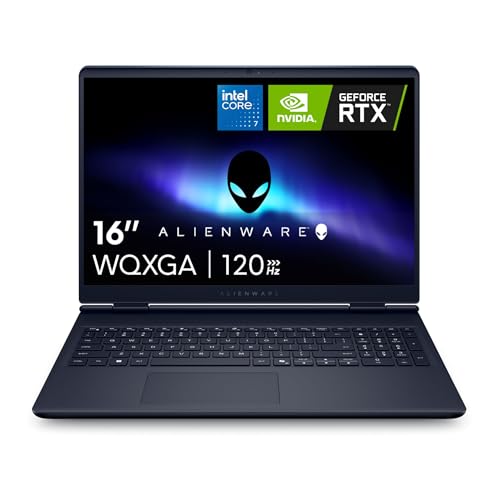
Alienware 16 Aurora RTX 5060 Laptop
Best for: 1600p gaming and daily home computing
- Processor
- Intel Core 7 240H
- RAM Capacity
- 16GB
- Storage Capacity
- 1TB SSD
- Screen Size
- 16"
- Graphics Card
- NVIDIA RTX 5060
- Display Resolution
- 2560×1600
This 16-inch gaming laptop pairs an Intel Core 7 240H processor with an NVIDIA RTX 5060 GPU. You get a 2560×1600 WQXGA panel running at 120Hz with 300 nits of brightness, alongside 16GB of RAM and a 1TB SSD. It suits you if you prioritize sharp 16:10 resolution for modern gaming and general productivity.
- Intel Core 7 240H processor and NVIDIA RTX 5060 GPU
- 2560×1600 WQXGA screen with a 16:10 aspect ratio
- 1TB solid-state drive with 16GB of system memory
- Cryo-Chamber cooling design without a rear thermal shelf
- 120Hz screen refresh rate
- 300 nits display brightness
- 5.49-pound total weight
- You want a 2560×1600 WQXGA resolution display with a 16:10 aspect ratio.
- You need an RTX 5060 GPU paired with 1TB of SSD storage.
- You want 1-year onsite hardware service coverage.
- You want a refresh rate higher than 120Hz.
- You need a light laptop under 5 pounds for daily travel.
- You work in bright spaces that require more than 300 nits of brightness.
Verdict: Alienware 16 Aurora RTX 5060 Gaming Laptop suits players who want 1600p resolution and dedicated graphics for home setups. Its 1TB SSD and Core 7 240H processor deliver capable desktop replacement utility.
Specifications side by side
| Spec | Alienware 16 Aurora RTX 5060 Laptop |
|---|---|
| Processor | Intel Core 7 240H |
| RAM Capacity | 16GB |
| Storage Capacity | 1TB SSD |
| Screen Size | 16" |
| Graphics Card | NVIDIA RTX 5060 |
| Display Resolution | 2560×1600 |
| Refresh Rate | 120Hz |
| Operating System | Windows 11 Home |
| Intended Use | Home, Gaming |
| Resolution | WQXGA |
| Dimensions | 10.5 × 14.1 × 0.89 inches |
| Weight | 5.49 pounds |
| Size | 16.0 WQXGA |
| Color | Blue |
| Model | LAC16250-7469BLU-PUS |
Frequently asked questions
What graphics card powers the Alienware 16 Aurora laptop?
This configuration features the NVIDIA GeForce RTX 5060 dedicated graphics card. Dedicated graphics handle rendering duties separately from the main processor, which helps maintain stable visual output in modern games and visual applications. You can use it for demanding home computing and gaming tasks that require independent GPU hardware.
Which processor is installed in the Alienware 16 Aurora RTX 5060?
The Alienware 16 Aurora includes an Intel Core 7 processor, specifically listed as the Core 7 240H. This component manages primary system calculations and software operations. Paired with Windows 11 Home, the multi-core chip processes daily background tasks and supports gaming workloads across standard desktop applications.
What screen resolution does the Alienware 16 Aurora display offer?
The 16.0-inch display runs at WQXGA resolution. This specification provides sharp visuals across the 16-inch panel for both gaming and general productivity. WQXGA gives you more pixels than standard Full HD screens, letting you view fine details clearly while you navigate your desktop or play compatible titles.
What is the exact model number for this Alienware 16 Aurora configuration?
The manufacturer part number for this specific Blue edition is LAC16250-7469BLU-PUS. Checking the exact model number helps you verify that you receive this specific hardware package, including the GeForce RTX 5060 GPU and Core 7 processor, rather than a different regional variant or alternate hardware setup.
How much storage space does the Alienware 16 Aurora provide out of the box?
You receive a 1TB solid-state drive with this model. A 1TB SSD delivers ample space to install the Windows 11 Home operating system, several modern games, and personal media files. Solid-state technology also ensures fast load times for programs compared to mechanical hard drives.
Is the Alienware 16 Aurora suitable as a desktop replacement laptop?
Yes, this laptop is designed for gaming and home computing desktop replacement roles. Its 5.49-pound chassis, Core 7 processor, and dedicated GeForce RTX 5060 GPU suit stationary desk setups well. You get full PC performance in a portable format measuring 14.1 by 10.5 by 0.89 inches.
See also
See the current listing on Amazon
Specifications on this page are read from the product listing. Scores are out of 10, based on listed specifications and buyer feedback.


