As Amazon Associates, we earn from qualifying purchases. This means we may receive a small commission at no extra cost to you if you click through and make a purchase.

As an Amazon Associate we earn from qualifying purchases. Links on this page are affiliate links.
Processor Explained: Core Specs for Laptops
The processor is the central computing unit in your laptop. It handles all instructions for software, games, and operating systems. When you look at processor explained guides, you will see several common tiers. These labels indicate performance levels and target audiences. You need to match the label to your daily tasks.
Intel Core i7 and AMD Ryzen 7 are high-performance options. They offer strong multi-core speeds for heavy workloads. You will find these in laptops used for video editing, 3D rendering, or complex data analysis. They handle multiple programs at once without slowing down.
Intel Core i5 and AMD Ryzen 5 serve the middle ground. They provide balanced performance for most users. You can run office applications, stream video, and browse the web smoothly. These chips are efficient and generate less heat than higher tiers.
Intel Core Ultra 5 and Intel Core 7 represent newer architectures. They focus on efficiency and integrated graphics performance. These are suitable for modern productivity tasks and light creative work. They often include dedicated AI processing units for faster task handling.
Intel Core 7 is a newer branding tier. It sits between older i5 and i7 lines. It offers improved efficiency and core counts for contemporary laptops. You will see this in newer models from major manufacturers.
Intel Core i9 is the top tier for Intel. It delivers maximum speed for extreme multitasking and professional workstations. It is overkill for casual browsing but essential for power users.
Apple M2 is the silicon for MacBooks. It uses an ARM-based architecture. It is known for high efficiency and long battery life. It handles macOS tasks smoothly with low power consumption.
Choosing the right chip depends on your needs. Check the core count and clock speed in the specs. Higher numbers usually mean better performance. Match the processor to the software you use most often.
Processor Options Compared
Intel Core i7
Intel Core i7 processors offer high performance for demanding tasks. This tier suits heavy multitaskers and professionals who run memory-intensive applications. The Apple MacBook Pro 16-inch with an Intel Core i7 provides 32GB of RAM and 1TB of storage. This configuration handles large files and multiple windows with ease. You gain screen real estate and processing power. The trade-off is reduced portability due to the 16-inch form factor and heavier weight. It is a solid choice if you prioritize raw capability and storage over carrying a lightweight device.
AMD Ryzen 7
AMD Ryzen 7 chips deliver strong multi-core performance for gaming and content creation. This processor handles high refresh rate gaming and complex rendering tasks efficiently. The Acer Nitro V 16S features an AMD Ryzen 7 paired with an RTX 5060 graphics card. It includes 32GB of RAM and 1TB of storage. This setup supports demanding workloads and smooth gameplay. You benefit from ample memory for multitasking. The downside is increased size and weight, making it less portable. It fits users who need desktop-like performance in a 16-inch chassis for gaming or creative work.
Intel Core i5
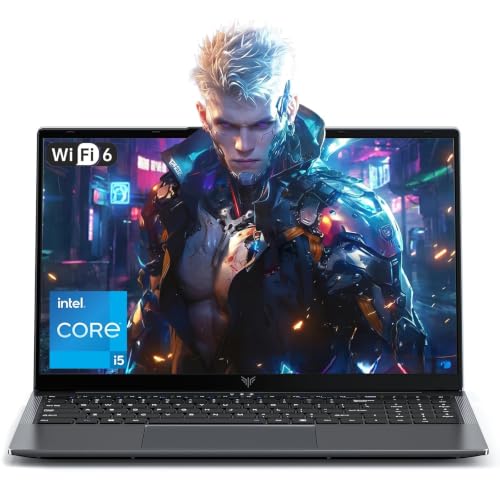
Intel Core i5 processors provide a balance of power and efficiency for general use. This tier is suitable for professionals managing heavy workloads on a budget. The MALLRACE 15.6-inch laptop uses an Intel Core i5 CPU. It is designed for users who need multi-core processing for demanding tasks. You get solid performance for office applications and multitasking. The trade-off is often a larger, heavier build compared to ultrabooks. This option suits those who prioritize processing power and memory capacity over sleek design and light weight. It is a practical choice for stationary or semi-mobile use.
AMD Ryzen 5
AMD Ryzen 5 processors offer reliable performance for everyday productivity and business tasks. This tier is ideal for students and office workers who manage multiple documents and applications. The HP OmniBook 17.3-inch features an AMD Ryzen 5 CPU with a large touchscreen. It provides a Full HD resolution for clear visuals. You gain ample screen space for productivity without the bulk of a gaming rig. The trade-off is limited portability due to the 17.3-inch display. It fits users who value screen real estate and storage for daily work over compact size and light weight.
Intel Core Ultra 5
Intel Core Ultra 5 processors bring modern efficiency and AI capabilities to mainstream laptops. This tier suits office workers and students who use AI-assisted tools and need everyday reliability. The Dell 15.6-inch laptop with an Intel Core Ultra 5 includes 16GB of RAM and a 512GB SSD. It offers solid performance for business and home use. You benefit from Windows 11 Home compatibility and Full HD resolution. The trade-off is a larger footprint than ultrabooks. It is a practical choice for users who value productivity features and screen size over maximum portability.
Who Needs This Processor Spec
Who needs it
You need these high-end chips if you edit video, compile code, or run virtual machines. Intel Core i9, Core Ultra 5, Core 7, and Core i7 deliver the raw power for heavy workloads. AMD Ryzen 7 and Ryzen 5 also handle demanding tasks well. Apple M2 is efficient for creative pros. These processors manage multiple apps without slowing down. If your work involves 4K video rendering, 3D modeling, or large datasets, you cannot compromise here. The extra cores and higher clock speeds ensure smooth operation. You will notice the difference in render times and application responsiveness. For gamers, these chips keep frame rates stable during intense scenes. If you rely on your laptop for professional output, investing in this tier is necessary. It future-proofs your device against software that demands more resources over time.
Who can skip it
You can skip these expensive processors if you only browse the web, write documents, or stream video. Intel Core i5 and Ryzen 5 are sufficient for daily tasks. They handle office suites and web browsing with ease. You do not need the extra cores of an i7 or i9 for email or spreadsheets. Focus your budget on more RAM or a better screen instead. A faster processor will not fix a slow hard drive or poor display. If you are a student or casual user, mid-range chips offer the best value. You save money without sacrificing performance for light use. Prioritize battery life and portability if you travel often. These high-end chips often consume more power and generate more heat. For basic computing, the difference in speed is negligible. Choose a chip that matches your actual usage, not your potential needs.
Processor Glossary Terms
Clock Speed
Measured in gigahertz, this indicates how many cycles the processor completes per second. Higher numbers generally mean faster performance for single-threaded tasks.
Core Count
The number of independent processing units inside the chip. More cores allow your laptop to handle multiple heavy applications simultaneously without slowing down.
Thread
A sequence of programmed instructions that the processor can execute. Hyperthreading allows one physical core to handle two threads, improving multitasking efficiency.
Cache
A small, fast memory built directly into the processor. It stores frequently used data to reduce the time needed to access information from the main RAM.
TDP
Thermal Design Power, measured in watts. It indicates the maximum heat the processor generates, helping you choose the right cooling system and battery life expectations.
Architecture
The underlying design of the processor, such as x86 or ARM. This determines which operating systems and software are compatible with your laptop hardware.
| # | Product | Best for | Price |
|---|---|---|---|
| 1 | Apple MacBook Pro 16-Inch Core i7 | Heavy multitasking and large storage needs | |
| 2 | Acer Nitro V 16S 16-Inch RTX 5060 Gaming Laptop | high refresh rate gaming and multitasking | |
| 3 | MALLRACE 15.6-inch Core i5 Laptop | multitasking and heavy workloads | |
| 4 | HP OmniBook 17.3-Inch Touchscreen Laptop | multitasking and large screen productivity | |
| 5 | Dell 15.6" Core Ultra 5 Laptop | Everyday productivity and AI-assisted work | |
| 6 | Apple MacBook Air 13-inch M2 | portable everyday computing |

Apple MacBook Pro 16-Inch Core i7
Best for: Heavy multitasking and large storage needs
- Processor
- Intel Core i7
- RAM Capacity
- 32GB
- Storage Capacity
- 1TB
- Screen Size
- 16-inch
- Dimensions
- 14.1 × 0.64 × 9.68 inches
- Weight
- 4 pounds
This 16-inch laptop features a 2.6GHz Intel Core i7 processor, 32GB of RAM, and 1TB of storage. The large display and high memory capacity handle demanding tasks with ease. It suits users who need substantial local storage and robust multitasking capabilities. The device weighs 4 pounds and measures 0.64 inches thick. It runs macOS on renewed hardware.
- 2.6GHz Intel Core i7 processor for reliable performance
- 32GB RAM supports heavy multitasking
- 1TB storage provides ample space for files
- 16-inch screen offers a large viewing area
- Heavier build at 4 pounds compared to lighter ultrabooks
- Older Intel architecture lacks the efficiency of newer Apple Silicon chips
- Renewed condition means it is not brand new
- You need 1TB of local storage for large projects
- You require 32GB of RAM for complex workflows
- You prefer a 16-inch display for better visibility
- You prioritize the latest battery efficiency from M-series chips
- You need a lightweight laptop for frequent travel
- You want a brand-new device with full manufacturer warranty
Verdict: Apple 16-inch MacBook Pro Intel Core i7 is a solid choice for users who need high RAM and large storage in a 16-inch form factor. It fits professionals who value screen real estate and multitasking power over portability and latest-generation efficiency.

Acer Nitro V 16S 16-Inch RTX 5060 Gaming Laptop
Best for: high refresh rate gaming and multitasking
- Processor
- AMD Ryzen 7
- RAM Capacity
- 32GB
- Storage Capacity
- 1TB SSD
- Screen Size
- 16"
- Graphics Card
- NVIDIA GeForce RTX 5060
- Display Resolution
- 1920 x 1200
The Acer Nitro V 16S pairs an AMD Ryzen 7 260 processor with an NVIDIA GeForce RTX 5060 GPU. It includes 32GB of DDR5 RAM and a 1TB SSD. The 16-inch WUXGA display offers a 180Hz refresh rate. This setup handles gaming and AI tasks. You get strong performance for content creation. The system supports 4K HDR streaming for entertainment.
- AMD Ryzen 7 260 CPU delivers up to 38 AI TOPS
- 32GB DDR5 5600MHz memory for multitasking
- 180Hz refresh rate on the 16-inch display
- 1TB PCIe Gen 4 SSD storage capacity
- WUXGA resolution is lower than 4K options
- 4.63 pounds weight is heavier than ultrabooks
- 32GB RAM is the maximum supported capacity
- You need high refresh rates for smooth gaming
- You require 32GB RAM for heavy multitasking
- You want AI acceleration for content creation
- You prefer a lighter laptop under 4 pounds
- You need a 4K display for precise editing
- You want a system with expandable RAM beyond 32GB
Verdict: Acer Nitro V 16S AMD Ryzen 7 suits gamers needing high frame rates and creators requiring ample RAM. It delivers solid performance for demanding tasks.
MALLRACE 15.6-inch Core i5 Laptop
Best for: multitasking and heavy workloads
- Processor
- Intel Core i5
- RAM Capacity
- 24GB
- Storage Capacity
- 512GB SSD
- Screen Size
- 15.6-inch
- Graphics Card
- Intel Iris Xe Graphics
- Intended Use
- Business, Gaming, Students
This MALLRACE laptop pairs an Intel Core i5-12600H processor with 24GB of DDR5 RAM. The 12-core chip handles multitasking well, while the generous memory supports heavy workloads. You get a 15.6-inch Full HD display and 512GB of SSD storage. It weighs 3.53 pounds and includes a 54.72Wh battery. This setup suits users who need solid processing power and ample memory for daily tasks.
- Intel Core i5-12600H processor with 12 cores
- 24GB DDR5 RAM for robust multitasking
- 512GB NVMe SSD for fast file access
- 15.6-inch Full HD display with 180-degree hinge
- WiFi 6 and Bluetooth 5.2 connectivity
- 54.72Wh battery is smaller than typical premium laptops
- 3.53-pound weight is heavier than ultrabooks
- HDMI 1.4 port limits high-resolution external displays
- You need 24GB of RAM for heavy multitasking
- You want a 12-core processor for complex tasks
- You prefer a traditional 15.6-inch screen size
- You require an OLED or 4K display
- You need a lightweight device under 3 pounds
- You prioritize long battery life over raw power
Verdict: MALLRACE 15.6 Intel Core i5 Laptop fits professionals who need high RAM and a multi-core CPU for demanding workloads. It is a practical option for users who prioritize processing power and memory capacity over portability.

HP OmniBook 17.3-Inch Touchscreen Laptop
Best for: multitasking and large screen productivity
- Processor
- AMD Ryzen 5
- RAM Capacity
- 16GB DDR5
- Storage Capacity
- 1TB SSD
- Screen Size
- 17.3"
- Graphics Card
- AMD Radeon 660M
- Display Resolution
- 1920×1080
The HP OmniBook 3 features a 17.3-inch FHD touchscreen and an AMD Ryzen 5 130 processor. It includes 16GB of DDR5 RAM and a 1TB SSD for ample storage and multitasking. The display offers anti-glare coating and supports up to three external monitors. This laptop suits professionals and students who need a large screen and reliable performance for office tasks, remote work, and light content creation.
- 17.3-inch FHD touchscreen with anti-glare coating
- AMD Ryzen 5 130 processor with up to 4.55 GHz boost
- 16GB DDR5 RAM and 1TB PCIe SSD
- Supports up to three external 4K monitors
- Heavier build at 4.43 pounds compared to lighter ultrabooks
- Ryzen 5 processor offers lower peak performance than Ryzen 7 or Core i7 options
- 1080p resolution is standard compared to higher resolution displays
- You need a large 17.3-inch screen for multitasking
- You require ample 1TB storage for professional workloads
- You want a touchscreen for direct interaction
- You prioritize portability and a lighter weight
- You need high-end gaming or heavy rendering performance
- You prefer a smaller 13-inch or 15-inch form factor
Verdict: HP OmniBook 3 17.3" Ryzen 5 is a practical choice for users who prioritize screen real estate and storage over portability. It fits professionals and students who work with multiple windows and documents daily.

Dell 15.6" Core Ultra 5 Laptop
Best for: Everyday productivity and AI-assisted work
- Processor
- Intel Core Ultra 5
- RAM Capacity
- 16GB
- Storage Capacity
- 512GB SSD
- Screen Size
- 15.6"
- Graphics Card
- Intel Graphics
- Operating System
- Windows 11 Home
This Dell laptop pairs an Intel Core Ultra 5 225U processor with 16GB of RAM and a 512GB SSD. The 15.6-inch Full HD display offers 300 nits of brightness and anti-glare coating. It includes a dedicated Copilot key for AI tasks. The system weighs 3.67 pounds. It suits users who need a balanced machine for business or home use.
- Intel Core Ultra 5 225U processor with NPU for AI tasks
- 16GB RAM for smooth multitasking
- 15.6-inch Full HD screen with 300 nits brightness
- Dedicated Copilot key for instant AI assistant access
- Integrated Intel Graphics limits heavy gaming performance
- 300 nits brightness is lower than premium 400+ nit displays
- 3.67 pounds weight is heavier than many 13-inch ultrabooks
- You need a 15.6-inch screen for comfortable typing and viewing
- You want built-in AI features via the Copilot key
- You require 16GB of RAM for efficient multitasking
- You need dedicated graphics for gaming or video editing
- You prefer a lighter laptop under 3 pounds
- You want a high-brightness screen above 400 nits
Verdict: Dell 15.6 Intel Core Ultra 5 Laptop offers solid everyday performance with 16GB RAM and AI tools. It fits office workers and students who value screen size and productivity features over portability.
Apple MacBook Air 13-inch M2
Best for: portable everyday computing
- Processor
- Apple M2
- RAM Capacity
- 8GB
- Storage Capacity
- 512GB SSD
- Screen Size
- 13-inch
- Dimensions
- 12.8 × 0.63 × 9 inches
- Weight
- 2.7 pounds
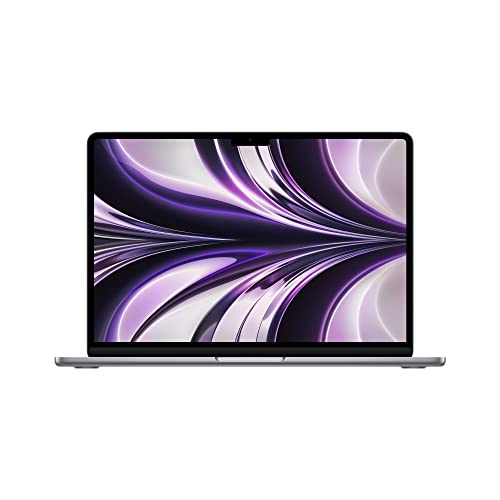
This 13.6-inch laptop runs on the Apple M2 chip with an 8-core CPU and up to 10-core GPU. It includes 8GB of unified memory and a 512GB SSD. The device weighs 2.7 pounds and measures 0.63 inches thick. You get a portable machine suitable for everyday tasks. The compact size fits easily in bags. The SSD provides ample space for files.
- Apple M2 chip with 8-core CPU
- 512GB SSD storage capacity
- 13.6-inch screen size
- 2.7 pounds weight
- 8GB RAM is lower than the 16GB or 24GB found in other listed laptops
- 13.6-inch display is smaller than the 16-inch or 17.3-inch screens in other options
- You need a lightweight laptop under 3 pounds
- You prefer a compact 13-inch screen for portability
- You require 512GB of SSD storage
- You need more than 8GB of RAM for heavy multitasking
- You want a larger screen than 13.6 inches
- You prefer Windows operating system compatibility
Verdict: Apple M2 13-inch MacBook Air offers a balance of portability and storage. It fits users who prioritize a light, compact machine with solid base specs over raw power or large screens.
Specifications side by side
| Spec | Apple MacBook Pro 16-Inch Core i7 | Acer Nitro V 16S 16-Inch RTX 5060 Gaming Laptop | MALLRACE 15.6-inch Core i5 Laptop | HP OmniBook 17.3-Inch Touchscreen Laptop | Dell 15.6" Core Ultra 5 Laptop | Apple MacBook Air 13-inch M2 |
|---|---|---|---|---|---|---|
| Processor | 2.6GHz Intel Core i7 | AMD Ryzen 7 260 | Intel i5-12600H | AMD Ryzen 5 130 | Intel Core Ultra 5 225U | M2 |
| RAM Capacity | 32GB | 32GB | 24GB | 16GB DDR5 | 16GB | 8GB |
| Storage Capacity | 1TB | 1TB SSD | 512GB SSD | 1TB SSD | 512GB SSD | 512GB SSD |
| Screen Size | 16-inch | 16" | 15.6-inch | 17.3" | 15.6" | 13-inch |
| Graphics Card | – | NVIDIA GeForce RTX 5060 | Intel Iris Xe Graphics | AMD Radeon 660M | Intel Graphics | – |
| Display Resolution | – | 1920 x 1200 | – | 1920×1080 | – | – |
| Refresh Rate | – | 180Hz | – | – | – | – |
| Operating System | – | – | – | Windows 11 Home | Windows 11 Home | – |
| Intended Use | – | Gaming | Business, Gaming, Students | Business, Home, Students | Business, Home | – |
| Resolution | – | WUXGA | – | Full HD | Full HD | – |
| Dimensions | 14.1 × 0.64 × 9.68 inches | 14.1 × 0.79 × 10.4 inches | 14.1 × 8.9 × 0.7 inches | 15.7 × 10.1 × 0.65 inches | 9.27 × 14.1 × 0.74 inches | 12.8 × 0.63 × 9 inches |
| Weight | 4 pounds | 4.63 pounds | 3.53 pounds | 4.43 pounds | 3.67 pounds | 2.7 pounds |
| Size | 32GB RAM | 1TB Storage | 32GB 1TB | – | – | 15.6 inches | 8GB |
| Color | Space Gray | Black | Silver Gray | Glacier silver | Carbon Black | Space Gray |
| Model | MVVL2LL/A | ANV16S-41-R2AJ | LX15PRO | OmniBook 3 | LD15260-5618BLK-PUS | MLXW3LL/A |
Frequently asked questions
Does a higher core count mean better multitasking?
Yes, more cores allow your laptop to handle multiple tasks simultaneously without slowing down. For example, the Acer Nitro V 16S with an AMD Ryzen 7 supports heavy gaming and multitasking. Similarly, the MALLRACE Core i5 model offers high RAM and multi-core processing for demanding workloads, ensuring smooth performance when running several applications at once.
Which processor is best for portable everyday computing?
The Apple M2 in the 13-inch MacBook Air is designed for portable everyday use. It balances performance with a lightweight 2.7-pound chassis and compact 12.8-inch length. This setup fits users who prioritize a light, compact machine with solid base specs over raw power or large screens, making it ideal for on-the-go productivity.
How does RAM size affect processor performance?
RAM works with the processor to manage active applications. The Apple MacBook Pro 16-inch with an Intel Core i7 includes 32GB of RAM, which supports heavy multitasking and large storage needs. This combination suits professionals who value screen real estate and multitasking power. More RAM ensures the processor can switch between tasks efficiently without lag.
Is a larger screen necessary for productivity?
A larger screen aids productivity by providing more space for multiple windows. The HP OmniBook 17.3-inch with an AMD Ryzen 5 offers a Full HD display for multitasking and large screen productivity. It fits users who work with multiple documents daily. The 15.7-inch length and 4.43-pound weight reflect its focus on workspace over portability.
What is the benefit of Intel Core Ultra processors?
Intel Core Ultra processors integrate AI tools for enhanced productivity. The Dell 15.6-inch laptop with an Intel Core Ultra 5 offers solid everyday performance with 16GB RAM. It fits office workers and students who value screen size and productivity features. The AI assistance helps streamline common tasks, making the computing experience more efficient for business and home use.
Do gaming laptops require specific processor types?
Gaming laptops benefit from processors that handle high frame rates and complex graphics. The Acer Nitro V 16S uses an AMD Ryzen 7 paired with an RTX 5060 graphics card. This combination delivers solid performance for demanding gaming tasks. The 32GB RAM and 1TB storage further support the processor in managing large game files and active sessions.
See also
See the current listing on Amazon
Specifications on this page are read from the product listing. Scores are out of 10, based on listed specifications and buyer feedback.


