As Amazon Associates, we earn from qualifying purchases. This means we may receive a small commission at no extra cost to you if you click through and make a purchase.

As an Amazon Associate we earn from qualifying purchases. Links on this page are affiliate links.
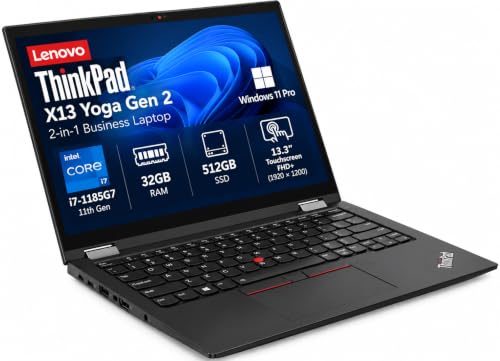
This lenovo vs ist computers laptop comparison evaluates two business machines with 512GB of solid-state storage, Windows 11 Pro, and 1920×1200 displays. The primary differences lie in design and hardware scale. Lenovo offers a compact 13.3-inch 2-in-1 convertible with 32GB of memory and a touchscreen. Ist Computers provides a standard 16-inch clamshell laptop with a 10-core Intel Core 5 120U processor, DDR5 memory, and dedicated Ethernet.
Form Factor
2-in-1 convertible with 360-degree hinge and touchscreen
Standard clamshell laptop
Screen Size
13.3 inches
16 inches
Processor
Intel Core i7-1185G7
Intel Core 5 120U (10 cores, up to 5.0 GHz)
System Memory
32GB LPDDR4X
16GB DDR5
Weight
3 pounds
4.23 pounds
Ethernet Port
Not listed
RJ45 Ethernet
Choose the first if
- You need a versatile 2-in-1 touchscreen device that folds into tablet mode.
- You require 32GB of memory for running dense applications.
- You prioritize mobility and want a lighter 3-pound laptop.
Choose the second if
- You prefer a larger 16-inch display for daily multitasking.
- You want an Intel Core 5 120U processor paired with DDR5 memory.
- You require a built-in RJ45 Ethernet port for wired office networking.
Verdict
Choose the Lenovo ThinkPad X13 Yoga if you need a lightweight 2-in-1 convertible with 32GB of memory and touchscreen functionality. Select the Ist Computers Dell Pro 16 if your work benefits from a larger 16-inch screen, updated Intel Core 5 processing, and native wired networking.
Comparing Lenovo and Ist Computers Laptops
Processor performance
Edge: Ist Computers Dell Pro 16 Laptop
The Ist Computers Dell Pro 16 features an Intel Core 5 120U processor with 10 cores and clock speeds up to 5.0 GHz. In comparison, the Lenovo ThinkPad X13 Yoga relies on an 11th Generation Intel Core i7-1185G7 processor. The 10-core architecture inside the Dell Pro 16 gives you more cores for heavy background operations and demanding multi-app workflows. Lenovo pairs its processor with Intel Iris Xe Graphics, while Ist Computers lists integrated Intel Graphics. If you run tasks that benefit from newer CPU architectures and higher maximum clock speeds, the Ist Computers Dell Pro 16 provides the stronger processing platform.
Installed system memory
Edge: Lenovo ThinkPad X13 Yoga 13.3" 2-in-1
Memory capacity determines how many demanding applications you can keep open simultaneously. The Lenovo ThinkPad X13 Yoga includes 32GB of LPDDR4X memory. The Ist Computers Dell Pro 16 comes configured with 16GB of DDR5 memory. While DDR5 represents a newer standard, Lenovo delivers twice the total memory capacity. That extra headroom helps when working with large spreadsheets, opening dozens of browser tabs, or running professional business tools without slowdowns. Ist Computers lists optional 32GB and 64GB configurations, but in these exact models, Lenovo gives you twice the working memory capacity directly out of the box.
Form factor and display
Edge: Lenovo ThinkPad X13 Yoga 13.3" 2-in-1
Screen design separates these two business laptops. The Lenovo ThinkPad X13 Yoga uses a 360-degree hinge that transitions across four setups: Laptop, Yoga, Flip, and Tablet modes. Its 13.3-inch WUXGA panel offers touch interaction, 300 nits brightness, anti-reflective coating, and 100% sRGB color coverage. The Ist Computers Dell Pro 16 uses a standard clamshell design with a larger 16-inch WUXGA non-touch screen that also reaches 300 nits. The Dell Pro 16 gives you more screen area for office work, but Lenovo delivers superior operational flexibility. You can tap, navigate, and present directly on Lenovo's versatile touchscreen.
Portability and dimensions
Edge: Lenovo ThinkPad X13 Yoga 13.3" 2-in-1
If you travel frequently, chassis dimensions and weight become critical factors. The Lenovo ThinkPad X13 Yoga measures 12 inches long, 8.42 inches wide, and 0.61 inches thick, with a weight of 3 pounds. In comparison, the Ist Computers Dell Pro 16 measures 14.1 inches long, 9.91 inches wide, and 0.82 inches thick, weighing 4.23 pounds. While the Dell Pro 16 passes MIL-STD 810H durability testing, it adds over 1.2 pounds of extra weight to your bag and takes up more space. The Lenovo ThinkPad X13 Yoga is substantially slimmer and lighter, making it much easier to carry between daily meetings or during business travel.
Wired and wireless connectivity
Edge: Ist Computers Dell Pro 16 Laptop
Both laptops support three external monitors, but their connection interfaces differ. The Lenovo ThinkPad X13 Yoga includes two Thunderbolt 4 ports, two USB-A ports, HDMI, Wi-Fi 6, and Bluetooth. It supports external monitor resolutions up to 5K at 60Hz over Thunderbolt 4 and 4K at 60Hz over HDMI. The Ist Computers Dell Pro 16 provides Thunderbolt 4, USB-C, USB-A, HDMI 2.1, an RJ-45 Ethernet jack, and a headset jack. For wireless, it steps up to Wi-Fi 6E and Bluetooth 5.3. With integrated wired Ethernet and newer wireless standards, the Ist Computers Dell Pro 16 offers a broader array of network and peripheral connections.
Camera and biometric security
Edge: Ist Computers Dell Pro 16 Laptop
Secure sign-in and video quality matter for remote business meetings. The Ist Computers Dell Pro 16 includes an FHD and infrared camera equipped with temporal noise reduction. It supports facial recognition login alongside its backlit keyboard. The Lenovo ThinkPad X13 Yoga includes an integrated fingerprint reader for biometric authentication and a backlit keyboard, but its exact camera resolution is not specified in the data. While Lenovo gives you fast fingerprint access, Ist Computers provides hands-free facial recognition login through its IR camera, combined with dedicated noise reduction for video calls. For conference calls and biometric options, the Dell Pro 16 holds the edge.
Choosing Your Next Business Laptop
Frequent travelers who need flexible tablet functionality
Our pick: Lenovo ThinkPad X13 Yoga 13.3" 2-in-1
You benefit from this model when working away from a desk. Its 360-degree hinge allows tablet, yoga, and flip orientations for meetings. At 3 pounds and 0.61 inches thick, it travels easily. You also gain a built-in fingerprint reader and up to 10.3 hours of battery life.
Professionals requiring wired networking and modern wireless standards
Our pick: Ist Computers Dell Pro 16 Laptop
Select this configuration if you connect to varied networks and physical office gear. It provides a dedicated RJ45 Ethernet port alongside Wi-Fi 6E and Bluetooth 5.3. Its FHD and infrared camera allows facial recognition login. You also receive HDMI 2.1 for monitors and a durable MIL-STD 810H tested chassis.
Visual creators who connect to external 5K displays
Our pick: Lenovo ThinkPad X13 Yoga 13.3" 2-in-1
Choose this laptop if you demand accurate visuals and high-bandwidth outputs. The built-in display covers 100% sRGB for accurate color representation. Its dual Thunderbolt 4 ports output video at up to 5K resolution at 60Hz to external displays. The compact footprint also takes up minimal desk space during multi-monitor setups.
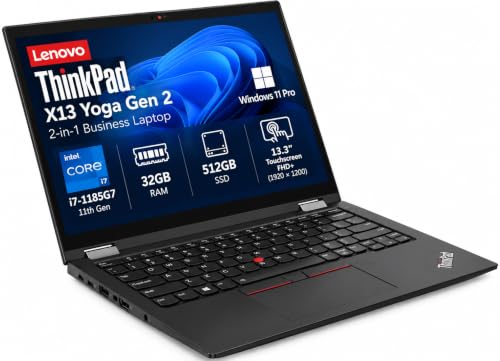
Lenovo ThinkPad X13 Yoga 13.3" 2-in-1
Best for: multitasking mobile workers needing flexible touchscreen modes
- Processor
- Intel Core i7-1185G7
- RAM Capacity
- 32GB
- Storage Capacity
- 512GB PCIe NVMe M.2 SSD
- Screen Size
- 13.3"
- Graphics Card
- Intel Iris Xe Graphics
- Display Resolution
- 1920×1200
This 13.3-inch convertible laptop combines a 360-degree hinge with a touchscreen display for flexible working modes. You get an 11th-generation Intel Core i7 processor, 32GB of LPDDR4X memory, and a 512GB SSD. The 1920×1200 panel offers 100 percent sRGB coverage. It suits mobile professionals needing high memory capacity and versatile tablet functionality on the go.
- 32GB LPDDR4X RAM for heavy multitasking
- 360-degree hinge enables laptop, tablet, and stand modes
- Two Thunderbolt 4 ports supporting up to 5K output
- 16:10 1920×1200 IPS touchscreen with 100% sRGB coverage
- Peak screen brightness reaches only 300 nits
- Intel Core i7-1185G7 relies on older 11th-generation architecture
- You need 32GB of RAM for memory-heavy business workflows.
- You want a convertible touchscreen device for tablet and laptop use.
- You run dual external monitors via Thunderbolt 4 and HDMI.
- You prefer a larger display than 13.3 inches for desktop work.
- You need newer-generation CPU processing architecture.
Verdict: Lenovo ThinkPad 13.3-Inch 2-in-1 Laptop pairs 32GB of memory with a flexible 360-degree touchscreen chassis. It serves mobile business users who need strong multitasking capacity and versatile display modes in a compact three-pound build.
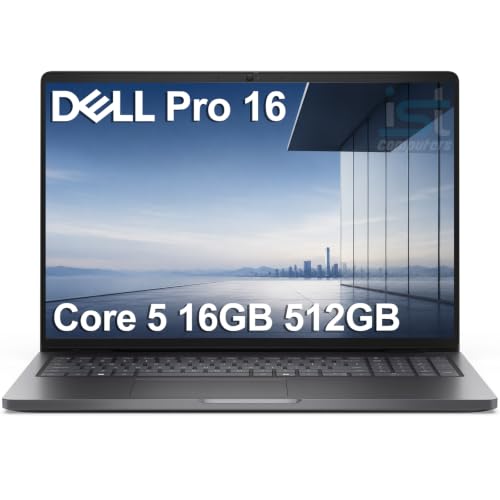
Ist Computers Dell Pro 16 Laptop
Best for: desk productivity needing multi-monitor connectivity
- Processor
- Intel Core 5 120U
- RAM Capacity
- 16GB
- Storage Capacity
- 512GB SSD
- Screen Size
- 16"
- Graphics Card
- Intel Graphics
- Display Resolution
- 1920×1200
This 16-inch laptop from Ist Computers pairs an Intel Core 5 120U 10-core processor with 16GB of DDR5 memory and a 512GB solid-state drive. It gives you a 1920×1200 anti-glare display running at 300 nits, Windows 11 Pro, and Thunderbolt 4 connectivity. It suits professionals who need a full-size workspace, wired Ethernet, and multi-monitor output without carrying an external dock.
- 16-inch WUXGA 1920×1200 anti-glare screen with 300 nits brightness
- Thunderbolt 4, HDMI 2.1, and RJ45 Ethernet ports built in
- 10-core Intel Core 5 120U processor with 16GB DDR5 memory
- FHD infrared webcam supports facial recognition login
- Heavier build at 4.23 pounds compared to smaller ultraportables
- Integrated Intel Graphics rather than dedicated GPU hardware
- Base manufacturer warranty on original components is limited to one year
- You want a spacious 16-inch display with a 16:10 aspect ratio for multi-window productivity.
- You require built-in legacy and modern ports including RJ45 Ethernet and Thunderbolt 4.
- You need Windows 11 Pro business tools such as BitLocker and Remote Desktop preinstalled.
- You prefer an ultra-light laptop under 3 pounds for constant travel.
- You require dedicated GPU hardware for intensive 3D rendering tasks.
Verdict: Ist Computers Dell Pro 16-Inch Laptop serves desk-based professionals and analysts who prioritize large display area, physical port variety, and DDR5 memory over lightweight portability.
Specifications side by side
| Spec | Lenovo ThinkPad X13 Yoga 13.3" 2-in-1 | Ist Computers Dell Pro 16 Laptop |
|---|---|---|
| Processor | Intel Core i7-1185G7 | Intel Core 5 120U |
| RAM Capacity | 32GB | 16GB |
| Storage Capacity | 512GB PCIe NVMe M.2 SSD | 512GB SSD |
| Screen Size | 13.3" | 16" |
| Graphics Card | Intel Iris Xe Graphics | Intel Graphics |
| Display Resolution | 1920×1200 | 1920×1200 |
| Operating System | Windows 11 Pro | Windows 11 Pro |
| Intended Use | Business | Business |
| Form Factor | 2-in-1 | – |
| Resolution | – | Full HD |
| Dimensions | 12 × 8.42 × 0.61 inches | 14.1 × 9.91 × 0.82 inches |
| Weight | 3 pounds | 4.23 pounds |
| Size | 32GB RAM / 512GB SSD | 16GB|512GB |
| Color | Black | Magnetite |
| Model | ThinkPad X13 Yoga Gen 2 | Dell pro 16 |
Frequently asked questions
Which laptop offers more system memory for heavy multitasking?
Lenovo ThinkPad X13 Yoga provides 32GB of RAM, while the Ist Computers Dell Pro 16 includes 16GB. Extra memory lets you keep more browser tabs, virtual machines, and background applications active simultaneously without system slowdowns. Both systems pair their respective memory capacities with 512GB of solid-state storage.
What processors do these Lenovo and Ist Computers laptops use?
Ist Computers Dell Pro 16 runs on an Intel Core Ultra 5 processor, whereas the Lenovo ThinkPad X13 Yoga uses an Intel Core i7 processor. Both chips target business computing tasks and handle daily productivity workloads under Windows 11 Pro. Your choice depends on whether you prefer the Core Ultra architecture or Core i7 series.
How do the screen sizes differ between these two laptops?
Ist Computers Dell Pro 16 features a 16-inch Full HD display, providing a spacious view for spreadsheets and split-screen work. Lenovo ThinkPad X13 Yoga has a smaller 13.3-inch screen built into a compact frame. The larger panel gives you more viewing area, while the smaller screen reduces total footprint.
Which laptop is lighter for travel and commuting?
Lenovo ThinkPad X13 Yoga is the lighter option at 3 pounds and measures 0.61 inches thick. In comparison, the Ist Computers Dell Pro 16 weighs 4.23 pounds and has a thickness of 0.82 inches. If you travel frequently, the smaller dimensions and lower weight of the Lenovo make transit easier.
Which operating system comes installed on these business machines?
Both laptops ship with Windows 11 Pro preinstalled. This edition includes business-focused capabilities such as BitLocker encryption, advanced device management, and remote desktop support. You can integrate either machine into corporate domains or secure enterprise office networks right out of the box without requiring an immediate operating system upgrade.
What exterior colors and finishes do these models feature?
Lenovo ThinkPad X13 Yoga features a classic Black finish, matching traditional ThinkPad styling. Ist Computers Dell Pro 16 comes in Magnetite, offering a modern dark metallic tone. Both colors provide an understated look suitable for professional corporate environments, client meetings, and home offices.
See also
See the current listing on Amazon
Specifications on this page are read from the product listing. Scores are out of 10, based on listed specifications and buyer feedback.