As Amazon Associates, we earn from qualifying purchases. This means we may receive a small commission at no extra cost to you if you click through and make a purchase.

As an Amazon Associate we earn from qualifying purchases. Links on this page are affiliate links.
This lenovo chromebook plus review examines a ChromeOS laptop built for productivity. The system is defined by its 16GB of system memory and a 256GB SSD. Inside, it runs on a MediaTek Kompanio Ultra 910 processor clocked at 2.10 GHz with a 12 MB L3 cache. Visuals run through an ARM Immort graphics chip onto a 14-inch WUXGA display. If you need a cloud-focused portable machine with generous memory for heavy multitasking and local solid-state storage, this gray clamshell offers a distinct hardware profile for 2026.
- 16GB RAM capacity for handling demanding browser tabs
- 256GB SSD local storage drive
- 14-inch WUXGA resolution display
- MediaTek Kompanio Ultra 910 processor with 12 MB L3 cache
Good fit for
This laptop suits students, remote workers, and web power users who keep dozens of browser tabs open at once. The 16GB RAM pool gives you ample headroom for demanding web applications and parallel tasks without tab reloading. If your daily workflow centers on Google Workspace, cloud tools, and local file storage, the 256GB SSD and 14-inch WUXGA screen provide a sharp workspace for extended daily sessions.
Who can skip it
You should look elsewhere if your daily work requires legacy Windows software, x86-specific desktop applications, or heavy 3D rendering. The MediaTek Kompanio Ultra 910 processor and ARM Immort graphics are built for lightweight efficiency rather than dedicated gaming or workstation software. Users who need a compact ultraportable travel machine may also want to pass, as the listed spec notes a heavier 6-pound weight.
Verdict
The Lenovo Chromebook Plus pairs 16GB of memory and a 256GB SSD with an ARM-based MediaTek Kompanio processor for capable, web-first daily computing. It gives tab-heavy users a solid spec foundation on a 14-inch WUXGA screen.
Key Specifications and Everyday Meaning
Display Resolution: WUXGA
A WUXGA resolution provides a 1920 by 1200 pixel grid. This gives you extra vertical workspace compared to standard Full HD panels. You can view more document lines and web content without scrolling. Students and office workers benefit during multitasking sessions. When you compare laptops, contrast this with standard 1080p screens to ensure adequate sharpness.
Screen Size: 14"
A 14-inch display provides a balanced viewing area between portability and usable workspace. You gain enough screen room to arrange side-by-side browser windows comfortably on your desk. Mobile professionals and commuting students benefit from this middle-ground form factor. When shopping for laptops, compare this size against compact 13-inch ultraportables and heavier 15.6-inch desktop-replacement options.
Graphics Card: ARM Immort
The ARM Immort graphics handle display rendering, web animation, and video streaming. This hardware powers external monitor outputs and smooth window transitions during daily navigation. Casual users and media streamers benefit from power-efficient visual processing. When you evaluate laptops, compare integrated ARM graphics with discrete GPUs if your workflow requires dedicated 3D rendering or complex creative applications.
Weight: 6 pounds
A weight of six pounds gives the chassis a substantial, grounded presence on a workstation. You experience stable desktop placement, though carrying it in a shoulder bag requires extra physical effort. Stationary remote workers benefit most from this build. When checking alternative laptops, compare this figure against sub-four-pound models if you need frequent travel portability.
Design, Dimensions, and Physical Build
The Lenovo Chromebook Plus features a 14-inch display profile finished in a gray color scheme, according to the listing. The product dimensions show a width of 11.8 inches, a height of 3.4 inches, and a length of 17.4 inches. In practice, a 14-inch footprint balances desk workspace with carry convenience. It gives you enough screen area to manage two side-by-side browser windows without occupying excess surface area on your work table.
The hardware specification lists an overall weight of 6 pounds. For a 14-inch laptop, a 6-pound specification according to the listing suggests a substantial chassis or package measurement. In everyday use, this weight profile means you will notice the bulk when carrying it inside a backpack during a regular commute. This measurement makes the device best suited for dedicated desk setups, home offices, or occasional room-to-room moves rather than constant on-the-go travel.
The exterior finish comes in gray, which offers a neutral appearance that fits standard office and educational environments. The listing identifies this model as 83MW0001US. The published specifications do not detail individual frame materials or button layouts, but the 14-inch form factor provides a focused layout for productivity. You get a compact base that sits cleanly on smaller desks while supporting your everyday ChromeOS workflow.
Setup Process and Daily Operation
Setting up this Lenovo Chromebook Plus centers on the Chrome operating system. You begin by powering on the device and connecting to your local wireless network. You then log in using your Google credentials, which immediately synchronizes your saved bookmarks, cloud files, and browser preferences. Because ChromeOS handles system updates and backups automatically in the background, your initial configuration takes very few manual steps.
In everyday use, the core hardware specifications support reliable multitasking. The 16GB of system RAM ensures you can run dozens of browser tabs and web tools simultaneously without tab reloading. This helps prevent slowdowns when switching between active tabs and office tools. The MediaTek Kompanio Ultra 910 processor operates at 2.10 GHz, utilizing its 12 MB L3 cache to quickly access instructions during daily web browsing, document composition, and communication tasks.
Visual rendering is powered by the integrated ARM Immort graphics card, driving output to the 14-inch WUXGA panel. Local storage needs are handled by the 256GB SSD, giving you ample fast space for offline documents, media downloads, and system files. This combination of ARM-based processing and generous memory creates a smooth daily workflow for web-centric tasks.
Before You Buy This Chromebook
Before choosing this laptop, evaluate your routine computing requirements. The system relies entirely on ChromeOS and an ARM-based MediaTek Kompanio Ultra 910 processor. You should confirm that your work tools run smoothly in browser environments or Android-based app formats instead of legacy Windows executables. If you manage larger project files locally, consider whether 256GB of onboard storage accommodates your offline archives or if you need external USB storage drives. For upkeep, keeping the operating system current requires regular restarts when background system updates finish downloading. Wiping the 14-inch display panel and gray exterior with a soft microfiber cloth maintains physical condition. Across the 1 options in the wider laptop category, this model stands out with 16GB of system memory. It provides practical multitasking for cloud workflows, while users needing specialized x86 software should assess traditional alternatives.
Check before you buy
- Verify your essential daily apps support ChromeOS rather than Windows or macOS.
- Confirm whether 256GB SSD capacity fits your offline file and download storage needs.
- Check if ARM-compatible peripherals and drivers match your external hardware accessories.
- Compare the 14-inch screen footprint with your travel bags and desk workspace.
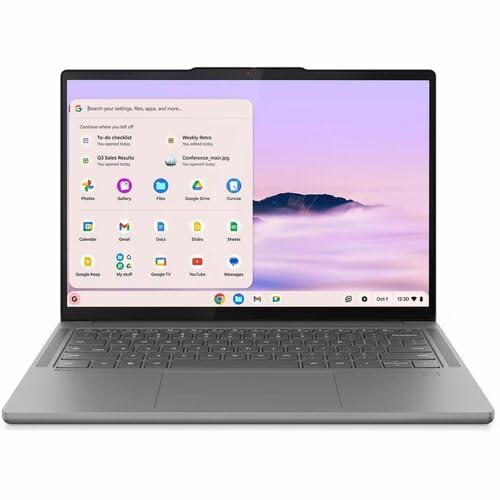
Lenovo Chromebook Plus 14" 16GB
Best for: Memory-intensive ChromeOS multitasking and browser work
- Processor
- MediaTek Kompanio Ultra 910
- RAM Capacity
- 16GB
- Storage Capacity
- 256GB SSD
- Screen Size
- 14"
- Graphics Card
- ARM Immort
- Display Resolution
- WUXGA
This Lenovo Chromebook Plus runs ChromeOS with a MediaTek Kompanio Ultra 910 processor and 16GB of system memory. You get a 14-inch WUXGA resolution display paired with a 256GB SSD for storage. These specifications handle multitasking across multiple browser tabs and web applications. It suits you if you need generous memory and solid local storage for cloud-centered work.
- 16GB RAM for handling multiple open browser tasks
- 256GB SSD local storage capacity
- 14-inch WUXGA resolution screen
- MediaTek Kompanio Ultra 910 processor with 12MB L3 cache
- Listed 6-pound weight is heavy for a 14-inch laptop
- Product specifications do not state expected battery run time
- You need 16GB of RAM to manage dense browser sessions and web apps.
- You want 256GB of local SSD storage on a ChromeOS machine.
- You need a lightweight portable laptop that weighs under 4 pounds.
- You require dedicated desktop-class graphics instead of an ARM integrated GPU.
Verdict: Lenovo Chromebook Plus 14" 16GB fits web-focused users who need 16GB of RAM and 256GB of local storage for intensive browser-based workloads.
Specifications side by side
| Spec | Lenovo Chromebook Plus 14" 16GB |
|---|---|
| Processor | MediaTek Kompanio Ultra 910 |
| RAM Capacity | 16GB |
| Storage Capacity | 256GB SSD |
| Screen Size | 14" |
| Graphics Card | ARM Immort |
| Display Resolution | WUXGA |
| Resolution | WUXGA |
| Dimensions | 17.4 × 11.8 × 3.4 inches |
| Weight | 6 pounds |
| Size | 16GB | 256GB SSD |
| Color | Gray |
| Model | 83MW0001US |
Frequently asked questions
What makes this Lenovo Chromebook Plus suitable for heavy multitasking?
This laptop carries 16GB of system memory paired with a 256GB solid-state drive. That memory capacity lets you keep dozens of active browser tabs open simultaneously without reloading. It prevents background tab discarding during research, spreadsheet editing, and continuous cloud-based work sessions.
What is the specific model number for this Lenovo Chromebook Plus?
The official manufacturer model number is 83MW0001US. Tracking this exact code helps you confirm hardware specifications before ordering components or accessories. It ensures you select the correct 14-inch configuration featuring the gray chassis, 16GB memory tier, and matching internal solid-state drive.
How much internal storage does the Lenovo Chromebook Plus include?
You get 256GB of local SSD storage built into the machine. This capacity provides ample room for downloaded files, offline documents, media libraries, and Android applications. Unlike entry-level cloud devices with smaller flash memory, this drive handles sizable local assets alongside your cloud storage.
Can you run traditional Windows software on this Lenovo Chromebook Plus?
No, this notebook runs ChromeOS rather than Microsoft Windows. You cannot install standard executable Windows programs directly on the machine. Instead, you access web-based tools, progressive web apps, and compatible Android software. You can also utilize remote desktop software or virtualization services if legacy software is required.
What is the screen size and aspect profile of this laptop?
The laptop features a 14-inch screen built with a WUXGA resolution. This compact screen footprint balances portability with visible workspace. It fits standard messenger bags and backpacks easily, making it practical for daily commutes, lecture halls, or mobile work setups away from your primary desk.
How heavy is the Lenovo Chromebook Plus in transport?
The listed package and product specifications cite a weight of 6 pounds. You will notice this mass when carrying the machine in a shoulder bag over longer distances. It provides a sturdy physical foundation on your desk but requires a supportive backpack for frequent travel.
See also
See the current listing on Amazon
Specifications on this page are read from the product listing. Scores are out of 10, based on listed specifications and buyer feedback.


