As Amazon Associates, we earn from qualifying purchases. This means we may receive a small commission at no extra cost to you if you click through and make a purchase.
As an Amazon Associate we earn from qualifying purchases. Links on this page are affiliate links.
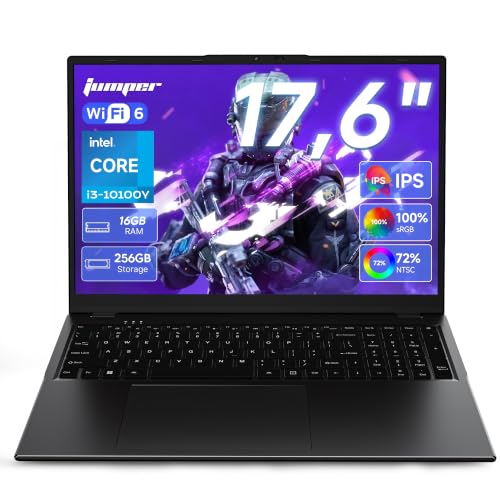
This jumper 17 6 laptop review examines the Jumper EZbook P1, a large-format portable computer built for everyday productivity. Two defining specifications lead its hardware sheet: an expansive 17.6-inch Full HD screen with a 1920×1200 resolution and an Intel Core i3-10100Y processor. The display uses a 16:10 aspect ratio and 100% sRGB coverage to provide extra vertical workspace and accurate colors. Paired with 16GB of system memory and a 256GB solid-state drive, the hardware focuses on desktop-style space for users who run routine tasks without external monitors.
- 17.6-inch FHD (1920×1200) display with 16:10 aspect ratio and 100% sRGB coverage
- 16GB RAM for multitasking paired with 256GB expandable SSD storage
- 53.2Wh (7000mAh) battery with fast-charging support and up to 8 hours runtime
- Wi-Fi 6, Bluetooth 5.2, full Type-C port, HDMI, and three USB 3.0 ports
Good fit for
This machine fits students, remote office workers, and families who prioritize screen real estate for spreadsheets, web research, and media. The 17.6-inch display offers ample room for side-by-side documents, reducing the need for an external monitor. You also get 16GB of RAM, which lets you keep dozens of browser tabs and office applications open at once. Wi-Fi 6 and three USB 3.0 ports support standard home workstation setups.
Who can skip it
Skip this model if you need high compute power for 3D gaming or intensive rendering. The Intel Core i3-10100Y processor is built for light tasks, not sustained heavy workloads. The 256GB internal storage also fills up quickly if you store large media libraries. Frequent commuters should note the 2.2-kilogram weight and 15.5-inch chassis length, which make this machine bulky to carry in standard backpacks all day.
Verdict
The Jumper EZbook P1 pairs an expansive 17.6-inch 16:10 display with 16GB of RAM for comfortable multi-window office work. It provides capable everyday performance as a stationary home or office laptop, provided your workflow does not require intensive processing.
Key Specifications and What They Mean
16GB RAM
This memory capacity allows you to keep dozens of browser tabs open alongside office software without system slowdowns. It benefits students, remote workers, and multitaskers handling large documents simultaneously. When shopping for laptops, compare this against standard entry-level machines that provide 8GB. A 16GB pool gives you twice the working memory for smoother active task management.
256GB SSD Storage
A solid-state drive delivers rapid boot times and quick application loading compared to traditional mechanical hard drives. This capacity suits users who primarily store documents, spreadsheets, and family photos locally while relying on cloud tools. When evaluating laptops, compare this 256GB capacity with larger 512GB or 1TB options if you plan to install multiple extensive programs or store large media archives.
7000mAh (53.2Wh) Battery
This energy capacity supports up to eight hours of run time for typical study and work sessions. It suits mobile users, students, and home professionals who move between rooms without keeping the charger connected. When you evaluate portable computers, compare this 53.2Wh rating against smaller 40Wh packs that require earlier charging or larger 70Wh batteries designed for heavier workloads.
Dual-band Wi-Fi 6 (2.4G/5G)
This wireless standard enables efficient data transmission across both 2.4GHz and 5GHz network frequencies. It benefits home office workers and learners attending online classes who need stable connections in congested household networks. When shopping for laptops, compare this against older Wi-Fi 5 gear. Wi-Fi 6 handles multi-device network traffic better and reduces data latency during active internet sessions.
Dimensions, Physical Layout, and Build Details
According to the listing, the Jumper EZbook P1 features a Carbon Black finish. The chassis measures 15.5 inches long, 11.1 inches wide, and 0.8 inches thick. At this footprint, you need a dedicated large-format bag or workstation desk to set it down comfortably. The laptop weighs 2.2 kilograms. This mass keeps the unit stable during desk work, though you will feel the heft if you carry it across a campus or during a commute.
For input, the build includes a backlit keyboard. According to the listing, the illuminated keys support typing in dim spaces without overhead lights. The base also integrates two stereo speakers for built-in audio playback during video meetings or casual streaming.
Physical ports cover both everyday input devices and extra displays. The layout provides three USB 3.0 ports and one Type-C port, so you can connect mice, flash drives, and modern peripherals at the same time. You also get an HDMI port to output video to a monitor, a 3.5mm headphone jack for wired audio, a Micro TF slot for external storage cards, and a dedicated DC fast-charging port. These physical connections let you set up a full desk workstation without relying on separate adapters.
System Setup and Everyday Practical Use
The laptop comes with pre-installed Windows 11, so initial configuration requires completing standard operating system prompts out of the box. You connect to local networks using dual-band Wi-Fi 6 across 2.4GHz and 5GHz frequencies. Bluetooth 5.2 handles wireless connections for external accessories like mice, headsets, or keyboards.
Physical peripheral setup relies on multiple integrated ports. You can attach wired accessories to the three USB 3.0 ports and single Type-C port. Connecting an external display uses the dedicated HDMI output. For audio during online classes or media playback, you can rely on the two built-in stereo speakers or plug into the 3.5mm headphone jack. You can also insert memory cards directly into the Micro TF slot to supplement the 256GB SSD storage.
During daily tasks, the 53.2Wh (7000mAh) battery delivers up to eight hours of runtime for document processing, study sessions, and home office routines. A dedicated DC fast-charging port restores power when the battery depletes. The integrated backlit keyboard aids typing in dimly lit workspaces. Together, these hardware features support continuous multitasking, web browsing, and remote work across standard desktop applications without requiring specialized adapters.
Purchasing Considerations for the Jumper Laptop
Before choosing this model, verify your accessory and workspace requirements. The 256GB SSD holds your operating system and essential applications, while the built-in Micro TF card slot lets you add external storage for larger file libraries. You will also need to keep the dedicated DC fast-charging power adapter handy during travel to maintain the 53.2Wh battery.
Peripheral compatibility remains straightforward. The three USB 3.0 ports, single Type-C port, HDMI output, and 3.5mm jack accept standard mice, headphones, and external monitors without multi-port hubs. At 2.2 kilograms and 15.5 inches wide, the Carbon Black chassis requires a bag compartment sized specifically for 17-inch or larger devices. Regular cleaning with a dry microfiber cloth maintains the backlit keyboard and 100% sRGB panel. Across the 1 laptops on the market, this build suits buyers prioritizing expansive desktop space over ultra-light portability.
Check before you buy
- Ensure your travel bag or backpack accommodates a 15.5-inch long chassis weighing 2.2 kilograms.
- Confirm that 256GB of internal SSD storage or a Micro TF card fits your data needs.
- Check that the HDMI port and three USB 3.0 ports match your external monitor and wired accessories.
- Assess whether the 53.2Wh battery capacity and DC fast charger align with your daily schedule away from outlets.
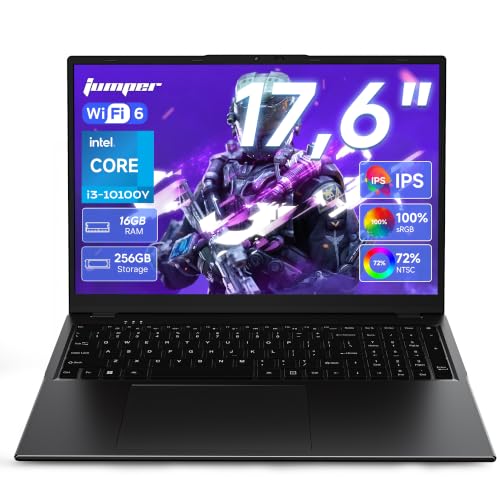
Jumper 17.6-Inch FHD Core i3 Laptop
Best for: large-screen office tasks and document editing
- Processor
- i3-10100Y
- RAM Capacity
- 16GB
- Storage Capacity
- 256GB SSD
- Screen Size
- 17.6"
- Display Resolution
- 1920 x 1200
- Dimensions
- 15.5 × 11.1 × 0.8 inches
The Jumper 17.6-inch Intel i3 Laptop gives you a large workspace with its 1920×1200 resolution screen. Inside, an Intel i3-10100Y processor pairs with 16GB of RAM and a 256GB solid-state drive for basic multitasking. It includes Wi-Fi 6 and Windows 11. This setup fits students, office workers, and anyone needing a wide display for documents and spreadsheets.
- Large 17.6-inch 1920×1200 display with 16:10 aspect ratio
- 16GB RAM for smooth multitasking
- Wi-Fi 6 and Bluetooth 5.2 connectivity
- Backlit keyboard for low-light typing
- Modest 256GB internal solid-state drive capacity
- Chassis weighs 2.2 kilograms, limiting portability
- You want a large 17.6-inch screen with 16:10 aspect ratio for document work.
- You run office tasks that benefit from 16GB of memory.
- You need more than 256GB of local storage out of the box.
- You travel daily and need a device lighter than 2.2 kilograms.
Verdict: Jumper 17.6-inch Intel i3 Laptop serves office workers and students who prioritize display space and 16GB RAM over portability. The 2.2-kilogram weight and 256GB storage drive make it better suited for desk setups than frequent travel.
Specifications side by side
| Spec | Jumper 17.6-Inch FHD Core i3 Laptop |
|---|---|
| Processor | i3-10100Y |
| RAM Capacity | 16GB |
| Storage Capacity | 256GB SSD |
| Screen Size | 17.6" |
| Display Resolution | 1920 x 1200 |
| Resolution | Full HD |
| Dimensions | 15.5 × 11.1 × 0.8 inches |
| Weight | 2.2 kilograms |
| Color | Carbon Black |
| Model | EZbook P1 |
Frequently asked questions
What model is this 17.6-inch Jumper laptop?
The official model name is the Jumper EZbook P1. This machine combines a large 17.6-inch Full HD display with an Intel Core i3 processor and 16GB RAM. You get a Carbon Black chassis designed primarily for stationary desktop work rather than mobile use, offering ample viewing space for productivity tasks.
Is the Jumper EZbook P1 easy to travel with?
The laptop is better suited for permanent desk setups than frequent commuting. It weighs 2.2 kilograms and measures 15.5 inches in length by 11.1 inches in width, with a thickness of 0.8 inches. You can carry it occasionally, but the physical bulk requires a substantially sized bag during transit.
What tasks is this Jumper laptop best suited for?
This model is best for large-screen office tasks and document editing. Its Full HD panel provides expansive screen area for managing side-by-side windows, spreadsheets, and text. Paired with 16GB of system RAM, it supports smooth daily multitasking, allowing you to run several office utilities at the same time.
What is the screen resolution on the Jumper EZbook P1?
The display features Full HD resolution on a 17.6-inch panel. This screen specification gives you crisp text, balanced clarity, and plenty of visual room across standard work software. A display this large helps you read documents comfortably without having to scale interface elements up to extreme sizes.
How much internal storage does this model offer?
You receive a 256GB storage drive in this configuration. That capacity accommodates the operating system, daily software programs, and standard text documents. If you frequently handle large photo archives or extensive video project folders, you will want to rely on external drives or cloud services to hold excess media.
What processor powers the 17.6-inch Jumper laptop?
An Intel Core i3 processor drives the Jumper EZbook P1. This component focuses on essential computing demands, handling web browsing, document creation, and basic office administrative duties reliably. Combined with 16GB of onboard memory, it provides responsive execution when you work across multiple desktop programs in standard business routines.
See also
See the current listing on Amazon
Specifications on this page are read from the product listing. Scores are out of 10, based on listed specifications and buyer feedback.


