As Amazon Associates, we earn from qualifying purchases. This means we may receive a small commission at no extra cost to you if you click through and make a purchase.

As an Amazon Associate we earn from qualifying purchases. Links on this page are affiliate links.
When evaluating an HP vs lenovo laptop, you will find both machines target business productivity with 512GB solid-state storage and Windows 11. However, their physical designs serve completely different setups. The HP model offers a spacious 17.3-inch Full HD screen paired with an AMD Ryzen 5 processor. In contrast, the Lenovo ThinkPad features a compact 13.3-inch 2-in-1 convertible touchscreen powered by an Intel Core i7 with 32GB RAM.
Form factor
Standard laptop
2-in-1 convertible
Screen size
17.3 inches
13.3 inches
Display resolution
Full HD
1920×1200
Processor
AMD Ryzen 5
Intel Core i7-1185G7
RAM capacity
16GB
32GB
Operating system
Windows 11
Windows 11 Pro
Choose the first if
- You want a large 17.3-inch display for viewing documents and multitasking at a desk.
- You need a full-size keyboard with a dedicated 10-key number pad for numeric data entry.
Choose the second if
- You require a portable 3-pound convertible design that switches between laptop and tablet modes.
- You need 32GB of memory and the management features included with Windows 11 Pro.
Verdict
Choose the HP laptop if you prioritize a large display and a full-size keypad for stationary desktop use. Select the Lenovo ThinkPad X13 Yoga if you need a lightweight touchscreen convertible with higher memory capacity for travel. Both models provide 512GB of solid-state storage for standard business workflows.
HP and Lenovo Specifications Compared
Screen size
Edge: HP 17.3" Ryzen 5 Laptop
The HP 17.3" Ryzen 5 Laptop gives you a 17.3-inch Full HD anti-glare display. This larger panel provides a broad viewing area suitable for viewing multiple windows side by side without an external monitor. In comparison, the Lenovo ThinkPad X13 Yoga 13.3" 2-in-1 features a much more compact 13.3-inch screen. While the Lenovo display offers a sharper 1920×1200 resolution and a 16:10 aspect ratio, its total screen area is substantially smaller. If your daily workflow benefits from maximum screen real estate on the machine itself, the HP laptop holds a distinct advantage in display size.
RAM capacity
Edge: Lenovo ThinkPad X13 Yoga 13.3" 2-in-1
Memory capacity directly impacts how smoothly your machine handles demanding background applications and heavy multitasking. The HP 17.3" Ryzen 5 Laptop includes 16GB of RAM, which is standard for modern business workloads. The Lenovo ThinkPad X13 Yoga 13.3" 2-in-1 doubles this allocation with 32GB of LPDDR4X memory. That additional 16GB gives you extra operational headroom when running multiple virtual instances, complex spreadsheets, and numerous browser tabs at the same time. Because the Lenovo laptop delivers twice the installed memory of the HP model, it handles heavier data sets and aggressive multitasking with less risk of memory saturation.
Form factor
Edge: Lenovo ThinkPad X13 Yoga 13.3" 2-in-1
Form factor determines how you interact with your device throughout the workday. The HP 17.3" Ryzen 5 Laptop uses a standard clamshell notebook design. In contrast, the Lenovo ThinkPad X13 Yoga 13.3" 2-in-1 features a 360-degree hinge paired with a touchscreen display. This convertible design allows you to transition the Lenovo laptop across four separate modes: Laptop mode for standard typing, Yoga mode for sharing content, Flip mode for streaming, and Tablet mode for direct touch interaction. The HP model remains in a single traditional notebook position, giving the Lenovo machine greater versatility for interactive presentations and tablet use.
Keyboard build
Edge: HP 17.3" Ryzen 5 Laptop
Keyboard layout dictates typing convenience during number-heavy office work. The HP 17.3" Ryzen 5 Laptop includes a brushed full-size keyboard equipped with an integrated 10-key number pad. This addition helps you enter numeric data into spreadsheets quickly without attaching external hardware. The Lenovo ThinkPad X13 Yoga 13.3" 2-in-1 features a backlit keyboard for low-light conditions and an integrated fingerprint reader, but its specifications do not list a 10-key number pad. If your daily routine involves frequent calculation, data entry, or accounting tasks directly on the built-in keyboard, the HP laptop gives you a dedicated layout built for numeric efficiency.
Display compatibility
Edge: Lenovo ThinkPad X13 Yoga 13.3" 2-in-1
Expanding your workspace with external monitors depends entirely on connectivity specifications. The Lenovo ThinkPad X13 Yoga 13.3" 2-in-1 includes two Thunderbolt 4 ports, two USB-A ports, and an HDMI output. It explicitly supports up to three external displays, outputting up to 5K at 60Hz over Thunderbolt 4 and 4K at 60Hz over HDMI. In contrast, the provided specifications for the HP 17.3" Ryzen 5 Laptop do not list its port types, external monitor limits, or external resolutions. If you plan to connect multiple high-resolution monitors to create a stationary multi-display workstation, the Lenovo model offers verified compatibility and clear technical capabilities.
Chassis size
Edge: Lenovo ThinkPad X13 Yoga 13.3" 2-in-1
Physical dimensions dictate how easily a laptop travels between workspaces. The HP 17.3" Ryzen 5 Laptop measures 15.8 inches long, 10.2 inches wide, and 0.81 inches thick, with its total weight not specified in the data. The Lenovo ThinkPad X13 Yoga 13.3" 2-in-1 is notably more compact, measuring 12 inches long, 8.42 inches wide, and 0.61 inches thick, while weighing 3 pounds. Its smaller footprint and slim profile require considerably less room in a backpack or briefcase. If portability and carrying comfort matter for your daily commute, the Lenovo laptop provides a significantly smaller and lighter build.
Which Laptop Fits Your Work Style?
Users who enter numbers frequently from a dedicated desk
Our pick: HP 17.3" Ryzen 5 Laptop
Choose this laptop if you need a dedicated 10-key number pad for frequent data entry. The full-size keyboard lets you type calculations efficiently without external accessories. Its 17.3-inch anti-glare display gives you ample space for spreadsheets, while the AMD Ryzen 5 processor and 16GB of RAM handle your daily business applications.
Mobile professionals who work across varying environments
Our pick: Lenovo ThinkPad X13 Yoga 13.3" 2-in-1
Choose this model if portability is your priority. Weighing 3 pounds and measuring 0.61 inches thick, it travels easily. Its 360-degree hinge switches between laptop, tablet, and tent orientations. You also get a 13.3-inch touchscreen, 32GB of RAM for heavy multitasking, and an integrated fingerprint reader to log in securely with Windows 11 Pro.
Power users connecting to multiple external displays
Our pick: Lenovo ThinkPad X13 Yoga 13.3" 2-in-1
Choose this 2-in-1 if you operate a multi-monitor workstation. Dual Thunderbolt 4 ports and an HDMI output let you connect up to three external screens at up to 5K resolution. The Intel Core i7-1185G7 processor paired with 32GB of memory ensures stable performance while running demanding business workflows across several active windows.

HP 17.3" Ryzen 5 Laptop
Best for: multitasking on a large desktop-replacement screen
- Processor
- AMD Ryzen 5
- RAM Capacity
- 16GB
- Storage Capacity
- 512GB SSD
- Screen Size
- 17.3"
- Intended Use
- Business
- Resolution
- Full HD
This HP laptop provides a 17.3-inch Full HD anti-glare display for working across large spreadsheets or documents. Inside, you get an AMD Ryzen 5 processor paired with 16GB of RAM and a 512GB solid-state drive for day-to-day office tasks. It includes a full-size keyboard with a dedicated number pad, making it suitable if you prioritize screen space over portability.
- 17.3-inch Full HD anti-glare display
- AMD Ryzen 5 processor with 16GB RAM
- Full-size keyboard with 10-key number pad
- 512GB SSD storage capacity
- Webcam resolution capped at 720p
- Large 15.8-inch by 10.2-inch footprint reduces portability
- You need a large 17.3-inch screen for multitasking and office software.
- You enter numbers frequently and need an integrated 10-key pad.
- You need a compact machine for frequent travel.
- You require a webcam resolution higher than 720p for video calls.
Verdict: HP 17.3-Inch Ryzen 5 Laptop suits desk-bound office workers who need expansive screen space, a dedicated numeric keypad, and responsive multitasking for daily productivity.
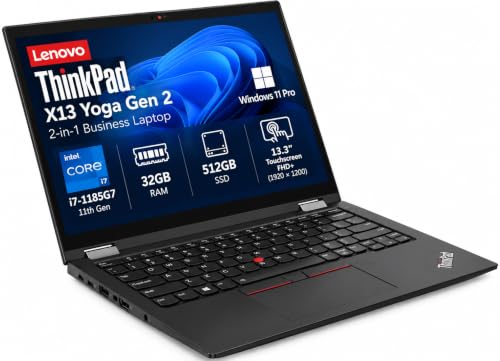
Lenovo ThinkPad X13 Yoga 13.3" 2-in-1
Best for: mobile professionals needing compact 32GB multitasking
- Processor
- Intel Core i7-1185G7
- RAM Capacity
- 32GB
- Storage Capacity
- 512GB PCIe NVMe M.2 SSD
- Screen Size
- 13.3"
- Graphics Card
- Intel Iris Xe Graphics
- Display Resolution
- 1920×1200
This Lenovo ThinkPad is a 13.3-inch convertible laptop built for business travel. You get a 360-degree hinge, 32GB of LPDDR4X RAM, and an Intel Core i7-1185G7 processor. The 1920×1200 touchscreen offers a 16:10 aspect ratio and 100% sRGB coverage. Weighing 3 pounds, it suits mobile professionals who need compact multitasking power and tablet flexibility.
- 32GB LPDDR4X RAM supports heavy multitasking
- 360-degree hinge converts into tablet, tent, and stand modes
- Two Thunderbolt 4 ports supporting up to 5K external displays
- WUXGA 16:10 touchscreen with 100% sRGB color gamut
- 512GB SSD capacity limits internal archive space
- Integrated Iris Xe graphics lacks dedicated video memory
- Panel brightness caps at 300 nits
- You need a 3-pound convertible design for travel and note-taking.
- You run memory-heavy office workflows requiring 32GB RAM.
- You connect dual high-resolution monitors using Thunderbolt 4.
- You require dedicated graphics hardware for 3D rendering.
- You want a large 17-inch workspace on a single display.
Verdict: Lenovo ThinkPad 13.3-Inch 2-in-1 Laptop delivers substantial memory and portable touchscreen flexibility for professionals working outside standard desk setups.
Specifications side by side
| Spec | HP 17.3" Ryzen 5 Laptop | Lenovo ThinkPad X13 Yoga 13.3" 2-in-1 |
|---|---|---|
| Processor | AMD Ryzen 5 | Intel Core i7-1185G7 |
| RAM Capacity | 16GB | 32GB |
| Storage Capacity | 512GB SSD | 512GB PCIe NVMe M.2 SSD |
| Screen Size | 17.3" | 13.3" |
| Graphics Card | – | Intel Iris Xe Graphics |
| Display Resolution | – | 1920×1200 |
| Operating System | – | Windows 11 Pro |
| Intended Use | Business | Business |
| Form Factor | – | 2-in-1 |
| Resolution | Full HD | – |
| Dimensions | 15.8 × 10.2 × 0.81 inches | 12 × 8.42 × 0.61 inches |
| Weight | – | 3 pounds |
| Color | Silver | Black |
| Model | V17 | ThinkPad X13 Yoga Gen 2 |
| Size | – | 32GB RAM / 512GB SSD |
Frequently asked questions
Does Lenovo or HP offer a 2-in-1 convertible design in this comparison?
Lenovo provides the 2-in-1 convertible form factor in this comparison. The ThinkPad X13 Yoga Gen 2 switches between laptop and tablet orientations for flexible business work. HP's V17 utilizes a traditional clamshell chassis. You should choose the Lenovo if you require touchscreen versatility on the go.
Which laptop is easier to carry on a daily commute?
Lenovo is much easier to transport. The ThinkPad X13 Yoga Gen 2 weighs 3 pounds and measures 12 by 8.42 inches with a 0.61-inch thickness. The HP V17 is bulkier, measuring 15.8 by 10.2 inches with an 0.81-inch height, making Lenovo better for your travel bag.
What processors power these HP and Lenovo business laptops?
These laptops feature processors from different chipmakers. HP includes an AMD Ryzen 5 processor in the V17 laptop. Lenovo uses an Intel Core i7 processor in the ThinkPad X13 Yoga Gen 2. Both processors give you dependable performance for daily office productivity and multitasking workloads.
Which laptop configuration includes 32GB of RAM?
The Lenovo ThinkPad X13 Yoga Gen 2 includes 32GB of RAM alongside a 512GB SSD. This extensive memory allows you to run multiple heavy productivity tools simultaneously without performance slowdowns. The published HP V17 specifications do not list the installed RAM amount for comparison.
What screen size difference exists between these HP and Lenovo models?
HP features a significantly larger 17-inch screen with Full HD resolution. Lenovo equips the ThinkPad X13 Yoga Gen 2 with a 13.3-inch display. You get substantially more physical screen space on the HP, while Lenovo prioritizes a smaller visual footprint to maximize portability.
What operating system comes preinstalled on the Lenovo laptop?
Lenovo equips the ThinkPad X13 Yoga Gen 2 with Windows 11 Pro. This operating system provides professional management tools, data encryption options, and domain integration for corporate settings. You get software tailored directly for business workflows without needing an immediate operating system upgrade.
See also
See the current listing on Amazon
Specifications on this page are read from the product listing. Scores are out of 10, based on listed specifications and buyer feedback.


