As Amazon Associates, we earn from qualifying purchases. This means we may receive a small commission at no extra cost to you if you click through and make a purchase.
As an Amazon Associate we earn from qualifying purchases. Links on this page are affiliate links.
Understanding Laptop Graphics Cards and Specifications
A graphics card processes visual data and sends the final image to your laptop screen. This component handles basic desktop rendering, video playback, and complex visual software. Here is the graphics card explained through hardware categories, label formats, and daily computing performance.
Laptops come with either integrated or dedicated graphics. Integrated graphics share space and memory directly on the central processor. Dedicated graphics cards use an independent processing chip and dedicated video memory, known as VRAM. Because a dedicated card does not draw from main system RAM, it executes heavy graphics jobs without slowing standard background operations.
Spec sheets list this hardware under GPU or Graphics. Common integrated options include Intel Iris Xe Graphics. Dedicated entries include GeForce RTX 3050 and GeForce RTX 5060. Listings often specify video memory size and memory generation, such as 4GB or 8GB of GDDR6. Higher model numbers within a brand family indicate newer architecture, more processing cores, and faster rendering speeds.
This specification matters because it dictates your machine's limits. If you focus on office documents, web tasks, and video calls, integrated graphics provide reliable visual performance while conserving battery life and generating less heat. If you edit high-resolution video, create 3D models, or run modern games, a dedicated GPU provides the computing cores necessary to keep frame rates smooth and processing times short. Matching this spec to your workflow prevents performance bottlenecks.
Laptop Graphics Card Options Compared
GeForce RTX 5060
GeForce RTX 5060 is a dedicated graphics processor built on Blackwell architecture. It handles demanding visual workloads independently from the main processor. This card suits you if you target high frame rates in modern gaming or run demanding graphics software. Paired with high-refresh screens, such as the 180Hz WUXGA panel on the Acer Nitro V 16S 16-Inch RTX 5060 Gaming Laptop, it provides smooth rendering. The trade-off centers on system weight and power needs. Laptops carrying this dedicated card weigh over 4.6 pounds and require larger cooling systems than machines with integrated graphics.
Intel Iris Xe Graphics
Intel Iris Xe Graphics is an integrated graphics solution built directly into Intel Core i5 processors. It shares memory and power with the central processor instead of using dedicated hardware. This option suits you if you focus on office work, web browsing, and document editing. A model like the HP 15.6" Touchscreen Core i5 Laptop keeps overall weight down to 3.75 pounds because it does not need heavy cooling hardware. The trade-off is limited raw graphical throughput. It does not provide the dedicated hardware power needed for high-refresh competitive gaming or heavy 3D rendering.
GeForce RTX 3050
GeForce RTX 3050 is an entry-tier dedicated graphics card designed for mainstream visual tasks. It contains standalone graphics hardware, separating rendering tasks from the central processor. This option suits you if you want entry-level gaming at Full HD resolution and need more capability than integrated chips provide. The HP Victus 15.6" RTX 3050 Gaming Laptop pairs this card with a 144Hz screen for smooth output in standard workloads. The trade-off is reduced computational performance compared to newer RTX tiers. It limits future graphical headroom while still adding chassis bulk and weight over standard office laptops.
Choosing Dedicated or Integrated Graphics
Who needs it
You need a dedicated graphics card if you run 3D modeling programs, compile video visual effects, or play modern games. A dedicated GPU features its own video memory and processing cores. This architecture prevents graphical tasks from competing with your central processor for system memory. As a result, you get stable frame rates, reduced export times, and responsive viewports in complex creative software.
You also benefit if you connect multiple high-resolution external monitors. The extra processing power maintains steady display refresh rates across several screens without slowing down your operating system. If visual computing drives your daily workflow, dedicated graphics hardware provides clear functional advantages.
Who can skip it
You can skip dedicated graphics if your routine focuses on document editing, web browsing, spreadsheets, and video streaming. Integrated graphics handle these standard visual tasks directly on the central processor die. This hardware configuration draws less power and produces less heat, which extends battery runtime and keeps the laptop quiet.
Instead of dedicated visual hardware, prioritize larger system memory and faster storage. More system memory keeps multi-tab browsing sessions responsive during heavy multitasking. A fast solid-state drive accelerates file transfers and application launch times. You can also look for a higher-resolution screen with better color coverage.
Laptop Graphics Terms
Dedicated Video Memory
This memory stores image data and 3D textures for your graphics chip. Higher capacity allows you to render detailed assets smoothly. Typical laptops feature 4GB, 8GB, or 16GB allocations.
Total Graphics Power
This metric measures peak electrical wattage for your laptop graphics chip. A higher rating, like 140W versus 60W, provides faster rendering performance but generates additional operating heat.
GPU Clock Speed
This metric indicates how many calculation cycles your graphics chip executes per second. Measured in megahertz or gigahertz, higher speeds help you process complex visual frames faster.
Display Refresh Rate
This number shows how many times each second your screen draws a new image. A 144Hz panel updates faster than a standard 60Hz panel, giving you smoother motion.
Ray Tracing
This technique simulates physical light paths to generate realistic reflections and shadows. It makes your visual scenes look authentic, though it requires significant processing power from your graphics hardware.
Thermal Throttling
This safeguard automatically lowers graphics chip speeds when internal temperatures reach unsafe levels. It protects your laptop from heat damage but temporarily slows your performance during demanding tasks.
Display Resolution
This spec indicates the pixel grid on your screen. A 2560×1440 display yields sharper images than 1920×1080, but it forces your graphics card to process significantly more visual data.
| # | Product | Best for | Price |
|---|---|---|---|
| 1 | Acer Nitro V 16S 16-Inch RTX 5060 Gaming Laptop | High-frame-rate gaming with dedicated graphics | |
| 2 | HP 15.6" Touchscreen Core i5 Laptop | everyday office work and casual media tasks | |
| 3 | HP Victus 15.6" RTX 3050 Gaming Laptop | Entry-level dedicated GPU gaming and multitasking | |
| 4 | Acer Nitro 16S 16" RTX 5060 Gaming Laptop | high-refresh competitive gaming with dedicated RTX graphics | |
| 5 | Lenovo IdeaPad 15.6" Intel Core i5 Laptop | everyday office productivity and web multitasking | |
| 6 | HP Victus 15.6" Core i5 RTX 3050 Laptop | entry-level 1080p gaming and everyday multitasking |

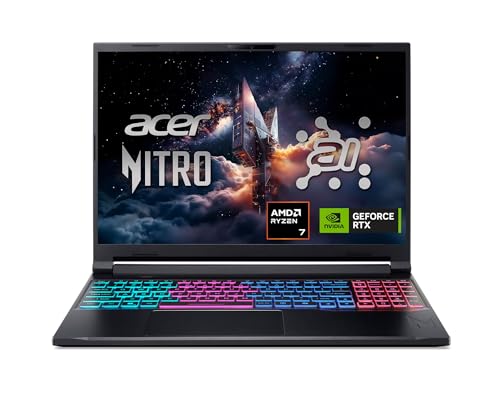
Acer Nitro V 16S 16-Inch RTX 5060 Gaming Laptop
Best for: High-frame-rate gaming with dedicated graphics
- Graphics Card
- GeForce RTX 5060
- Processor
- AMD Ryzen 7 260
- RAM Capacity
- 32GB
- Storage Capacity
- 1TB SSD
- Screen Size
- 16"
- Display Resolution
- 1920 x 1200
This gaming laptop pairs a dedicated NVIDIA GeForce RTX 5060 graphics processor with an AMD Ryzen 7 260 processor. For visual workloads and modern games, the discrete GPU provides ray tracing and AI frame generation on a 16-inch 1920 x 1200 display running at 180Hz. It suits you if you need dedicated graphical power and fast screen refreshes.
- NVIDIA GeForce RTX 5060 laptop GPU with DLSS 4 support
- 16-inch 180Hz WUXGA display with 100% sRGB coverage
- 32GB DDR5 5600MHz system memory installed
- 1TB PCIe Gen 4 SSD with an available second M.2 slot
- Maximum system memory is capped at 32GB across both slots
- Screen resolution tops out at 1920 x 1200
- You need a dedicated GeForce RTX 5060 GPU for ray tracing and AI frame generation.
- You want a 180Hz refresh rate for fast-moving visuals.
- You want an open internal M.2 slot for future storage expansion.
- You require a display resolution higher than 1920 x 1200.
- You plan to expand system memory past 32GB.
Verdict: Acer Nitro V 16S RTX 5060 Gaming Laptop delivers dedicated Blackwell-architecture graphics and a 180Hz panel for users prioritizing high-frame-rate rendering over ultra-high display resolution.

HP 15.6" Touchscreen Core i5 Laptop
Best for: everyday office work and casual media tasks
- Graphics Card
- Intel Iris Xe Graphics
- Processor
- Intel Core i5-1135G7
- RAM Capacity
- 16GB
- Storage Capacity
- 512GB SSD
- Screen Size
- 15.6"
- Display Resolution
- FHD
This HP 15.6-inch laptop runs on an Intel Core i5 processor paired with integrated Intel Iris Xe Graphics. Unlike systems with dedicated GPUs, it relies on shared system memory, backed here by 16GB of RAM and a 512GB SSD. You get basic visual processing suitable for office work, media streaming, and light photo editing without the weight of discrete graphics.
- Integrated Intel Iris Xe Graphics
- 16GB RAM for multitasking
- 15.6-inch Full HD touch display
- Weighs 3.75 pounds
- Integrated graphics instead of a dedicated GPU
- Storage capacity limited to 512GB SSD
- You need integrated graphics for daily office productivity and media playback.
- You want a 15.6-inch touchscreen paired with 16GB of system memory.
- You need a dedicated graphics card such as an RTX series GPU for demanding 3D tasks.
- You require more than 512GB of internal storage space out of the box.
Verdict: HP 15.6" Iris Xe Touch Laptop fits office workers and students who need reliable everyday computing without the extra bulk of a dedicated graphics processor.

HP Victus 15.6" RTX 3050 Gaming Laptop
Best for: Entry-level dedicated GPU gaming and multitasking
- Graphics Card
- GeForce RTX 3050
- Processor
- Intel Core i5-12450H
- RAM Capacity
- 16GB
- Storage Capacity
- 512GB SSD
- Screen Size
- 15.6"
- Refresh Rate
- 144Hz
This gaming laptop features an NVIDIA GeForce RTX 3050 graphics card paired with an Intel Core i5-12450H processor. You get a 15.6-inch Full HD display with a 144Hz refresh rate for fast-paced visuals, along with 16GB of DDR4 RAM and a 512GB SSD. It suits gamers and multitaskers who need dedicated graphics performance on Windows 11 Pro.
- NVIDIA GeForce RTX 3050 graphics card with 6GB GDDR6 memory
- 15.6-inch Full HD anti-glare display with 144Hz refresh rate
- 16GB DDR4 RAM for multitasking
- Intel Core i5-12450H processor reaching up to 4.4GHz
- 512GB solid state drive offers limited internal storage capacity
- Heavy build at 7 pounds
- You want dedicated GeForce RTX 3050 graphics for gaming.
- You need a 144Hz Full HD display for smooth visuals.
- You run Windows 11 Pro for productivity and play.
- You require more than 512GB of factory storage space.
- You need a lightweight laptop under 7 pounds for portability.
Verdict: HP Victus 15.6" RTX 3050 Gaming Laptop fits players who want dedicated GeForce graphics and a 144Hz refresh rate. Its 16GB of RAM and Core i5 processor provide capable power for daily workloads and games.

Acer Nitro 16S 16" RTX 5060 Gaming Laptop
Best for: high-refresh competitive gaming with dedicated RTX graphics
- Graphics Card
- GeForce RTX 5060
- Processor
- AMD Ryzen AI 7 350
- RAM Capacity
- 16GB
- Storage Capacity
- 1TB Gen 4 SSD
- Screen Size
- 16"
- Display Resolution
- 1920 x 1200
This 16-inch gaming laptop pairs an NVIDIA GeForce RTX 5060 GPU with an AMD Ryzen AI 7 350 processor. It features a 1920 x 1200 display with a 180Hz refresh rate and 400 nits brightness. You get a dedicated graphics card and 1TB of Gen 4 storage, suiting users who prioritize fast frame rates during modern gaming.
- NVIDIA GeForce RTX 5060 Laptop GPU with DLSS 4 support
- 16-inch 180Hz WUXGA panel with 400 nits brightness
- 1TB Gen 4 SSD alongside 16GB of system memory
- 8-core AMD Ryzen AI 7 350 processor
- Display resolution caps at 1920 x 1200 instead of 2560 x 1600
- Chassis weight of 4.81 pounds adds carrying heft
- You play fast-paced titles that benefit from a 180Hz refresh rate.
- You want dedicated ray-tracing hardware via an RTX 5060 GPU.
- You need a bright 400-nit screen with 100% sRGB color coverage.
- You require an ultralight chassis under four pounds for travel.
- You want a native 2560 x 1600 display panel.
Verdict: Acer Nitro 16S 16" RTX 5060 Gaming Laptop delivers modern dedicated graphics performance and a 180Hz display for competitive players. It suits gamers who prioritize high frame rates over higher-resolution 1600p panels.

Lenovo IdeaPad 15.6" Intel Core i5 Laptop
Best for: everyday office productivity and web multitasking
- Processor
- Intel Core i5-1235U
- RAM Capacity
- 16GB
- Storage Capacity
- 512GB SSD
- Screen Size
- 15.6"
- Graphics Card
- Intel Iris Xe Graphics
- Intended Use
- Home, Students
This 15.6-inch laptop uses integrated Intel Iris Xe Graphics instead of a dedicated graphics card. Powered by a 10-core Intel Core i5-1235U processor with 16GB of RAM and a 512GB SSD, it handles everyday computing, media playback, and standard office workflows. It suits you if you need reliable display output without the power draw and weight of a discrete GPU.
- 10-core Intel Core i5-1235U processor
- 16GB RAM for responsive multitasking
- 15.6-inch Full HD anti-glare screen
- Wi-Fi 6 and Bluetooth 5.0 connectivity
- Full-size keyboard with integrated number pad
- Integrated Intel Iris Xe Graphics lacks dedicated video memory
- 512GB SSD offers less storage than available 1TB options
- You want everyday productivity performance with 16GB of RAM and a 10-core processor.
- You prioritize a 3.97-pound build over heavier laptops with discrete graphics cards.
- You need a full keyboard layout with a numeric pad for spreadsheet tasks.
- You require a dedicated graphics card for modern 3D gaming or GPU rendering.
- You need more than 512GB of internal storage immediately.
Verdict: Lenovo IdeaPad 15.6" Iris Xe Laptop fits buyers who need a responsive daily work machine for documents and web tasks without the battery drain of a dedicated GPU.

HP Victus 15.6" Core i5 RTX 3050 Laptop
Best for: entry-level 1080p gaming and everyday multitasking
- Graphics Card
- GeForce RTX 3050
- Processor
- Intel Core i5-13420H
- RAM Capacity
- 8GB
- Storage Capacity
- 512GB SSD
- Screen Size
- 15.6"
- Display Resolution
- 1920 x 1080
This HP Victus 15 is an entry gaming laptop built around an NVIDIA GeForce RTX 3050 GPU with 6GB of GDDR6 memory. It pairs an 8-core Intel Core i5-13420H processor with a 15.6-inch 144Hz Full HD screen. If you need a dedicated graphics card for casual gaming and video tasks on a high-refresh display, this setup covers your baseline needs.
- NVIDIA GeForce RTX 3050 graphics with 6GB GDDR6 VRAM
- 15.6-inch Full HD IPS display with 144Hz refresh rate
- Intel Core i5-13420H processor with 8 cores and up to 4.6 GHz
- Wi-Fi 6, Bluetooth 5.3, RJ-45 Ethernet, and HDMI 2.1 ports
- 8GB DDR4 system memory limits heavy multitasking
- Display is limited to 250 nits brightness and 45% NTSC gamut
- Total weight is 5.06 pounds
- You want an entry dedicated GPU with 6GB VRAM for casual 1080p gaming.
- You prefer a 144Hz refresh rate for smoother motion in games.
- You need multiple ports including HDMI 2.1 and 10Gbps USB-C.
- You require more than 8GB of system memory out of the box.
- You need a bright or color-accurate screen for outdoor creative work.
- You want a machine under five pounds for easy commuting.
Verdict: HP Victus 15 RTX 3050 Gaming Laptop suits budget-focused gamers and students who want dedicated 6GB graphics and a 144Hz panel for mainstream 1080p play. Its 8GB memory and modest display brightness mean you must accept entry-tier hardware limits.
Specifications side by side
| Spec | Acer Nitro V 16S 16-Inch RTX 5060 Gaming Laptop | HP 15.6" Touchscreen Core i5 Laptop | HP Victus 15.6" RTX 3050 Gaming Laptop | Acer Nitro 16S 16" RTX 5060 Gaming Laptop | Lenovo IdeaPad 15.6" Intel Core i5 Laptop | HP Victus 15.6" Core i5 RTX 3050 Laptop |
|---|---|---|---|---|---|---|
| Processor | AMD Ryzen 7 260 | Intel Core i5-1135G7 | Intel Core i5-12450H | AMD Ryzen AI 7 350 | Intel Core i5-1235U | Intel Core i5-13420H |
| RAM Capacity | 32GB | 16GB | 16GB | 16GB | 16GB | 8GB |
| Storage Capacity | 1TB SSD | 512GB SSD | 512GB SSD | 1TB Gen 4 SSD | 512GB SSD | 512GB SSD |
| Screen Size | 16" | 15.6" | 15.6" | 16" | 15.6" | 15.6" |
| Graphics Card | NVIDIA GeForce RTX 5060 | Intel Iris Xe Graphic | NVIDIA GeForce RTX 3050 | NVIDIA GeForce RTX 5060 Laptop GPU | Intel Iris Xe Graphics | NVIDIA GeForce RTX 3050 |
| Display Resolution | 1920 x 1200 | FHD | – | 1920 x 1200 | – | 1920 x 1080 |
| Refresh Rate | 180Hz | – | 144Hz | 180Hz | – | 144Hz |
| Operating System | – | Windows 11 Pro | Windows 11 Pro | – | – | Windows 11 Home |
| Intended Use | Gaming | Business | Gaming | Gaming | Home, Students | Home, Gaming |
| Resolution | WUXGA | Full HD | Full HD | WUXGA | Full HD | Full HD |
| Size | 32GB 1TB | 16GB RAM | 512GB PCIe SSD | 16GB | 512GB SSD | – | 16GB RAM | 512GB SSD | 8GB-512GB |
| Dimensions | 14.1 × 0.79 × 10.4 inches | 14.1 × 9.53 × 0.71 inches | 19 × 12 × 3 inches | 14.1 × 0.83 × 10.9 inches | 14.2 × 0.7 × 9.29 inches | 14.1 × 10 × 0.93 inches |
| Weight | 4.63 pounds | 3.75 pounds | 7 pounds | 4.81 pounds | 3.97 pounds | 5.06 pounds |
| Color | Black | Silver | Blue | Black | Blue | Mica Silver |
| Model | ANV16S-41-R2AJ | HP Laptop | hp laptop | AN16S-61-R7YL | 00WXR5_V1 | 15-FA200 |
Frequently asked questions
How does an integrated GPU affect laptop weight?
Integrated graphics help keep laptops lighter by removing bulky dedicated cooling hardware. In this guide, machines with Intel Iris Xe Graphics, like the HP 15.6" Touchscreen and Lenovo IdeaPad, weigh 3.75 and 3.97 pounds. Gaming models with dedicated GeForce RTX 3050 cards weigh more, ranging up to 7 pounds on the HP Victus.
Can you use integrated graphics for everyday office tasks?
Yes, integrated graphics handle standard productivity duties without issue. Processors with built-in Intel Iris Xe Graphics, such as those in the HP 15.6" Touchscreen and Lenovo IdeaPad, support Full HD resolution for office software and web multitasking. You get efficient power use for daily operations without the added footprint of a dedicated gaming card.
What display refresh rates do dedicated gaming laptops offer?
Dedicated gaming laptops frequently include screens with faster refresh speeds to match their graphics output. Models with GeForce RTX 3050, such as the HP Victus, provide 144Hz Full HD panels. Higher-tier options like the Acer Nitro V 16S with GeForce RTX 5060 feature 180Hz WUXGA screens to deliver fluid visual playback during fast motion.
What display resolutions are common on laptops with dedicated graphics?
Laptops with dedicated cards usually feature Full HD or WUXGA displays. The HP Victus 15.6" models with GeForce RTX 3050 utilize Full HD panels. Stepping up to 16-inch models, like the Acer Nitro V 16S with GeForce RTX 5060, gives you a WUXGA resolution, which adds extra vertical screen space for games and creative apps.
How much system memory do dedicated graphics laptops include?
System memory varies by configuration across gaming models. Entry-level builds, such as certain HP Victus 15 configurations, provide 8GB of RAM, while standard versions feature 16GB. Advanced machines like the Acer Nitro V 16S pair a GeForce RTX 5060 with 32GB of RAM and a 1TB SSD to handle demanding computational workloads.
What operating systems come preinstalled on these graphics laptops?
The laptops in this guide ship with either Windows 11 Home or Windows 11 Pro. Business-oriented units like the HP 15.6" Touchscreen and the HP Victus 15.6" RTX 3050 feature Windows 11 Pro. Other machines, including the Lenovo IdeaPad and entry HP Victus configurations, come preinstalled with Windows 11 Home for daily use.
See also
See the current listing on Amazon
Specifications on this page are read from the product listing. Scores are out of 10, based on listed specifications and buyer feedback.


