As Amazon Associates, we earn from qualifying purchases. This means we may receive a small commission at no extra cost to you if you click through and make a purchase.
As an Amazon Associate we earn from qualifying purchases. Links on this page are affiliate links.
Both machines target gaming with dedicated graphics hardware and fast refresh displays. When comparing a GeForce RTX 5060 vs GeForce RTX 3050 laptop, the core difference lies in their hardware generations. The Acer Nitro V 16S features a newer Blackwell architecture GPU, faster display, and double the factory RAM. The HP Victus offers an Intel Core i5 foundation, Windows 11 Pro, and a standard high-refresh screen.
Graphics card
NVIDIA GeForce RTX 5060
NVIDIA GeForce RTX 3050
Processor
AMD Ryzen 7 260
Intel Core i5-12450H
Display
16-inch WUXGA (1920 x 1200), 180Hz
15.6-inch Full HD, 144Hz
Installed memory
32GB DDR5
16GB DDR4
Storage capacity
1TB SSD
512GB SSD
Operating system
not listed
Windows 11 Pro
Choose the first if
- You want higher refresh rates with a 180Hz 16-inch display.
- You need newer RTX 5060 graphics, 32GB DDR5 memory, and 1TB of storage out of the box.
Choose the second if
- You prefer an Intel Core i5 processor paired with dedicated RTX 3050 graphics.
- You require Windows 11 Pro pre-installed for your setup.
Verdict
The Acer Nitro V 16S suits users who need higher graphical capabilities, double the memory, and faster screen refresh rates. The HP Victus is suited for users who want an Intel Core processor with Windows 11 Pro out of the box. Your choice depends on whether you prioritize newer GPU architecture and larger memory or a specific operating system.
Specification Differences and Performance Breakdown
Graphics card capabilities
Edge: Acer Nitro V 16S 16-Inch RTX 5060 Gaming Laptop
The Acer Nitro V 16S provides an NVIDIA GeForce RTX 5060 Laptop GPU built on NVIDIA Blackwell architecture. You get 572 AI TOPS of compute power, fourth-generation RT Cores, fifth-generation Tensor Cores, and DLSS 4 support with Multi Frame Generation. These hardware specs assist with neural rendering and full ray tracing workflows. In contrast, the HP Victus 15.6" includes an NVIDIA GeForce RTX 3050 with 6GB GDDR6 dedicated memory. The HP laptop delivers entry-level graphical power from an earlier GPU generation. If you prioritize modern architecture, advanced ray tracing cores, and higher AI TOPS throughput for demanding rendering, the Acer Nitro V 16S holds the advantage.
Display resolution and refresh rate
Edge: Acer Nitro V 16S 16-Inch RTX 5060 Gaming Laptop
Display quality dictates your visual clarity and motion fluidity during fast action. The Acer Nitro V 16S features a 16-inch WUXGA screen with a 1920 x 1200 resolution, a 180Hz refresh rate, and 100% sRGB color gamut coverage. This panel setup outputs accurate color reproduction alongside rapid motion response. The HP Victus 15.6" carries a 15.6-inch Full HD IPS anti-glare display running at a 144Hz refresh rate with micro-edge bezels. While both panels provide smooth gaming visuals, the Acer Nitro V 16S gives you higher vertical resolution, wider color fidelity specs, and a faster 180Hz refresh cycle for quick frame transitions.
Processor performance
Edge: Acer Nitro V 16S 16-Inch RTX 5060 Gaming Laptop
Processor architecture determines how efficiently your system runs background tasks and compute-heavy games. The Acer Nitro V 16S comes equipped with an AMD Ryzen 7 260 processor delivering up to 38 AI Overall TOPS for dedicated artificial intelligence acceleration and 4K HDR streaming. Across the aisle, the HP Victus 15.6" uses a 12th Generation Intel Core i5-12450H processor clocking up to 4.4GHz. While the Intel Core i5 offers dependable speeds for regular gaming sessions, the AMD Ryzen 7 processor in the Acer provides integrated AI hardware acceleration and higher processing tiering to maintain seamless multitasking throughput across complex application workloads.
Memory upgrade ceiling
Edge: HP Victus 15.6" RTX 3050 Gaming Laptop
System memory dictates how many tasks you can handle simultaneously without slowdowns. The Acer Nitro V 16S comes with 32GB of DDR5 5600MHz memory spread across two slots, but 32GB is the maximum supported limit according to its technical specifications. In comparison, the HP Victus 15.6" ships with 16GB of DDR4-3200 RAM, yet its platform supports expansion up to 64GB of total RAM. Even though the Acer laptop ships with faster DDR5 modules out of the box, the HP Victus offers a higher potential memory ceiling if you plan to upgrade hardware for extreme memory-heavy workloads later.
Operating system
Edge: HP Victus 15.6" RTX 3050 Gaming Laptop
The operating system defines the software environment you use for everyday programs. The HP Victus 15.6" lists Windows 11 Pro directly in its technical attributes. This confirms you have an active pre-installed operating system ready for immediate computing tasks and gaming setups. In contrast, the Acer Nitro V 16S specifications do not list an operating system anywhere in the provided product details. When you evaluate published specifications directly, knowing the installed operating system ensures setup clarity. Because the HP Victus confirms Windows 11 Pro while the Acer product data leaves the operating system unlisted, the HP Victus takes this round.
Storage capacity and expansion
Edge: Acer Nitro V 16S 16-Inch RTX 5060 Gaming Laptop
Your solid-state drive determines local game library capacity and load speeds. The Acer Nitro V 16S provides a 1TB PCIe Gen 4 SSD straight from the factory. Furthermore, its chassis includes two PCIe M.2 slots total, leaving one slot open for additional storage expansion. The HP Victus 15.6" includes a 512GB PCIe SSD, with support extending up to a 2TB solid-state drive. Although the HP can support up to 2TB, the Acer Nitro V 16S delivers twice the included baseline storage out of the box alongside a verified open PCIe M.2 expansion slot for your drives.
Which Laptop Should You Choose?
Competitive gamers seeking high display refresh rates
Our pick: Acer Nitro V 16S 16-Inch RTX 5060 Gaming Laptop
You get a 180Hz refresh rate on a 16-inch 1920 x 1200 panel, higher than the 144Hz screen on the HP. The NVIDIA GeForce RTX 5060 GPU features DLSS 4 and 572 AI TOPS. You also receive 32GB DDR5 memory and a 1TB PCIe Gen 4 SSD.
Gamers needing Windows 11 Pro preinstalled
Our pick: HP Victus 15.6" RTX 3050 Gaming Laptop
You get Windows 11 Pro preinstalled alongside an Intel Core i5-12450H processor and NVIDIA GeForce RTX 3050 graphics with 6GB GDDR6 memory. The 15.6-inch Full HD screen offers a 144Hz refresh rate with anti-glare IPS hardware. The architecture supports system memory expansion up to 64GB DDR4.
Content creators prioritizing color accuracy and portability
Our pick: Acer Nitro V 16S 16-Inch RTX 5060 Gaming Laptop
You receive a 16-inch WUXGA display with 100% sRGB coverage for accurate colors. At 4.63 pounds and 0.79 inches thin, this chassis is lighter than the 7-pound HP model. The system includes an AMD Ryzen 7 260 processor, 32GB DDR5 RAM, and an open M.2 slot for storage expansion.
| # | Product | Best for | Price |
|---|---|---|---|
| 1 | Acer Nitro V 16S 16-Inch RTX 5060 Gaming Laptop | high-refresh 1200p gaming with modern graphics | |
| 2 | HP Victus 15.6" RTX 3050 Gaming Laptop | entry-level 1080p gaming and esports |

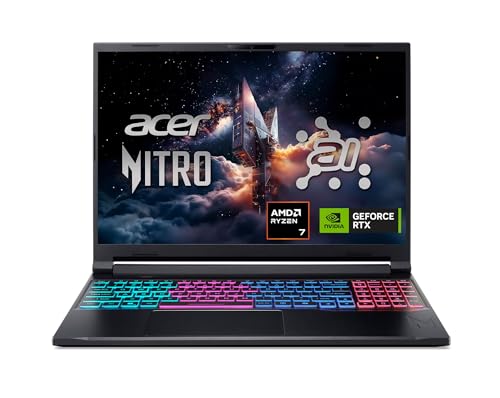
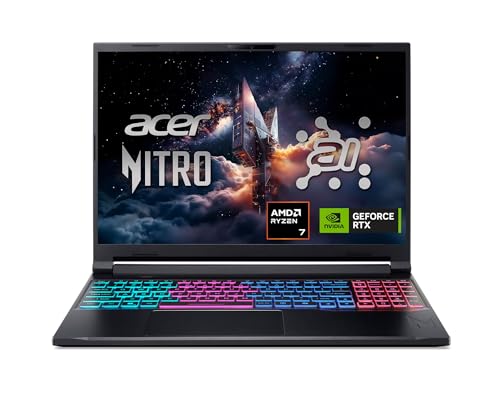
Acer Nitro V 16S 16-Inch RTX 5060 Gaming Laptop
Best for: high-refresh 1200p gaming with modern graphics
- Graphics Card
- GeForce RTX 5060
- Processor
- AMD Ryzen 7 260
- RAM Capacity
- 32GB
- Storage Capacity
- 1TB SSD
- Screen Size
- 16"
- Display Resolution
- 1920 x 1200
This 16-inch gaming laptop pairs an AMD Ryzen 7 260 processor with an NVIDIA GeForce RTX 5060 graphics card. You get 32GB of DDR5 memory, a 1TB solid-state drive, and a 180Hz WUXGA screen covering 100% sRGB. It suits you if you want modern GPU architecture, high refresh rates, and ample memory for competitive multiplayer titles right out of the box.
- NVIDIA GeForce RTX 5060 GPU with DLSS 4 support
- 16-inch 1920 x 1200 display with 180Hz refresh rate and 100% sRGB
- 32GB DDR5 5600MHz RAM pre-installed
- Available secondary M.2 PCIe slot for internal storage expansion
- Maximum memory capacity is capped at 32GB total
- Screen resolution tops out at 1920 x 1200 rather than 1440p
- You want a fast 180Hz display for fluid motion in competitive titles.
- You need 32GB of system memory ready to use immediately.
- You plan to install an additional drive using an open M.2 slot.
- You require a laptop that supports more than 32GB of RAM.
- You prefer a native 1440p or 4K panel over WUXGA.
Verdict: Acer Nitro V 16S 16" RTX 5060 Gaming Laptop delivers fluid high-frame-rate performance through its 180Hz display and dedicated RTX 5060 GPU. It fits gamers who want a balanced 1200p setup with 32GB of memory and room for storage expansion.

HP Victus 15.6" RTX 3050 Gaming Laptop
Best for: entry-level 1080p gaming and esports
- Graphics Card
- GeForce RTX 3050
- Processor
- Intel Core i5-12450H
- RAM Capacity
- 16GB
- Storage Capacity
- 512GB SSD
- Screen Size
- 15.6"
- Refresh Rate
- 144Hz
This HP Victus is an entry-tier gaming laptop pairing an Intel Core i5-12450H processor with an NVIDIA GeForce RTX 3050 graphics card. You get a 15.6-inch Full HD anti-glare screen running at 144Hz, alongside 16GB of RAM and a 512GB SSD. It suits you if you need dependable 1080p gaming output and fast frame rates on a high-refresh display.
- 15.6-inch Full HD display with 144Hz refresh rate
- NVIDIA GeForce RTX 3050 with 6GB GDDR6 memory
- Intel Core i5-12450H processor up to 4.4GHz
- 16GB DDR4 system memory
- Base solid-state drive capacity is limited to 512GB
- Relatively heavy carry profile at 7 pounds
- You play competitive esports titles that benefit from a 144Hz display.
- You want a dedicated GeForce RTX 3050 GPU with 6GB of VRAM.
- You require 16GB of memory for standard gaming and multitasking.
- You need more than 512GB of internal storage out of the box.
- You want a portable laptop that weighs less than 7 pounds.
Verdict: HP Victus 15.6" RTX 3050 Gaming Laptop provides a 144Hz display and 16GB of memory for gamers focused on 1080p multiplayer titles. It gives entry-tier players dedicated 6GB graphics power without unnecessary hardware extras.
Specifications side by side
| Spec | Acer Nitro V 16S 16-Inch RTX 5060 Gaming Laptop | HP Victus 15.6" RTX 3050 Gaming Laptop |
|---|---|---|
| Processor | AMD Ryzen 7 260 | Intel Core i5-12450H |
| RAM Capacity | 32GB | 16GB |
| Storage Capacity | 1TB SSD | 512GB SSD |
| Screen Size | 16" | 15.6" |
| Graphics Card | NVIDIA GeForce RTX 5060 | NVIDIA GeForce RTX 3050 |
| Display Resolution | 1920 x 1200 | – |
| Refresh Rate | 180Hz | 144Hz |
| Operating System | – | Windows 11 Pro |
| Intended Use | Gaming | Gaming |
| Resolution | WUXGA | Full HD |
| Dimensions | 14.1 × 0.79 × 10.4 inches | 19 × 12 × 3 inches |
| Weight | 4.63 pounds | 7 pounds |
| Size | 32GB 1TB | 16GB | 512GB SSD |
| Color | Black | Blue |
| Model | ANV16S-41-R2AJ | hp laptop |
Frequently asked questions
What is the display difference between RTX 5060 and RTX 3050 laptops?
You get different screen dimensions and aspect ratios. The Acer Nitro V 16S features a 16-inch WUXGA display, providing a taller vertical workspace than standard screens. The HP Victus uses a traditional 15.6-inch Full HD screen. Acer also offers a 180Hz panel, while HP caps display output at 144Hz.
How much system memory do these laptops provide for gaming?
Memory capacities vary significantly across both models. The Acer Nitro V 16S includes 32GB of system RAM, accommodating demanding multitasking alongside games. The HP Victus comes equipped with 16GB of memory. While 16GB handles typical multiplayer gaming sessions, 32GB gives you twice the capacity for background applications and complex computing tasks.
How much built-in storage comes with RTX 5060 versus RTX 3050 laptops?
You receive double the internal storage capacity on the newer platform. The Acer Nitro V 16S provides a 1TB solid-state drive for game installations and personal files. In comparison, the HP Victus supplies a 512GB SSD. Larger baseline storage lets you maintain multiple large titles without managing drive space immediately.
Which processors power RTX 5060 and RTX 3050 gaming laptops?
Different processor architectures power each configuration. The Acer Nitro V 16S runs on an AMD Ryzen 7 processor, while the HP Victus relies on an Intel Core i5 CPU. Both chips coordinate game data with their dedicated graphics hardware, but the AMD tier generally offers higher multithreaded compute capability.
Are RTX 5060 laptops heavier than RTX 3050 laptops?
Not necessarily, as chassis engineering affects overall bulk. The Acer Nitro V 16S weighs 4.63 pounds and measures 0.79 inches thin. Conversely, the HP Victus weighs 7 pounds with thicker physical measurements. Carrying the Acer model in a backpack requires noticeably less physical effort due to its lighter build.
What gaming resolutions do RTX 5060 and RTX 3050 laptops target?
Each laptop targets distinct resolution baselines based on GPU capabilities. The Acer Nitro V 16S pairs an RTX 5060 GPU with a WUXGA 1200p screen, focusing on high-frame-rate rendering at modern resolutions. The HP Victus targets entry-level 1080p gaming and esports, utilizing a 6GB RTX 3050 graphics card for standard Full HD playback.
See also
See the current listing on Amazon
Specifications on this page are read from the product listing. Scores are out of 10, based on listed specifications and buyer feedback.