As Amazon Associates, we earn from qualifying purchases. This means we may receive a small commission at no extra cost to you if you click through and make a purchase.

As an Amazon Associate we earn from qualifying purchases. Links on this page are affiliate links.
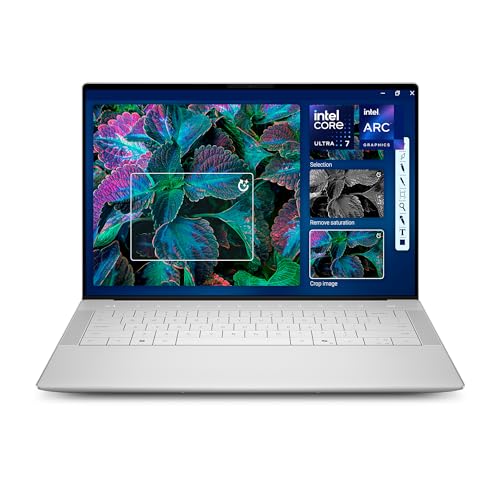
Evaluating dell xps 14 3 2k OLED touch laptop alternatives helps you find the right hardware balance for your daily workflow. The original Dell XPS 14 pairs a 14.5-inch 3.2K OLED touchscreen and a 48-120Hz variable refresh rate with an Intel Core Ultra 7 255H processor, 32GB of RAM, and a 1TB SSD. This configuration provides sharp visuals, fluid scrolling, and reliable productivity in a machined aluminum chassis weighing 3.79 pounds.
You might prefer a different option if you need specific hardware features not found on this model. Intense 3D workloads call for dedicated graphics instead of integrated Intel Arc graphics. You may also want a larger 16-inch display, a flexible 2-in-1 form factor, macOS, or greater memory capacity. The 6 alternatives in this guide were chosen because their specifications directly overlap with the original Dell XPS 14 while giving you distinct trade-offs in size, platform, and processing power.
How Each Alternative Compares
Apple MacBook Air 15-Inch M5
The Apple MacBook Air 15-Inch gives you a larger 15-inch non-touch display compared to the 14.5-inch 3.2K OLED touchscreen on the Dell XPS 14. You receive 24GB of unified memory rather than 32GB of RAM, while both laptops share a 1TB SSD. This model runs on Apple M5 silicon rather than the Intel Core Ultra 7 255H with Intel Arc Graphics. You trade away the Dell panel's 48-120Hz variable refresh rate and touch controls for a bigger screen area and all-day battery life. Pick this laptop if you prioritize a roomier screen over OLED touch features.
Apple MacBook Pro 14-inch M5 24GB 1TB
The Apple MacBook Pro 14-inch weighs 3.42 pounds and measures 0.61 inches thick, making it lighter and thinner than the 3.79-pound, 0.71-inch Dell XPS 14. It matches the Dell unit's 1TB SSD but steps down to 24GB of unified memory and a slightly smaller 14.2-inch non-touch display. You trade the Dell model's 3.2K OLED touch panel and Intel Core Ultra 7 255H chip for Apple M5 processing with high peak brightness. Pick this model if you want a lighter build for macOS creative workflows rather than a Windows touchscreen setup.
Apple MacBook Pro 16 M1 Max
The Apple MacBook Pro 16 provides double the memory and four times the storage of the Dell XPS 14, featuring 64GB of RAM and a 4TB SSD. Its 16-inch display offers more viewing area than the Dell model's 14.5-inch panel. However, you give up touch capability and the 3.2K OLED panel. At 4 pounds and 16 inches long, this laptop is heavier and larger than the 3.79-pound Dell chassis. Choose this system if you need maximum memory bandwidth and heavy storage capacity on macOS instead of a compact Windows touchscreen.
Acer Nitro V 16 RTX 5060 Gaming Laptop
The Acer Nitro V 16 features dedicated GeForce RTX 5060 graphics and a 165Hz refresh rate, outperforming the Dell XPS 14 integrated Intel Arc Graphics and 120Hz limit for 3D tasks. It also doubles local storage with a 2TB capacity. In return, you drop from a sharp 3.2K OLED touchscreen down to a standard WUXGA non-touch panel. You also accept a noticeably heavier 4.63-pound build compared to the 3.79-pound Dell laptop. Choose the Nitro V 16 if you need dedicated gaming graphics and extra drive space rather than a thin OLED creation setup.
Apple MacBook Pro 16 M4 Pro
The Apple MacBook Pro 16 provides an M4 Pro processor and an expansive 16-inch display with high sustained brightness. Compared to the Dell XPS 14, this machine scales up your screen real estate for demanding creative workflows. However, it cuts memory to 24GB RAM and storage to a 512GB SSD, compared to 32GB of RAM and 1TB SSD on the Dell model. It also weighs 4.72 pounds and lacks touch input. Pick this model if you need macOS performance on a large viewing canvas and do not require touchscreen controls or 1TB of base storage.
Microsoft Surface Pro 13-Inch 2-in-1
The Microsoft Surface Pro 13-Inch offers a 2-in-1 tablet form factor paired with an OLED touchscreen and efficient Snapdragon processing. Like the Dell XPS 14, it retains a 1TB SSD and an OLED touch surface. However, you downsize from a 14.5-inch screen to a 13-inch display and halve the system memory from 32GB down to 16GB of RAM. You also give up the Intel Core Ultra 7 255H processor. Pick the Surface Pro if you need ultraportable 2-in-1 flexibility for mobile tasks and can manage with half of the XPS 14 memory capacity.
| # | Product | Best for | Price |
|---|---|---|---|
| 1 | Dell XPS 14 3.2K OLED Touch Laptop Best overall | creators wanting high-resolution touch and 32GB RAM | |
| 2 | Apple MacBook Air 15-Inch M5 Also great | long battery life and portable multitasking | |
| 3 | Apple MacBook Pro 14-inch M5 24GB 1TB Best budget | compact macOS creative workflows | |
| 4 | Apple MacBook Pro 16 M1 Max Best premium | maximum memory and high-capacity local storage | |
| 5 | Acer Nitro V 16 RTX 5060 Gaming Laptop Best intel core 7 | high-refresh performance and large local storage | |
| 6 | Apple MacBook Pro 16 M4 Pro Also great | macOS creators needing high sustained brightness | |
| 7 | Microsoft Surface Pro 13-Inch 2-in-1 Best 13" | ultraportable 2-in-1 OLED productivity |
Dell XPS 14 3.2K OLED Touch Laptop
Best for: creators wanting high-resolution touch and 32GB RAM
- Processor
- Intel Core Ultra 7 255H
- RAM Capacity
- 32GB
- Storage Capacity
- 1TB SSD
- Screen Size
- 14.5-inch
- Graphics Card
- Intel Arc Graphics
- Display Resolution
- 3.2K
The Dell XPS 14 combines a 14.5-inch 3.2K OLED touch display with an Intel Core Ultra 7 255H processor. You get 32GB of RAM, a 1TB SSD, and integrated Intel Arc graphics inside an aluminum chassis. Its dynamic 48–120Hz refresh rate balances motion clarity with efficiency. It suits mobile professionals needing high-resolution touch input and substantial multitasking memory.
- 14.5-inch 3.2K OLED touch display with 48–120Hz variable refresh rate
- Intel Core Ultra 7 255H processor paired with 32GB RAM
- Machined aluminum and Gorilla Glass 3 construction
- 1TB solid-state storage capacity
- Relies on integrated Intel Arc graphics rather than a dedicated GPU
- Weighs 3.79 pounds, which is relatively heavy for a 14-inch laptop
- You need a sharp 3.2K OLED touch panel with a smooth 120Hz variable refresh rate.
- You run multitasking workflows that require 32GB of system memory.
- You prefer a machined aluminum and Gorilla Glass build.
- You require dedicated graphics hardware for heavy 3D rendering or gaming.
- You prioritize a sub-three-pound chassis for daily travel.
Verdict: Dell XPS 14 3.2K OLED Touch Laptop delivers strong processing power, ample memory, and a vivid 120Hz panel for daily creative productivity. It suits digital creators and multitasking professionals who work without discrete graphics hardware.

Apple MacBook Air 15-Inch M5
Best for: long battery life and portable multitasking
- Processor
- M5
- RAM Capacity
- 24GB
- Storage Capacity
- 1TB SSD
- Screen Size
- 15.3-inch
This laptop pairs Apple's M5 processor with 24GB of unified memory and a 1TB solid-state drive. You get a 15.3-inch Liquid Retina screen, up to 18 hours of battery life, and Wi-Fi 7. It gives you a larger display and extended unplugged run time, making it suitable if you prioritize quiet portability over touchscreen controls.
- Up to 18 hours of battery life
- 24GB unified memory and 1TB SSD storage
- 15.3-inch Liquid Retina display with 1 billion colors
- 12MP Center Stage camera with Desk View support
- No touchscreen support
- Limited to two Thunderbolt 4 ports
- You need up to 18 hours of battery life away from a charger.
- You want a 15.3-inch screen with 24GB unified memory for daily multitasking.
- You require a touchscreen or an OLED display panel.
- You need more than two Thunderbolt 4 ports for accessories.
Verdict: Apple MacBook Air 15-inch M5 fits users who prioritize a large non-touch display and all-day battery life over OLED touch functionality.

Apple MacBook Pro 14-inch M5 24GB 1TB
Best for: compact macOS creative workflows
- Processor
- Apple M5
- RAM Capacity
- 24GB
- Storage Capacity
- 1TB SSD
- Screen Size
- 14.2-inch
- Graphics Card
- 10-core GPU
- Dimensions
- 12.3 × 8.71 × 0.61 inches
This 14.2-inch Apple MacBook Pro runs on the M5 chip with a 10-core CPU and a 10-core GPU. It pairs 24GB of unified memory with a 1TB SSD and a Liquid Retina XDR display reaching 1,600 nits peak brightness. If you need portable workstation performance with high screen brightness instead of the XPS 14 OLED panel, this setup fits your creative workloads.
- Liquid Retina XDR screen with 1,600 nits peak brightness
- Apple M5 chip with 10-core CPU and 10-core GPU
- 24GB memory and 1TB SSD storage configuration
- 12MP Center Stage camera and six-speaker sound system
- No touch display capability listed in the specifications
- Smaller 14.2-inch viewing area than 15-inch and 16-inch alternatives
- You want a high-brightness display reaching up to 1,600 nits peak.
- You need 24GB of memory and 1TB of onboard storage.
- You use macOS software like Adobe Creative Cloud and Microsoft 365.
- You require a touchscreen interface for your workflow.
- You prefer a larger 15-inch or 16-inch display.
Verdict: Apple MacBook Pro 14.2-Inch M5 suits creative professionals who need high peak brightness and 24GB of unified memory in a 3.42-pound chassis. It delivers capable multi-core processing for macOS users moving away from Windows-based alternatives.

Apple MacBook Pro 16 M1 Max
Best for: maximum memory and high-capacity local storage
- Processor
- Apple M1 Max
- RAM Capacity
- 64GB
- Storage Capacity
- 4TB SSD
- Screen Size
- 16.2"
- Graphics Card
- 32-core GPU
- Refresh Rate
- 120Hz
This renewed Apple MacBook Pro 16-Inch offers a 16.2-inch Liquid Retina XDR display with a 120Hz refresh rate, an M1 Max chip, 64GB of RAM, and a 4TB SSD. If you need massive local storage, high memory capacity, and 1600 nits peak screen brightness for demanding creative workflows instead of a compact Windows laptop, this configuration fits.
- 64GB unified memory for heavy multitasking
- 4TB SSD provides expansive internal storage
- 16.2-inch display hits 1600 nits peak brightness with 120Hz ProMotion
- M1 Max chip includes 10-core CPU and 32-core GPU
- Lacks touchscreen support
- Weighs 4 pounds with a wide 16-inch chassis
- Renewed hardware rather than factory-new unit
- You need 64GB RAM and 4TB SSD storage for extensive creative libraries.
- You want a 120Hz Liquid Retina XDR panel reaching 1600 nits peak brightness.
- You use pro macOS software that leverages a 32-core GPU.
- You require a touchscreen interface.
- You want a lighter, travel-friendly 14-inch footprint.
- You avoid renewed or refurbished devices.
Verdict: Apple MacBook Pro 16-Inch M1 Max delivers heavy-duty memory bandwidth and 4TB of storage for demanding production tasks. It provides extreme workstation capacity on macOS for users who do not need compact touchscreen hardware.

Acer Nitro V 16 RTX 5060 Gaming Laptop
Best for: high-refresh performance and large local storage
- Processor
- Intel Core 7 240H
- RAM Capacity
- 32GB
- Storage Capacity
- 2TB SSD
- Screen Size
- 16-inch
- Graphics Card
- NVIDIA GeForce RTX 5060
- Display Resolution
- 1920 x 1200
This 16-inch laptop pairs an Intel Core 7 240H processor with an NVIDIA GeForce RTX 5060 GPU. You get a 165Hz WUXGA display with 400 nits brightness, alongside 32GB of DDR5 memory and a 2TB SSD. It suits users who prioritize fast refresh rates, discrete graphics, and high storage capacity over ultra-compact mobility or OLED panel technology.
- Intel Core 7 240H 10-core processor reaching 5.20 GHz boost
- NVIDIA GeForce RTX 5060 GPU with 8GB GDDR7 memory
- 165Hz refresh rate with 3ms response time and 400 nits brightness
- 32GB DDR5 RAM paired with a 2TB PCIe NVMe SSD
- 1920 x 1200 WUXGA resolution offers lower sharpness than 3.2K panels
- 4.63-pound weight adds bulk compared to smaller laptops
- Display does not support touch input
- You want an Intel Core 7 processor with dedicated RTX 5060 graphics.
- You need a 165Hz refresh rate for fast-motion clarity.
- You require 32GB RAM and 2TB of internal SSD storage.
- You need a sharp 3.2K or OLED display for color-critical work.
- You prefer a thin, lightweight machine under four pounds.
- You want a touchscreen for direct navigation or pen input.
Verdict: Acer Nitro V 16 Core 7 RTX 5060 Laptop delivers dedicated graphics, generous memory, and a fast 165Hz panel for users who prioritize 3D performance and 2TB of storage over ultraportable OLED designs.

Apple MacBook Pro 16 M4 Pro
Best for: macOS creators needing high sustained brightness
- Processor
- Apple M4 Pro
- RAM Capacity
- 24GB
- Storage Capacity
- 512GB SSD
- Screen Size
- 16-inch
- Dimensions
- 5.28 × 3.68 × 0.18 inches
- Weight
- 4.72 pounds
This Apple MacBook Pro pairs a 16.2-inch Liquid Retina XDR screen with Apple's M4 Pro processor and 24GB of memory. It delivers 1600 nits peak brightness and sustained 1000 nits for intensive creative work. If you prefer macOS, need substantial screen area over portability, and do not require a touchscreen, this configuration handles demanding production workloads reliably.
- Liquid Retina XDR display reaches 1600 nits peak brightness
- Apple M4 Pro chip paired with 24GB unified memory
- High 1,000,000:1 display contrast ratio
- 12MP Center Stage camera with six-speaker sound system
- Heavier chassis at 4.72 pounds
- Base internal storage limited to 512GB SSD
- No touchscreen support
- You want a large 16.2-inch screen with 1000 nits sustained brightness.
- You need 24GB of unified memory for compiling code and heavy multitasking.
- You rely on macOS software and integration with Apple hardware.
- You need a lightweight laptop under four pounds for daily transit.
- You require touchscreen capability for your workflow.
- You need more than 512GB of internal storage without relying on external drives.
Verdict: Apple MacBook Pro 16-Inch M4 Pro suits power users who prioritize sustained processing output and a high-brightness HDR panel over touch input. It trades the compact form factor of 14-inch laptops for a larger 16.2-inch canvas and robust battery-driven performance.

Microsoft Surface Pro 13-Inch 2-in-1
Best for: ultraportable 2-in-1 OLED productivity
- Processor
- Qualcomm Snapdragon X2 Elite
- RAM Capacity
- 16GB
- Storage Capacity
- 1TB SSD
- Screen Size
- 13-inch
- Form Factor
- 2-in-1
- Dimensions
- 12.1 × 8.98 × 1.97 inches
This 13-inch 2-in-1 Windows tablet runs on a 12-core Qualcomm Snapdragon X2 Elite processor with 16GB of RAM and a 1TB SSD. You get an OLED PixelSense touchscreen, a 165-degree kickstand, and two USB-C USB4 ports. It suits you if you need tablet versatility, up to 15.5 hours of battery life, and compact OLED performance.
- 13-inch OLED PixelSense touchscreen with HDR
- 12-core Qualcomm Snapdragon X2 Elite processor
- Up to 15.5 hours of battery life
- Built-in 165-degree fluid kickstand
- Smaller 13-inch screen size than 14-inch to 16-inch alternatives
- Only two USB-C USB4 ports with no dedicated display or media ports
- You want a 2-in-1 tablet form factor with a 165-degree kickstand.
- You need an OLED touchscreen driven by a Snapdragon X2 Elite processor.
- You prioritize portability with up to 15.5 hours of battery life.
- You prefer a traditional clamshell laptop with a larger display.
- You require built-in ports beyond dual USB-C connections.
Verdict: Microsoft Surface Pro 13-inch OLED 2-in-1 fits mobile professionals who want high-efficiency Snapdragon processing in a versatile tablet format with an OLED touchscreen.
Specifications side by side
| Spec | Dell XPS 14 3.2K OLED Touch Laptop | Apple MacBook Air 15-Inch M5 | Apple MacBook Pro 14-inch M5 24GB 1TB | Apple MacBook Pro 16 M1 Max | Acer Nitro V 16 RTX 5060 Gaming Laptop | Apple MacBook Pro 16 M4 Pro | Microsoft Surface Pro 13-Inch 2-in-1 |
|---|---|---|---|---|---|---|---|
| Processor | Intel Core Ultra 7 255H | M5 | Apple M5 | Apple M1 Max | Intel Core 7 240H | Apple M4 Pro | Qualcomm Snapdragon X2 Elite |
| RAM Capacity | 32GB | 24GB | 24GB | 64GB | 32GB | 24GB | 16GB |
| Storage Capacity | 1TB SSD | 1TB SSD | 1TB SSD | 4TB SSD | 2TB SSD | 512GB SSD | 1TB SSD |
| Screen Size | 14.5-inch | 15.3-inch | 14.2-inch | 16.2" | 16-inch | 16-inch | 13-inch |
| Graphics Card | Intel Arc Graphics | – | 10-core GPU | 32-core GPU | NVIDIA GeForce RTX 5060 | – | – |
| Display Resolution | 3.2K | – | – | – | 1920 x 1200 | – | – |
| Refresh Rate | 48-120Hz | – | – | 120Hz | 165Hz | – | – |
| Intended Use | – | – | – | – | Gaming | – | – |
| Form Factor | – | – | – | – | – | – | 2-in-1 |
| Resolution | – | – | – | – | WUXGA | – | – |
| Dimensions | 8.5 × 12.6 × 0.71 inches | – | 12.3 × 8.71 × 0.61 inches | 16 × 9.77 × 0.66 inches | 0.78 × 10.2 × 14 inches | 5.28 × 3.68 × 0.18 inches | 12.1 × 8.98 × 1.97 inches |
| Weight | 3.79 pounds | – | 3.42 pounds | 4 pounds | 4.63 pounds | 4.72 pounds | – |
| Size | XPS14|32GB|1TB | 24GB Unified Memory | 1TB SSD Storage | 24GB Memory | 1TB | 64GB RAM, 4TB SSD Storage | – | 24GB RAM, 512GB SSD Storage | 16 GB RAM, 1 TB SSD |
| Color | Platinum | Sky Blue | Space Black | Space Gray | Obsidian Black | Space Black | Platinum |
| Model | LDA14250-7667SLV-PUS | – | MDE34LL/A | Macbook Pro | – | MX2X3LL/A | EP2-65013 |
Frequently asked questions
Which alternative offers a touchscreen display like the Dell XPS 14?
The Microsoft Surface Pro 13-Inch provides an OLED touchscreen alternative. It features a versatile 2-in-1 form factor and runs on Snapdragon processing. You get 16GB of RAM and a 1TB SSD, making it a viable compact Windows alternative if you require touch interaction on a high-contrast panel.
Which laptop provides dedicated graphics for heavy visual tasks?
The Acer Nitro V 16 includes a dedicated GeForce RTX 5060 graphics card and an Intel Core 7 processor. Unlike the integrated graphics on the Dell XPS 14, this system accelerates 3D workloads. It also pairs a fast 165Hz WUXGA display with 2TB of internal storage.
What is the lightest alternative to the Dell XPS 14?
The Apple MacBook Pro 14-inch M5 is lighter, weighing 3.42 pounds compared to the 3.79-pound Dell XPS 14. It measures 0.61 inches thin and includes 24GB of unified memory with a 1TB SSD. This option gives you a compact footprint without sacrificing processing capability.
Which alternative offers the largest memory and storage capacity?
The Apple MacBook Pro 16 M1 Max delivers the highest capacity with 64GB of RAM and 4TB of SSD storage. That is double the memory and four times the storage capacity of the Dell XPS 14. It features a 16-inch display within a 4-pound chassis for demanding local workflows.
Can you find a 16-inch macOS laptop among these alternatives?
Yes, you can choose between two 16-inch options: the Apple MacBook Pro 16 M1 Max and the MacBook Pro 16 M4 Pro. The M4 Pro model features a 16.2-inch high-brightness HDR panel, 24GB of RAM, and a 512GB SSD, weighing 4.72 pounds for demanding production workloads.
How does the display refresh rate on the Acer Nitro V 16 compare to the Dell XPS 14?
The Acer Nitro V 16 features a 165Hz refresh rate on its WUXGA panel, which is faster than the 120Hz OLED screen on the Dell XPS 14. This higher refresh rate ensures smoother motion during fast-paced rendering and gaming, paired with its dedicated GeForce RTX 5060 graphics card.
See also
See the current listing on Amazon
Specifications on this page are read from the product listing. Scores are out of 10, based on listed specifications and buyer feedback.