As Amazon Associates, we earn from qualifying purchases. This means we may receive a small commission at no extra cost to you if you click through and make a purchase.

As an Amazon Associate we earn from qualifying purchases. Links on this page are affiliate links.
When evaluating the dell 15 laptop vs inspiron business laptop, you will find both share 15.6-inch Full HD displays, 16GB of RAM, and similar Carbon Black chassis weights around 3.66 to 3.67 pounds. The primary differences lie in processing, interface, and software. Model A includes an Intel Core Ultra 7 processor, DDR5 memory, and Windows 11 Home. Model B features an Intel Core i5 CPU, touchscreen functionality, and Windows 11 Pro.
Processor
Intel Core Ultra 7 255U
Intel Core i5-1334U
RAM Type
16GB DDR5
16GB DDR4
Internal Storage
1TB SSD
512GB SSD
Operating System
Windows 11 Home
Windows 11 Pro
Touchscreen
Non-Touch
Touchscreen
Choose the first if
- You need an Intel Core Ultra 7 processor paired with DDR5 memory.
- You prefer 1TB of internal SSD capacity in a single drive.
Choose the second if
- You want a touchscreen display for direct on-screen navigation.
- You require Windows 11 Pro for business and enterprise management features.
Verdict
Product A fits users who prioritize an Intel Core Ultra 7 processor, DDR5 memory, and 1TB of internal SSD capacity. Product B serves users who need Windows 11 Pro tools and touchscreen functionality. Your choice depends on whether you value internal storage and CPU architecture or touch input and operating system features.
Dell 15 Versus Inspiron Comparison
Processor performance
Edge: Dell 15 Core Ultra 7 Laptop
The Dell 15 Core Ultra 7 Laptop features an Intel Core Ultra 7 255U processor. In contrast, the Dell Inspiron 15.6" FHD Touchscreen Laptop runs on a 13th Generation Intel Core i5-1334U processor with 10 cores, 12 threads, 12MB Intel Smart Cache, and boost clocks up to 4.6GHz. Both processors handle daily office workloads and multitasking smoothly. The Core Ultra 7 platform gives you a newer generation processor design compared to the 13th Gen Core i5 setup. If your computing needs demand the processing architecture of the Core Ultra family, Product A holds the hardware edge here.
System memory type
Edge: Dell 15 Core Ultra 7 Laptop
Both machines provide 16GB of system memory, giving you ample room to juggle multiple browser tabs and background applications. However, the Dell 15 Core Ultra 7 Laptop uses faster DDR5 RAM. In comparison, the Dell Inspiron 15.6" FHD Touchscreen Laptop uses DDR4 memory. While 16GB on either computer delivers dependable capacity for productivity, DDR5 memory provides greater bandwidth and data transfer rates than DDR4. If you prioritize modern memory architecture to match recent processor standards, the Dell 15 Core Ultra 7 Laptop holds the edge with its inclusion of DDR5 RAM.
Display and touch interaction
Edge: Dell Inspiron 15.6" FHD Touchscreen Laptop
Screen dimensions match across both units with 15.6-inch Full HD panels. The Dell 15 Core Ultra 7 Laptop provides a standard 60Hz non-touch display. Meanwhile, the Dell Inspiron 15.6" FHD Touchscreen Laptop adds touch functionality alongside 178-degree wide-viewing angles. Touch input enables you to tap, pinch, zoom, and swipe through documents or web pages directly on the glass. If you prefer navigating your workspace via direct touch inputs or sharing your screen across broader viewing angles, the Dell Inspiron 15.6" FHD Touchscreen Laptop provides tangible interactive advantages over the non-touch display on Product A.
Storage capacity
Edge: Dell 15 Core Ultra 7 Laptop
The Dell 15 Core Ultra 7 Laptop comes equipped with a 1TB solid-state drive built entirely inside the system. The Dell Inspiron 15.6" FHD Touchscreen Laptop provides 512GB of internal M.2 NVMe solid-state storage, paired with an included 500GB portable external drive to reach around 1TB total. Having a single internal 1TB SSD means you do not need to carry, plug in, or manage files across an external storage drive. For integrated onboard space that keeps your operating system, local files, and applications on one drive, Product A delivers a cleaner setup.
Operating system
Edge: Dell Inspiron 15.6" FHD Touchscreen Laptop
Operating system configurations reflect the distinct intended environments for these two laptops. The Dell 15 Core Ultra 7 Laptop runs Windows 11 Home, targeting everyday personal and home computing tasks. The Dell Inspiron 15.6" FHD Touchscreen Laptop comes with Windows 11 Pro, geared toward business, commercial, and professional use. Windows 11 Pro adds built-in security features, including encryption, malware protection, and hardware-based isolation tools. If you manage networked office environments, need remote domain management, or require hardware-level data encryption out of the box, Product B offers the more capable operating system.
Choosing the Right Dell Laptop
Users needing fast internal storage and DDR5 memory
Our pick: Dell 15 Core Ultra 7 Laptop
You should pick this model if your workflow demands faster system memory and large internal storage. It provides a 1TB solid-state drive built into the chassis alongside fast DDR5 RAM. This setup gives you direct access to local storage for larger media libraries while keeping your primary setup self-contained.
Professionals requiring touchscreen navigation and enterprise operating systems
Our pick: Dell Inspiron 15.6" FHD Touchscreen Laptop
You should choose this laptop if you interact directly with your display. It features a Full HD touchscreen with 178-degree viewing angles. You also receive Windows 11 Pro, which brings hardware-based isolation and encryption tools designed for commercial environments, along with a 720p webcam and dual array digital microphones for calls.
Home users focused on newer Intel processor technology
Our pick: Dell 15 Core Ultra 7 Laptop
You should select this machine if your daily computing centers on modern processor architecture. It offers an Intel Core Ultra 7 255U chip paired with Intel Graphics and Windows 11 Home. Combined with 16GB of DDR5 memory, this setup delivers responsive performance for everyday browsing, personal productivity, and media consumption.

Dell 15 Core Ultra 7 Laptop
Best for: Everyday home productivity and local file storage
- Processor
- Intel Core Ultra 7 255U
- RAM Capacity
- 16GB DDR5
- Storage Capacity
- 1TB SSD
- Screen Size
- 15.6-inch
- Graphics Card
- Intel Graphics
- Refresh Rate
- 60Hz
This Dell 15 laptop features a 15.6-inch Full HD display, an Intel Core Ultra 7 255U processor, and 16GB of DDR5 RAM. With a 1TB solid-state drive and integrated Intel Graphics, it gives you responsive performance and generous storage for personal files. Weighing 3.67 pounds and running Windows 11 Home, it suits everyday home computing and productivity.
- Intel Core Ultra 7 255U processor with 16GB DDR5 RAM
- 1TB solid-state storage capacity
- Lightweight 3.67-pound chassis at 0.74 inches thick
- 15.6-inch Full HD screen
- Standard 60Hz display refresh rate
- Non-touch screen panel
- Integrated Intel Graphics rather than a dedicated GPU
- You need 1TB of fast solid-state storage for local documents and files.
- You want an Intel Core Ultra 7 processor paired with 16GB of DDR5 memory.
- You prefer a full-sized 15.6-inch laptop that weighs under 3.7 pounds.
- You require a touchscreen display for your daily workflow.
- You need a display panel faster than 60Hz.
- You want a dedicated graphics card for heavy 3D rendering.
Verdict: Dell 15 Core Ultra 7 15.6-Inch Laptop delivers balanced processing power and 1TB of storage for home office users. It fits anyone who wants a lightweight 15.6-inch machine without touchscreen hardware or dedicated graphics.
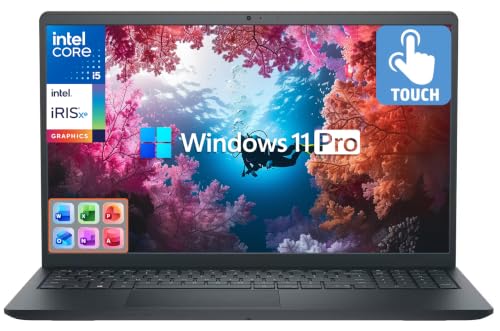
Dell Inspiron 15.6" FHD Touchscreen Laptop
Best for: touchscreen productivity and Windows 11 Pro workflows
- Processor
- Intel Core i5-1334U
- RAM Capacity
- 16GB
- Storage Capacity
- 512GB SSD
- Screen Size
- 15.6"
- Display Resolution
- FHD
- Operating System
- Windows 11 Pro
This Dell Inspiron 15 configuration gives you a 15.6-inch Full HD touchscreen paired with a 10-core Intel Core i5-1334U processor. It pairs 16GB of DDR4 RAM with 512GB of internal NVMe SSD storage and includes Windows 11 Pro. It suits professionals and students needing direct screen interaction, daily multitasking capacity, and business security features in a 3.66-pound package.
- 15.6-inch Full HD touchscreen with 178-degree viewing angles
- 10-core Intel Core i5-1334U processor reaches up to 4.6GHz boost
- Preinstalled Windows 11 Pro operating system for business use
- Includes a portable 500GB external drive alongside the internal SSD
- Internal drive capacity limited to 512GB SSD
- Uses DDR4 RAM rather than DDR5 memory
- Integrated webcam limited to 720p resolution
- You want a 15.6-inch touchscreen for tap, swipe, and zoom navigation.
- You require Windows 11 Pro features for business security and isolation.
- You do standard productivity tasks using a 10-core Intel Core i5 processor.
- You need 1TB of built-in internal SSD storage without relying on external drives.
- You require faster DDR5 memory speeds for demanding workloads.
- You want a higher-resolution 1080p webcam for video conferences.
Verdict: Dell Inspiron 15 Touchscreen Laptop provides responsive touch input and Windows 11 Pro security tools for office users and students managing daily administrative workloads.
Specifications side by side
| Spec | Dell 15 Core Ultra 7 Laptop | Dell Inspiron 15.6" FHD Touchscreen Laptop |
|---|---|---|
| Processor | Intel Core Ultra 7 255U | Intel Core i5-1334U |
| RAM Capacity | 16GB DDR5 | 16GB |
| Storage Capacity | 1TB SSD | 512GB SSD |
| Screen Size | 15.6-inch | 15.6" |
| Graphics Card | Intel Graphics | – |
| Display Resolution | – | FHD |
| Refresh Rate | 60Hz | – |
| Operating System | Windows 11 Home | Windows 11 Pro |
| Intended Use | Home | Business |
| Resolution | Full HD | Full HD |
| Dimensions | 9.27 × 14.1 × 0.74 inches | 14.1 × 9.27 × 0.75 inches |
| Weight | 3.67 pounds | 3.66 pounds |
| Size | 15.6 inches | 16GB RAM + 1TB Storage |
| Color | Carbon Black | Carbon Black |
| Model | LD15260-7625BLK-PUS | 2025 Dell Inspiron 15 |
Frequently asked questions
Does the Dell 15 Core Ultra 7 Laptop have a touchscreen display?
No, the Dell 15 Core Ultra 7 Laptop does not feature a touchscreen display. It comes with a non-touch 15.6-inch Full HD panel intended for standard home computing tasks. If your daily workflow requires direct finger input on the screen, you should choose the Dell Inspiron 15.6-inch FHD Touchscreen Laptop instead.
Which operating system comes installed on the Dell Inspiron business laptop?
The Dell Inspiron business laptop comes configured with Windows 11 Pro. This operating system edition provides built-in enterprise management features and specialized security tools tailored for business environments. In comparison, you receive the standard Windows 11 Home platform when configuring the Dell 15 Core Ultra 7 Laptop for everyday consumer tasks.
How do the physical dimensions and weights of these Dell laptops compare?
The Dell 15 Core Ultra 7 measures 14.1 by 9.27 inches with a 0.74-inch thickness and weighs 3.67 pounds. Meanwhile, the Dell Inspiron 15 measures 14.1 by 9.27 inches, stands 0.75 inches tall, and weighs 3.66 pounds. You will find almost identical physical footprints across both models.
What is the primary intended use for each Dell laptop model?
Dell targets the Dell 15 Core Ultra 7 Laptop for home use and personal productivity. In contrast, the manufacturer designates the Dell Inspiron 15.6-inch laptop for business deployments. You will see this classification reflected in the operating system, with the Inspiron offering Windows 11 Pro and the home model using Windows 11 Home.
Do either of these Dell laptops include dedicated graphics hardware?
Neither model includes a dedicated graphics card. The Dell 15 Core Ultra 7 Laptop relies on integrated graphics inside its processor rather than a discrete GPU. Likewise, the Dell Inspiron 15 business configuration uses integrated processing components to run its 15.6-inch Full HD display without standalone graphics hardware.
What color finish is used on these Dell 15-inch laptops?
Both laptops come in Dell's Carbon Black finish. This dark color gives each chassis a clean exterior look suitable for your home office or business tasks. Because each model utilizes this identical color scheme, you get a matching dark finish regardless of whether you choose the home or business configuration.
See also
See the current listing on Amazon
Specifications on this page are read from the product listing. Scores are out of 10, based on listed specifications and buyer feedback.


