As Amazon Associates, we earn from qualifying purchases. This means we may receive a small commission at no extra cost to you if you click through and make a purchase.

As an Amazon Associate we earn from qualifying purchases. Links on this page are affiliate links.
You might be searching for asus vivobook 16 laptop alternatives if you need distinct hardware capabilities for your daily workload. The original ASUS Vivobook 16 handles standard tasks well with its AMD Ryzen AI 5 340 processor, 16GB of system memory, and 512GB SSD. Its 16-inch WUXGA display provides a 1920 x 1200 resolution at 60Hz and 300 nits of brightness, while the 3.88-pound chassis includes a backlit keyboard with a numeric keypad.
However, you may require specifications tailored to heavier computational tasks. You might want dedicated graphics like a GeForce RTX 5060 or RTX 5070, higher screen refresh rates of 165Hz or 180Hz for gaming, a flexible 2-in-1 convertible form factor, or Windows 11 Pro. These 6 alternatives were selected because their core specifications overlap with the Vivobook, giving you comparable 16-inch displays alongside different processors, graphics capabilities, and chassis designs.
Comparing the Vivobook 16 Alternatives
Acer Nitro V 16S 16-Inch RTX 5060 Gaming Laptop
The Acer Nitro V 16S upgrades performance with a dedicated GeForce RTX 5060 graphics card and an AMD Ryzen 7 processor. You also receive 32GB of memory and a 1TB solid-state drive, doubling the capacities found on the ASUS Vivobook 16. Its 16-inch WUXGA panel increases screen fluidity to 180Hz, well above the Vivobook’s 60Hz limit. You trade off portability for this power, as the Nitro V 16S weighs 4.63 pounds and measures 0.79 inches thick, compared to the 3.88-pound, 0.7-inch Vivobook chassis. Pick this model if you need dedicated gaming graphics and higher memory bandwidth.
Acer Nitro 16S 16" RTX 5060 Gaming Laptop
The Acer Nitro 16S provides dedicated GeForce RTX 5060 graphics and a 1TB storage drive, whereas the ASUS Vivobook 16 relies on integrated AMD Radeon graphics and a 512GB SSD. Gamers gain a 180Hz refresh rate on the 16-inch WUXGA display, offering sharper motion than the Vivobook’s standard 60Hz screen. In exchange, you sacrifice lightweight handling. The Nitro 16S weighs 4.81 pounds and has a 0.83-inch thickness, making it bulkier than the 3.88-pound, 0.7-inch Vivobook. Choose this laptop if your priority is running graphics-heavy titles and storing larger games on a faster screen.
Lenovo Yoga 7i 16" 2-in-1 Laptop
The Lenovo Yoga 7i replaces the traditional clamshell body of the ASUS Vivobook 16 with a flexible 2-in-1 convertible build. Its 16-inch WUXGA touchscreen enables direct pen and finger input, which the standard Vivobook screen cannot support. It also features a thinner 0.62-inch profile compared to the 0.7-inch Vivobook frame. However, you give up the AMD Ryzen AI platform and carry a heavier 4.22-pound machine, whereas the Vivobook weighs 3.88 pounds. Pick the Yoga 7i if you need versatile tablet modes, touchscreen sketching, and Series 2 Intel processing for flexible home or office use.
Lenovo ThinkPad 16 Core Ultra 7 Laptop
The Lenovo ThinkPad T16 Gen 4 brings enterprise utility by providing Windows 11 Pro and 32GB of DDR5 memory, doubling the 16GB RAM found in the ASUS Vivobook 16. It also swaps the Ryzen AI 5 processor for an Intel Core Ultra 7 chip. On the other hand, you lose mobility. The ThinkPad measures 3 inches thick and weighs 6 pounds, making it far bulkier than the 0.7-inch, 3.88-pound Vivobook. You also keep an integrated graphics setup and a 512GB SSD. Choose the ThinkPad if you manage corporate IT environments and need large memory bandwidth.
GIGABYTE Gaming A16 16" RTX 5070 Laptop
The GIGABYTE Gaming A16 delivers higher graphical performance than the ASUS Vivobook 16 by utilizing an Intel Core i7 processor and a dedicated GeForce RTX 5070 graphics card. Its 16-inch WUXGA screen also refreshes at 165Hz, presenting faster frame rates than the Vivobook's 60Hz display. However, this gaming setup compromises on portability. The laptop measures 0.91 inches thick and weighs 4.85 pounds, noticeably heavier than the 3.88-pound, 0.7-inch Vivobook. It also lacks AMD's dedicated 50 TOPS XDNA NPU. Pick the GIGABYTE A16 if you demand dedicated RTX rendering power for gaming and creative workloads over compact travel convenience.
ASUS Vivobook 16 Ryzen 5 Laptop
This ASUS Vivobook 16 configuration uses a standard AMD Ryzen 5 processor and 8GB of memory, whereas the original model includes a Ryzen AI 5 340 chip and 16GB of RAM. It gives up the 50 TOPS XDNA neural processing unit and faster multi-application headroom. Physical dimensions are slightly larger as well, weighing 4.14 pounds with a 0.78-inch thickness, compared to the 3.88-pound, 0.7-inch original. It retains the same 16-inch WUXGA 16:10 display for document viewing alongside an HDMI 1.4 port. Choose this version if your everyday computing involves basic web tasks and spreadsheets rather than heavy multitasking.
| # | Product | Best for | Price |
|---|---|---|---|
| 1 | ASUS Vivobook 16 Ryzen AI 5 Laptop Best overall | everyday productivity and AI-assisted multitasking | |
| 2 | Acer Nitro V 16S 16-Inch RTX 5060 Gaming Laptop Best amd ryzen 7 | gamers and creators wanting dedicated graphics | |
| 3 | Acer Nitro 16S 16" RTX 5060 Gaming Laptop Best premium | gamers wanting dedicated graphics and 180Hz displays | |
| 4 | Lenovo Yoga 7i 16" 2-in-1 Laptop Best budget | large-screen convertible productivity and touch input | |
| 5 | Lenovo ThinkPad 16 Core Ultra 7 Laptop Best windows 11 pro | business multitasking with Windows 11 Pro | |
| 6 | GIGABYTE Gaming A16 16" RTX 5070 Laptop Best intel core i7 | gamers and creators wanting dedicated RTX graphics | |
| 7 | ASUS Vivobook 16 Ryzen 5 Laptop Best amd ryzen 5 | everyday home office tasks and spreadsheet work |

ASUS Vivobook 16 Ryzen AI 5 Laptop
Best for: everyday productivity and AI-assisted multitasking
- Processor
- AMD Ryzen AI 5 340
- RAM Capacity
- 16GB
- Storage Capacity
- 512GB SSD
- Screen Size
- 16-inch
- Graphics Card
- AMD Radeon Graphics
- Display Resolution
- 1920 x 1200
This 16-inch laptop features an AMD Ryzen AI 5 340 processor paired with integrated AMD Radeon Graphics and a 50 TOPS NPU. You get 16GB of memory, a 512GB solid-state drive, and an 8-hour battery that charges to full in 80 minutes. The 1920 x 1200 display runs at 60Hz. It suits your everyday multitasking and productivity workloads.
- AMD Ryzen AI 5 340 processor with up to 50 TOPS NPU
- 16:10 WUXGA display with 300-nit brightness
- Fast battery recharging to 100% in 80 minutes
- Backlit keyboard includes a dedicated numeric keypad
- Screen refresh rate capped at standard 60Hz
- Integrated Radeon graphics instead of a discrete GPU
- You need a dedicated numeric keypad and backlit keyboard for typing.
- You run productivity tasks requiring local NPU acceleration up to 50 TOPS.
- You want a 16-inch 16:10 workspace for viewing documents and spreadsheets.
- You need a high-refresh display beyond 60Hz for fast-paced motion.
- You require a discrete graphics card for heavy 3D rendering workloads.
Verdict: ASUS Vivobook 16 Ryzen AI 5 Laptop delivers dedicated AI processing and a tall 16:10 workspace for office workers and students handling daily spreadsheets and documents.

Acer Nitro V 16S 16-Inch RTX 5060 Gaming Laptop
Best for: gamers and creators wanting dedicated graphics
- Processor
- AMD Ryzen 7 260
- RAM Capacity
- 32GB
- Storage Capacity
- 1TB SSD
- Screen Size
- 16"
- Graphics Card
- NVIDIA GeForce RTX 5060
- Display Resolution
- 1920 x 1200
This 16-inch gaming laptop pairs an AMD Ryzen 7 260 processor with a dedicated NVIDIA GeForce RTX 5060 graphics card. You get a fast 180Hz WUXGA screen with 100% sRGB color coverage, alongside 32GB of DDR5 memory and a 1TB solid-state drive. It suits you if you need dedicated graphics horsepower for gaming or creative workloads beyond basic office tasks.
- NVIDIA GeForce RTX 5060 Laptop GPU with DLSS 4 support
- 16-inch 180Hz WUXGA display with 100% sRGB color coverage
- 32GB DDR5 5600MHz memory and 1TB PCIe Gen 4 SSD
- Extra open M.2 PCIe slot for storage expansion
- System memory is capped at a 32GB maximum
- Weighs 4.63 pounds, adding bulk compared to standard productivity machines
- You want dedicated RTX 5060 graphics and a 180Hz refresh rate for gaming.
- You need 32GB of system memory out of the box with room for a second SSD.
- You prioritize color accuracy with full 100% sRGB coverage on a 16-inch screen.
- You want an ultra-lightweight laptop under 4 pounds for daily travel.
- You plan to upgrade system memory past 32GB down the road.
Verdict: Acer Nitro V 16S 16-Inch Ryzen 7 Laptop gives you dedicated RTX 5060 graphics and a fast 180Hz screen for demanding games and creative software.

Acer Nitro 16S 16" RTX 5060 Gaming Laptop
Best for: gamers wanting dedicated graphics and 180Hz displays
- Processor
- AMD Ryzen AI 7 350
- RAM Capacity
- 16GB
- Storage Capacity
- 1TB Gen 4 SSD
- Screen Size
- 16"
- Graphics Card
- NVIDIA GeForce RTX 5060 Laptop GPU
- Display Resolution
- 1920 x 1200
This 16-inch gaming laptop pairs an AMD Ryzen AI 7 350 eight-core processor with a dedicated NVIDIA GeForce RTX 5060 graphics card. You get a fast 180Hz WUXGA display with 400 nits brightness and full 100% sRGB coverage. It suits you if you need dedicated graphical power and high display refresh rates beyond typical productivity machines.
- NVIDIA GeForce RTX 5060 dedicated graphics
- 180Hz refresh rate with 3ms response time
- 400-nit panel with 100% sRGB color coverage
- AMD Ryzen AI 7 350 processor with 8 cores
- Heavier chassis at 4.81 pounds
- Display resolution limited to 1920 x 1200
- You play fast-paced games that benefit from a 180Hz refresh rate.
- You need dedicated GeForce RTX 5060 graphics performance.
- You work in color-managed tasks requiring 100% sRGB.
- You prioritize an ultralight chassis under 4 pounds.
- You require more than 16GB of system memory.
Verdict: Acer Nitro 16S RTX 5060 Gaming Laptop suits users who require dedicated GPU performance, high 180Hz motion clarity, and 1TB of Gen 4 storage.
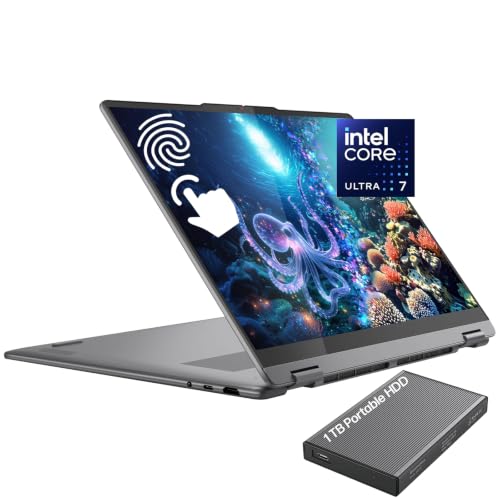
Lenovo Yoga 7i 16" 2-in-1 Laptop
Best for: large-screen convertible productivity and touch input
- Processor
- Intel Core Ultra 7 256V
- RAM Capacity
- 16GB
- Storage Capacity
- 1TB SSD
- Screen Size
- 16"
- Graphics Card
- Intel Arc 140V
- Display Resolution
- 1920 x 1200
The Lenovo Yoga 7i 16" Touchscreen 2-in-1 pairs an Intel Core Ultra 7 256V processor with a 360-degree convertible hinge. You get a 16-inch 1920 x 1200 touchscreen display, 16GB of system memory, and a 1TB SSD. Two Thunderbolt 4 ports handle high-speed data transfer. It suits you if you need tablet versatility alongside standard laptop productivity.
- 360-degree hinge converts between laptop and tablet modes
- Intel Core Ultra 7 256V processor with 47 TOPS NPU
- Dual Thunderbolt 4 ports and Wi-Fi 7 connectivity
- 70WHr battery with Rapid Charge Express support
- HDMI 1.4b port limits external video output bandwidth
- 300 nits peak display brightness limits outdoor visibility
- At 4.22 pounds, tablet mode feels heavy in hand
- You want a 16-inch convertible touchscreen that folds into a tablet.
- You need dual Thunderbolt 4 ports for docks and high-speed accessories.
- You run local AI tasks using an integrated 47 TOPS NPU.
- You require dedicated graphics hardware for heavy gaming workloads.
- You need a brighter display than 300 nits for direct sun use.
Verdict: Lenovo Yoga 7i 16" Touchscreen 2-in-1 gives flexible convertibility and Series 2 Intel processing to users who split time between tablet sketching and office productivity. It replaces standard clamshell laptops for anyone wanting touch input without losing full keyboard utility.

Lenovo ThinkPad 16 Core Ultra 7 Laptop
Best for: business multitasking with Windows 11 Pro
- Processor
- Intel Core Ultra 7 258V
- RAM Capacity
- 32GB LPDDR5X
- Storage Capacity
- 512GB SSD
- Screen Size
- 16"
- Graphics Card
- Intel HD Graphics
- Display Resolution
- 1920 x 1200
The Lenovo ThinkPad 16 Windows 11 Pro Laptop gives you an enterprise operating system paired with an Intel Core Ultra 7 258V processor and 32GB of soldered LPDDR5X memory. Its 16-inch 1920×1200 IPS screen delivers everyday workspace room, while Thunderbolt connectivity supports desktop accessories. It suits you if you need heavy multitasking and built-in security features for business tasks.
- 32GB soldered LPDDR5X memory for multitasking
- Windows 11 Pro operating system installed
- Thunderbolt, USB-C, and USB-A connectivity
- Built-in fingerprint reader and backlit keyboard
- Weighs 6 pounds, making it heavy to carry
- Integrated Intel graphics rather than a dedicated GPU
- 512GB SSD offers less internal storage than 1TB options
- You need Windows 11 Pro management and security features.
- You want 32GB of high-speed memory for running multiple applications.
- You rely on Thunderbolt ports for fast peripheral connections.
- You need dedicated graphics hardware for 3D rendering or gaming.
- You want a lightweight machine under 5 pounds for daily commuting.
- You require more than 512GB of base internal storage.
Verdict: Lenovo ThinkPad 16 Windows 11 Pro Laptop gives office professionals and remote workers substantial 32GB memory and enterprise software tools on a 16-inch IPS screen. It fits productivity tasks where integrated Intel graphics and a 512GB drive meet your operational requirements.

GIGABYTE Gaming A16 16" RTX 5070 Laptop
Best for: gamers and creators wanting dedicated RTX graphics
- Processor
- Intel Core i7-13620H
- RAM Capacity
- 32GB
- Storage Capacity
- 1TB SSD
- Screen Size
- 16"
- Graphics Card
- NVIDIA GeForce RTX 5070
- Display Resolution
- 1920×1200
If you want dedicated graphics in a 16-inch chassis, this laptop pairs an Intel Core i7-13620H processor with an NVIDIA GeForce RTX 5070 GPU. You get 32GB of DDR5 memory, a 1TB SSD, and a 165Hz WUXGA display. It suits you if you need strong 3D graphics and high-refresh gaming beyond standard productivity notebooks.
- NVIDIA GeForce RTX 5070 laptop GPU
- 165Hz refresh rate on a 16-inch WUXGA display
- 32GB DDR5 system memory and 1TB SSD storage
- 180-degree lay-flat hinge design
- Carries a heavier 4.85-pound weight
- Display resolution caps at 1920×1200
- You need dedicated NVIDIA RTX 5070 graphics for 3D tasks or gaming.
- You want a fast 165Hz refresh rate for fluid motion.
- You run heavy multitasking that benefits from 32GB of DDR5 RAM.
- You need a lightweight laptop for travel, as this model weighs 4.85 pounds.
- You require a display resolution sharper than 1920×1200.
Verdict: GIGABYTE Gaming A16 16-Inch Intel i7 Laptop delivers high-tier RTX 5070 graphics and a 165Hz screen for users prioritizing computing and gaming performance over lightweight travel.

ASUS Vivobook 16 Ryzen 5 Laptop
Best for: everyday home office tasks and spreadsheet work
- Processor
- AMD Ryzen 5 150
- RAM Capacity
- 8 GB
- Storage Capacity
- 512 GB SSD
- Screen Size
- 16”
- Display Resolution
- 1920 x 1200
- Operating System
- Windows 11 Home
This ASUS Vivobook 16 gives you a 16-inch 1920 x 1200 display with a 16:10 aspect ratio and 300 nits brightness. It runs on an AMD Ryzen 5 150 processor paired with 8 GB of RAM and a 512 GB SSD. Built for everyday computing, it suits you if you need a full-size workspace, a numeric keypad, and standard office connectivity.
- 16-inch WUXGA display with 16:10 aspect ratio and 300 nits brightness
- Fast charging reaches 60% battery capacity in 49 minutes
- 180-degree lay-flat hinge allows easy screen sharing
- Features Wi-Fi 6 and Bluetooth 5.4 wireless connectivity
- Equipped with 8 GB RAM, which limits heavy multitasking
- Uses older HDMI 1.4 standard for external monitor output
- You need a 16-inch screen with a dedicated numeric keypad for daily office tasks.
- You want fast battery charging to reach 60% capacity in under 50 minutes.
- You run heavy multitasking workloads that demand more than 8 GB of memory.
- You require modern high-refresh external display outputs beyond HDMI 1.4.
Verdict: ASUS Vivobook 16 Ryzen 5 Laptop provides a balanced 16:10 workspace and dependable Ryzen 5 processing for students and office workers handling everyday productivity tasks. Its 8 GB memory configuration and HDMI 1.4 port make it strictly suited for standard home or office workloads.
Specifications side by side
| Spec | ASUS Vivobook 16 Ryzen AI 5 Laptop | Acer Nitro V 16S 16-Inch RTX 5060 Gaming Laptop | Acer Nitro 16S 16" RTX 5060 Gaming Laptop | Lenovo Yoga 7i 16" 2-in-1 Laptop | Lenovo ThinkPad 16 Core Ultra 7 Laptop | GIGABYTE Gaming A16 16" RTX 5070 Laptop | ASUS Vivobook 16 Ryzen 5 Laptop |
|---|---|---|---|---|---|---|---|
| Processor | AMD Ryzen AI 5 340 | AMD Ryzen 7 260 | AMD Ryzen AI 7 350 | Intel Core Ultra 7 256V | Intel Core Ultra 7 258V | Intel Core i7-13620H | AMD Ryzen 5 150 |
| RAM Capacity | 16GB | 32GB | 16GB | 16GB | 32GB LPDDR5X | 32GB | 8 GB |
| Storage Capacity | 512GB SSD | 1TB SSD | 1TB Gen 4 SSD | 1TB SSD | 512GB SSD | 1TB SSD | 512 GB SSD |
| Screen Size | 16-inch | 16" | 16" | 16" | 16" | 16" | 16” |
| Graphics Card | AMD Radeon Graphics | NVIDIA GeForce RTX 5060 | NVIDIA GeForce RTX 5060 Laptop GPU | Intel Arc 140V | Intel HD Graphics | NVIDIA GeForce RTX 5070 | – |
| Display Resolution | 1920 x 1200 | 1920 x 1200 | 1920 x 1200 | 1920 x 1200 | 1920 x 1200 | 1920×1200 | 1920 x 1200 |
| Refresh Rate | 60Hz | 180Hz | 180Hz | – | – | 165Hz | – |
| Operating System | – | – | – | Windows 11 Home | Windows 11 Pro | Windows 11 Home | Windows 11 Home |
| Intended Use | – | Gaming | Gaming | Home | – | Home, Gaming | Home |
| Form Factor | – | – | – | 2-in-1 | – | – | – |
| Resolution | WUXGA | WUXGA | WUXGA | WUXGA | WUXGA | WUXGA | WUXGA |
| Dimensions | 14.1 × 0.7 × 9.87 inches | 14.1 × 0.79 × 10.4 inches | 14.1 × 0.83 × 10.9 inches | 14.2 × 0.62 × 10.1 inches | 17 × 3 × 11 inches | 14.1 × 0.91 × 10.3 inches | 14.1 × 0.78 × 9.82 inches |
| Weight | 3.88 pounds | 4.63 pounds | 4.81 pounds | 4.22 pounds | 6 pounds | 4.85 pounds | 4.14 pounds |
| Color | Quiet Blue | Black | Black | Luna Grey | Black | Black Steel | Indie Black |
| Model | M1607KA-DS54 | ANV16S-41-R2AJ | AN16S-61-R7YL | 83JT | Lenovo ThinkPad T16 Gen 4 | GAMING A16 CWHI3US864SH | M1605NAQ-ES51 |
| Size | – | 32GB 1TB | – | – | 32GB DDR5 | 512GB SSD | – | – |
Frequently asked questions
Which ASUS Vivobook 16 alternative offers a 2-in-1 touchscreen display?
The Lenovo Yoga 7i 16-inch laptop provides a convertible touchscreen display. It runs Windows 11 Home with Series 2 Intel processing. The chassis measures 0.62 inches thick and weighs 4.22 pounds, giving you tablet versatility alongside a physical keyboard. Its 16-inch screen maintains a standard WUXGA resolution.
Which alternative is best suited for professional business environments?
The Lenovo ThinkPad 16 suits business environments because it provides you with Windows 11 Pro and 32GB of DDR5 memory. It includes a 512GB solid-state drive and an integrated Intel setup on a 16-inch WUXGA IPS screen. The system weighs 6 pounds and handles your enterprise workflows.
What is the lightest 16-inch laptop among these alternatives?
The ASUS Vivobook 16 Ryzen AI 5 laptop is the lightest option at 3.88 pounds. Its chassis measures 0.7 inches thick, 9.87 inches high, and 14.1 inches long. You receive a portable 16-inch WUXGA workspace designed for mobile productivity without adding excess weight to your bag.
Which Vivobook 16 alternative provides the highest dedicated graphics performance?
The GIGABYTE Gaming A16 provides the highest graphics tier with its dedicated GeForce RTX 5070 graphics card. It pairs an Intel Core i7 processor with a 165Hz WUXGA screen for smooth motion. The laptop weighs 4.85 pounds and gives you Windows 11 Home for daily tasks.
Do any 16-inch gaming alternatives feature a 180Hz refresh rate display?
Both the Acer Nitro V 16S and Acer Nitro 16S feature 180Hz WUXGA screens. Each laptop includes a dedicated GeForce RTX 5060 graphics card for demanding visuals. The Nitro V 16S weighs 4.63 pounds, while the Nitro 16S weighs 4.81 pounds and gives you 1TB of Gen 4 storage.
How does the ASUS Vivobook 16 Ryzen 5 configuration differ from other productivity models?
The ASUS Vivobook 16 Ryzen 5 model uses an 8 GB memory configuration and includes an HDMI 1.4 port for standard setups. It runs Windows 11 Home on an AMD Ryzen 5 processor with a 16-inch WUXGA screen. At 4.14 pounds, it gives you reliable performance for basic office work.
See also
See the current listing on Amazon
Specifications on this page are read from the product listing. Scores are out of 10, based on listed specifications and buyer feedback.


