As Amazon Associates, we earn from qualifying purchases. This means we may receive a small commission at no extra cost to you if you click through and make a purchase.

As an Amazon Associate we earn from qualifying purchases. Links on this page are affiliate links.
Evaluating asus rog strix g16 gaming laptop alternatives helps you find hardware that matches your exact performance needs. The ASUS ROG Strix G16 provides high processing power with its 16-core AMD Ryzen 9 9955HX processor, 1TB PCIe Gen 4 SSD, and 16-inch 144Hz WUXGA display. However, its 7-pound weight reduces portability, and the NVIDIA GeForce RTX 5050 graphics card or 16GB RAM configuration may not suit heavier gaming or graphics workloads. You might also want a different brand, a lighter chassis, or larger storage.
The 6 alternatives in this guide were chosen because their specifications overlap with the original model. Each laptop shares a 16-inch display and gaming design, but offers distinct differences such as 165Hz refresh rates, NVIDIA GeForce RTX 5060 or RTX 5070 graphics, 32GB RAM, or chassis weights under five pounds. Reviewing these specifications lets you select the best hardware balance for your setup.
Comparing ROG Strix G16 Alternatives
Acer Nitro V 16 RTX 5060 Gaming Laptop
The Acer Nitro V 16 upgrades the graphics card to an NVIDIA GeForce RTX 5060 and doubles the system memory to 32GB RAM compared to the 16GB on the ASUS ROG Strix G16. Its 16-inch WUXGA panel increases the refresh rate to 165Hz over the ROG Strix model’s 144Hz. It is also significantly lighter at 4.63 pounds versus 7 pounds. You give up the 16-core AMD Ryzen 9 9955HX processor for an Intel Core 7. Choose this configuration if you want faster display speeds and double the RAM for gaming.
GIGABYTE Gaming A16 16" RTX 5070 Laptop
The GIGABYTE Gaming A16 equips an NVIDIA GeForce RTX 5070 graphics card and 32GB of RAM, both clear upgrades over the RTX 5050 and 16GB on the ASUS ROG Strix G16. It also weighs 4.85 pounds, making it over two pounds lighter than the 7-pound ASUS chassis. You sacrifice the high multicore ceiling of the AMD Ryzen 9 9955HX chip by switching to an Intel Core i7 processor. Pick this machine if you prioritize stronger gaming GPU performance and higher memory capacity over heavy CPU computing power.
ASUS V16 16-inch RTX 5060 Laptop
The ASUS V16 provides an upgraded NVIDIA GeForce RTX 5060 GPU and 32GB of system RAM, doubling the 16GB capacity of the ASUS ROG Strix G16. At 4.3 pounds with a 0.87-inch thickness, it is much easier to transport than the 7-pound, 0.96-inch ROG Strix. However, you trade away the top-tier 16-core AMD Ryzen 9 9955HX processor for an Intel Core 7 CPU. Select this model if you need a lighter build with extra memory for multitasking and a stronger graphics processor for everyday gaming.
Acer Nitro V 16" RTX 5060
The Acer Nitro V 16 doubles internal storage to a 2TB SSD over the 1TB drive on the ASUS ROG Strix G16. It also upgrades the graphics card to an NVIDIA GeForce RTX 5060 and raises screen refresh rates from 144Hz to 165Hz. At 4.63 pounds, it cuts down on carrying weight compared to the 7-pound ROG Strix. You give up the Ryzen 9 9955HX processor in favor of an Intel Core 7 chip. Pick this laptop if you want double the storage space and higher refresh rates.
Acer Nitro V 16 RTX 5060 Gaming Laptop
The Acer Nitro V 16 matches the ASUS ROG Strix G16 with 16GB of RAM and a 1TB SSD, but upgrades the GPU to an NVIDIA GeForce RTX 5060. Weighing 4.63 pounds with a 0.78-inch profile, it is far more portable than the 7-pound, 0.96-inch ROG Strix. You give up the Zen 5 processing power of the 16-core AMD Ryzen 9 9955HX by opting for an Intel Core 7 processor. You should choose this unit if you prefer a lighter gaming laptop with a stronger GPU while keeping standard storage.
ASUS ROG Strix G16 16-inch Gaming Laptop
This ASUS ROG Strix G16 variant features an upgraded NVIDIA GeForce RTX 5060 GPU and weighs 5.84 pounds, reducing overall bulk compared to the 7-pound original model. Both share the Eclipse Gray styling, but this version adopts a standard Full HD display rather than the taller 16:10 WUXGA screen found on the original. It also foregoes the 16-core Ryzen 9 9955HX processor. Choose this model if you want the dedicated cooling chassis of the ROG Strix series paired with improved RTX 5060 graphics performance for standard 1080p gaming.
| # | Product | Best for | Price |
|---|---|---|---|
| 1 | ASUS ROG Strix 16 RTX 5050 Gaming Laptop Best overall | CPU-heavy multitasking and entry-level gaming | |
| 2 | Acer Nitro V 16 RTX 5060 Gaming Laptop Best premium | high-memory 1200p gaming at 165Hz | |
| 3 | GIGABYTE Gaming A16 16" RTX 5070 Laptop Best budget | high-frame-rate 1200p gaming with 32GB RAM | |
| 4 | ASUS V16 16-inch RTX 5060 Laptop Also great | players who need 32GB of system memory | |
| 5 | Acer Nitro V 16" RTX 5060 Also great | gamers needing large 2TB storage and 165Hz | |
| 6 | Acer Nitro V 16 RTX 5060 Gaming Laptop Best 16gb ram | 1tb ssd | high-refresh 1200p gaming with balanced storage | |
| 7 | ASUS ROG Strix G16 16-inch Gaming Laptop Best full hd | high-frame-rate Full HD desk gaming |

ASUS ROG Strix 16 RTX 5050 Gaming Laptop
Best for: CPU-heavy multitasking and entry-level gaming
- Processor
- AMD Ryzen 9 9955HX
- RAM Capacity
- 16GB
- Storage Capacity
- 1TB SSD
- Screen Size
- 16"
- Graphics Card
- NVIDIA GeForce RTX 5050
- Display Resolution
- WUXGA
This 16-inch gaming laptop pairs an AMD Ryzen 9 9955HX processor with an NVIDIA GeForce RTX 5050 graphics chip. You get a 16:10 WUXGA screen running at 144Hz, backed by 16GB of system memory and a 1TB PCIe Gen 4 SSD. It suits you if you prioritize high-core-count CPU performance for multitasking alongside entry-level dedicated graphics and fast Wi-Fi 6E connectivity.
- AMD Ryzen 9 9955HX processor with 16 cores and 32 threads
- 1TB PCIe Gen 4 solid-state drive for fast storage
- 16-inch WUXGA screen with a taller 16:10 aspect ratio
- Wi-Fi 6E and Bluetooth 5.3 connectivity
- Weighs 7 pounds, which is heavy for travel
- 144Hz refresh rate is lower than the 165Hz panels on list alternatives
- Entry-level RTX 5050 graphics card delivers lower GPU power than RTX 5070 options
- You need 16 cores and 32 threads for CPU-heavy tasks.
- You want a 16:10 aspect ratio display for extra vertical view space.
- You require tri-band Wi-Fi 6E and Bluetooth 5.3 connectivity.
- You need a lightweight machine for frequent travel.
- You want a higher-tier GPU like an RTX 5070 for graphics-heavy games.
- You prefer a 165Hz or faster display refresh rate.
Verdict: ASUS ROG Strix 16" RTX 5050 Gaming Laptop delivers exceptional multicore CPU performance via the Ryzen 9 9955HX for users who need serious processing power without needing top-tier discrete graphics. It fits desk-based setups where fast storage access and wireless speeds matter more than low carry weight.

Acer Nitro V 16 RTX 5060 Gaming Laptop
Best for: high-memory 1200p gaming at 165Hz
- Processor
- Intel Core 7 240H
- RAM Capacity
- 32GB
- Storage Capacity
- 1TB SSD
- Screen Size
- 16-inch
- Graphics Card
- NVIDIA GeForce RTX 5060
- Display Resolution
- 1920 x 1200
This 16-inch gaming laptop pairs an Intel Core 7 240H processor with an NVIDIA GeForce RTX 5060 graphics card and 32GB of DDR5 memory. Its 1920 x 1200 IPS display delivers a 165Hz refresh rate and 400 nits of brightness. If you need generous system memory alongside modern graphics for high-frame-rate 1200p play, this configuration suits you.
- 32GB DDR5 RAM handles demanding multitasking
- 165Hz 16:10 display with 400 nits brightness and 3ms response
- NVIDIA GeForce RTX 5060 GPU with 8GB GDDR7 memory
- 1TB PCIe NVMe SSD provides fast internal storage
- Screen resolution tops out at 1920 x 1200 instead of 1440p or 4K
- Chassis includes only one USB-C port among four USB connections
- You want 32GB of DDR5 memory without needing immediate upgrades.
- You prioritize a bright 400-nit screen with a 165Hz refresh rate.
- You play modern titles at 1920 x 1200 resolution.
- You require a higher-resolution panel than WUXGA.
- You depend on multiple USB-C ports for external displays and accessories.
Verdict: Acer Nitro V 16 RTX 5060 Gaming Laptop delivers 32GB of RAM and a 165Hz display for gamers targeting smooth 1200p gameplay with modern hardware.

GIGABYTE Gaming A16 16" RTX 5070 Laptop
Best for: high-frame-rate 1200p gaming with 32GB RAM
- Processor
- Intel Core i7-13620H
- RAM Capacity
- 32GB
- Storage Capacity
- 1TB SSD
- Screen Size
- 16"
- Graphics Card
- NVIDIA GeForce RTX 5070
- Display Resolution
- 1920×1200
The GIGABYTE Gaming A16 is a 16-inch gaming notebook configured with an Intel Core i7-13620H processor and an NVIDIA GeForce RTX 5070 GPU. You get 32GB of DDR5 memory, a 1TB SSD, and a 165Hz WUXGA display with a 1920×1200 resolution. It suits you if you prioritize modern graphics performance and high system memory for multitasking.
- NVIDIA GeForce RTX 5070 Laptop GPU
- 32GB DDR5 system memory
- 165Hz refresh rate on a 1920×1200 panel
- 1TB solid-state drive storage
- Relies on a previous-generation Intel Core i7-13620H processor
- Display resolution caps at 1920×1200 rather than QHD
- You want 32GB of DDR5 memory ready out of the box.
- You need an RTX 5070 GPU paired with a fast 165Hz refresh rate.
- You prefer a 16:10 display with a lay-flat 180-degree hinge.
- You require a higher display resolution than 1920×1200.
- You prefer a lighter machine than 4.85 pounds for travel.
Verdict: GIGABYTE Gaming A16 16" RTX 5070 Laptop pairs modern graphics hardware with generous 32GB memory for players focused on high frame rates at 1200p.

ASUS V16 16-inch RTX 5060 Laptop
Best for: players who need 32GB of system memory
- Processor
- Intel Core 7 Processor 240H
- RAM Capacity
- 32GB
- Storage Capacity
- 1TB
- Screen Size
- 16-inch
- Graphics Card
- NVIDIA GeForce RTX 5060
- Display Resolution
- 1920 x 1200
The ASUS V16 provides an alternative setup with an Intel Core 7 240H processor and NVIDIA GeForce RTX 5060 graphics. You get 32GB of system memory alongside a 1TB PCIe 4.0 SSD for storage. Its 16-inch 1920 x 1200 screen runs at 144Hz with 300 nits of brightness. This configuration fits you if you need generous memory for gaming and multitasking.
- 32GB system memory for heavy multitasking
- NVIDIA GeForce RTX 5060 GPU with 8GB GDDR7 VRAM
- 1080p IR camera with Windows Hello and physical shutter
- FastCharge technology reaches full battery in 1 hour 20 minutes
- 144Hz refresh rate is lower than 165Hz alternatives
- Display brightness tops out at 300 nits
- You want 32GB of memory included out of the box.
- You need an infrared webcam for Windows Hello facial recognition.
- You prefer an integrated numeric keypad on your keyboard.
- You want a display refresh rate higher than 144Hz.
- You require screen brightness exceeding 300 nits.
Verdict: ASUS V16 RTX 5060 Gaming Laptop suits players and multitaskers who prioritize 32GB of memory and biometric login over faster 165Hz panels.
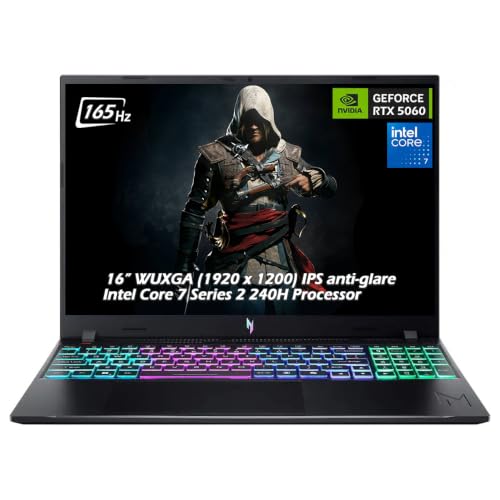
Acer Nitro V 16" RTX 5060
Best for: gamers needing large 2TB storage and 165Hz
- Processor
- Intel Core 7 240H
- RAM Capacity
- 16GB
- Storage Capacity
- 2TB SSD
- Screen Size
- 16-inch
- Graphics Card
- NVIDIA GeForce RTX 5060
- Display Resolution
- 1920 x 1200
This Acer Nitro V 16 gaming laptop delivers a 10-core Intel Core 7 240H processor paired with an NVIDIA GeForce RTX 5060 graphics card. You get a fast 16-inch 165Hz WUXGA display with 400 nits of brightness and a large 2TB solid-state drive for game installations. It suits you if you want high-capacity storage and fluid frame rates in a 4.63-pound build.
- 2TB PCIe NVMe SSD provides expansive built-in storage
- 16-inch 165Hz WUXGA display features 400 nits brightness and 3ms response
- NVIDIA GeForce RTX 5060 GPU with 8GB GDDR7 memory and DLSS 4
- Intel Core 7 240H 10-core processor boosts up to 5.20 GHz
- 1920 x 1200 resolution provides lower pixel density than 1440p panels
- 16GB system memory is lower than 32GB options
- You want a large 2TB built-in drive for extensive game libraries.
- You play competitive titles requiring a 165Hz refresh rate and 3ms response time.
- You need a bright 400-nit screen for well-lit rooms.
- You require a higher-resolution 1440p or 4K panel.
- You need 32GB of memory out of the box for heavy multitasking.
Verdict: Acer Nitro V 16 RTX 5060 Laptop delivers high-capacity 2TB storage and a bright 165Hz panel for players focused on responsive gameplay and install space. It gives mid-range Blackwell graphics power to users who do not need higher display resolutions.

Acer Nitro V 16 RTX 5060 Gaming Laptop
Best for: high-refresh 1200p gaming with balanced storage
- Processor
- Intel Core 7 Series 2 240H
- RAM Capacity
- 16GB
- Storage Capacity
- 1TB SSD
- Screen Size
- 16-inch
- Graphics Card
- NVIDIA GeForce RTX 5060
- Display Resolution
- 1920 x 1200
The Acer Nitro V 16 pairs an Intel Core 7 240H 10-core processor with an NVIDIA GeForce RTX 5060 laptop GPU. You get a 16-inch 1920 x 1200 IPS display running at 165Hz with 400 nits brightness. With 16GB of DDR5 memory and a 1TB SSD, it suits you if you want modern hardware and balanced storage for daily gaming.
- 165Hz 1920 x 1200 IPS panel with 400 nits brightness and 3ms response time
- NVIDIA GeForce RTX 5060 GPU with 8GB GDDR7 VRAM
- Intel Core 7 240H processor boosting up to 5.20 GHz
- Solid connectivity with 3 USB-A ports, 1 USB-C port, and HDMI 2.1
- Resolution tops out at 1920 x 1200 rather than QHD
- Wireless connectivity limited to Wi-Fi 6 rather than Wi-Fi 6E or 7
- You want a fast 165Hz, 400-nit display for competitive gaming.
- You need a balanced 16GB memory and 1TB storage setup.
- You use multiple standard accessories via USB-A and HDMI 2.1 ports.
- You need a higher resolution than 1920 x 1200.
- You require more than 16GB of RAM for heavier workloads.
Verdict: Acer Nitro V 16 RTX 5060 Gaming Laptop delivers reliable mid-range performance for players targeting high-framerate 1200p gameplay with balanced 1TB storage.

ASUS ROG Strix G16 16-inch Gaming Laptop
Best for: high-frame-rate Full HD desk gaming
- Processor
- Intel Core i7 Processor 14650HX
- RAM Capacity
- 16GB
- Storage Capacity
- 1TB Gen 4 SSD
- Screen Size
- 16"
- Graphics Card
- NVIDIA GeForce RTX 5060
- Refresh Rate
- 165Hz
This gaming laptop pairs an Intel Core i7-14650HX processor with an NVIDIA GeForce RTX 5060 graphics card and 16GB of DDR5 memory. You get a 16-inch 165Hz Full HD plus display with a 3ms response time and 1TB of solid-state storage. It fits you if you want high-refresh 1080p gaming performance backed by a tri-fan liquid metal cooling setup.
- 165Hz Full HD plus display with 3ms response time
- Intel Core i7-14650HX processor paired with RTX 5060 GPU
- Tri-fan cooling with vapor chamber and liquid metal
- 1TB PCIe Gen 4 SSD and 16GB DDR5-5600MHz RAM
- Weighs 5.84 pounds
- Display capped at Full HD resolution
- You prioritize high frame rates on a 165Hz Full HD panel over higher resolutions.
- You want robust thermals featuring a vapor chamber and three fans.
- You need 1TB of fast Gen 4 NVMe storage out of the box.
- You need a lightweight machine under five pounds for travel.
- You prefer a native 1440p or 1600p display.
Verdict: ASUS ROG Strix 16 RTX 5060 Gaming Laptop delivers dedicated power for high-refresh Full HD players who prioritize sustained cooling over portability. Its 5.84-pound chassis fits best on a permanent desk setup.
Specifications side by side
| Spec | ASUS ROG Strix 16 RTX 5050 Gaming Laptop | Acer Nitro V 16 RTX 5060 Gaming Laptop | GIGABYTE Gaming A16 16" RTX 5070 Laptop | ASUS V16 16-inch RTX 5060 Laptop | Acer Nitro V 16" RTX 5060 | Acer Nitro V 16 RTX 5060 Gaming Laptop | ASUS ROG Strix G16 16-inch Gaming Laptop |
|---|---|---|---|---|---|---|---|
| Processor | AMD Ryzen 9 9955HX | Intel Core 7 240H | Intel Core i7-13620H | Intel Core 7 Processor 240H | Intel Core 7 240H | Intel Core 7 Series 2 240H | Intel Core i7 Processor 14650HX |
| RAM Capacity | 16GB | 32GB | 32GB | 32GB | 16GB | 16GB | 16GB |
| Storage Capacity | 1TB SSD | 1TB SSD | 1TB SSD | 1TB | 2TB SSD | 1TB SSD | 1TB Gen 4 SSD |
| Screen Size | 16" | 16-inch | 16" | 16-inch | 16-inch | 16-inch | 16" |
| Graphics Card | NVIDIA GeForce RTX 5050 | NVIDIA GeForce RTX 5060 | NVIDIA GeForce RTX 5070 | NVIDIA GeForce RTX 5060 | NVIDIA GeForce RTX 5060 | NVIDIA GeForce RTX 5060 | NVIDIA GeForce RTX 5060 |
| Display Resolution | WUXGA | 1920 x 1200 | 1920×1200 | 1920 x 1200 | 1920 x 1200 | 1920 x 1200 | – |
| Refresh Rate | 144Hz | 165Hz | 165Hz | 144Hz | 165Hz | 165Hz | 165Hz |
| Operating System | – | – | Windows 11 Home | – | – | – | Windows 11 Home |
| Intended Use | Gaming | Gaming | Home, Gaming | Gaming | Gaming | Gaming | Home, Gaming |
| Resolution | WUXGA | WUXGA | WUXGA | WUXGA | WUXGA | WUXGA | Full HD |
| Size | – | – | – | 0.87" x 14.1" x 9.9" | 16GB+2TB | 16GB RAM | 1TB SSD | – |
| Dimensions | 20 × 10.8 × 0.96 inches | 0.78 × 10.2 × 14 inches | 14.1 × 0.91 × 10.3 inches | 14.1 × 9.87 × 0.87 inches | 0.78 × 10.2 × 14 inches | 0.78 × 10.2 × 14 inches | 13.9 × 0.9 × 10.6 inches |
| Weight | 7 pounds | 4.63 pounds | 4.85 pounds | 4.3 pounds | 4.63 pounds | 4.63 pounds | 5.84 pounds |
| Color | Eclipse Gray | Obsidian Black | Black Steel | Black | Obsidian Black | Obsidian Black | Eclipse Gray |
| Model | ASUS ROG Strix G16 | – | GAMING A16 CWHI3US864SH | V3607VM-DS79 | – | – | G615JMR-AS74 |
Frequently asked questions
Which alternative offers the highest graphics performance?
The GIGABYTE Gaming A16 provides the highest graphics specification among these options with its RTX 5070 GPU. It pairs this graphics processor with an Intel Core i7 and 32GB of RAM. This setup targets high frame rates at WUXGA resolution, giving you stronger graphical rendering capability than laptops equipped with RTX 5060 or RTX 5050 hardware.
Which ROG Strix alternative is the lightest option for travel?
The ASUS V16 is the lightest alternative on this list, weighing 4.3 pounds. It measures 0.87 inches thick, making it significantly easier to carry than the 7-pound ASUS ROG Strix 16. You still get an Intel Core 7 processor, GeForce RTX 5060 graphics, and 32GB of system memory in a more portable chassis.
Which gaming laptop alternative includes a 2TB solid-state drive?
The Acer Nitro V 16 configuration with model size 16GB+2TB provides a built-in 2TB solid-state drive. It combines this spacious storage capacity with an Intel Core 7 processor and GeForce RTX 5060 graphics. This drive setup gives you ample room for large game installations without requiring an immediate storage upgrade or external drives.
What display resolutions do these alternative gaming laptops feature?
Most models on this list feature 16-inch WUXGA screens, while the ASUS ROG Strix G16 model G615JMR-AS74 uses a Full HD panel. WUXGA provides a 16:10 aspect ratio with extra vertical pixels compared to traditional 16:9 Full HD displays. Both display types ensure smooth gameplay at 1080p and 1200p target resolutions.
Which laptops offer 32GB of RAM out of the box?
The Acer Nitro V 16, GIGABYTE Gaming A16, and ASUS V16 all come configured with 32GB of system memory. Having 32GB of RAM benefits demanding modern games, heavy multitasking, and background applications. It eliminates the immediate need to open the chassis and upgrade the physical memory modules yourself.
Which alternative laptop has biometric login functionality?
The ASUS V16 RTX 5060 laptop includes biometric login capability for secure system access. In addition to biometric authentication, this 4.3-pound laptop features an Intel Core 7 processor, an RTX 5060 graphics card, 32GB of RAM, and a 16-inch WUXGA display. This makes it suitable for productivity tasks alongside gaming.
See also
See the current listing on Amazon
Specifications on this page are read from the product listing. Scores are out of 10, based on listed specifications and buyer feedback.


