As Amazon Associates, we earn from qualifying purchases. This means we may receive a small commission at no extra cost to you if you click through and make a purchase.

As an Amazon Associate we earn from qualifying purchases. Links on this page are affiliate links.
Finding suitable apple macbook pro 16 m4 alternatives depends on your hardware requirements. The Apple MacBook Pro 16 excels with its Apple M4 Pro processor, 24GB of memory, and a 16.2-inch Liquid Retina XDR display reaching 1600 nits peak brightness. It delivers steady performance on battery power alongside a 12MP Center Stage camera. You might prefer an alternative brand, a Windows operating system, dedicated Nvidia graphics, or higher memory capacity.
The 6 alternatives on this list were chosen because their specifications overlap with the original hardware. Each model provides a 16-inch screen alongside fast multi-core processing from Apple, Intel, or AMD. Selected configurations deliver expanded system memory up to 64GB or internal SSD storage reaching 4TB. Other options include discrete GeForce RTX GPUs for specialized workloads. Reviewing these hardware specifications allows you to choose the right balance of processing, graphics, and storage for your daily work.
How Each Alternative Compares
Apple MacBook Pro 16 M1 Max
This configuration trades the newer Apple M4 Pro chip for the previous-generation M1 Max, but increases capacity across the board. You get 64GB of RAM and a 4TB SSD, compared to the 24GB of memory and 512GB SSD on the M4 Pro model. At 4 pounds, it is also lighter than the 4.72-pound original. Both retain the 16-inch display footprint and macOS ecosystem features. Choose this option if your production workflows prioritize massive local storage and four times the system memory over the raw single-thread generation gains of the M4 family.
Acer Nitro V 16 RTX 5060 Gaming Laptop
The Acer Nitro V 16 shifts from Apple silicon to an Intel Core 7 processor and dedicated Nvidia GeForce RTX 5060 graphics. While the MacBook Pro relies on integrated Apple M4 Pro architecture and an advanced 1600-nit Liquid Retina XDR screen, this laptop provides a WUXGA panel tailored for gaming. At 4.63 pounds, it is slightly lighter than the 4.72-pound MacBook. You give up macOS integration and high-contrast display specifications. Choose this system if you need dedicated Nvidia graphics acceleration for gaming or specialized software pipelines on a 16-inch platform.
Lenovo ThinkPad 16" Ryzen 7 Laptop
This Lenovo ThinkPad moves to an AMD Ryzen 7 processor and Windows 11 Pro. It doubles the internal storage to a 1TB SSD and steps up memory to 64GB RAM, exceeding the MacBook Pro’s 24GB RAM and 512GB SSD. The chassis weighs 4 pounds, undercutting the MacBook’s 4.72 pounds. However, its Full HD screen does not match the brightness and contrast of the 1600-nit Liquid Retina XDR panel. Select this laptop if your business workload requires Windows 11 Pro and extensive system memory for heavy spreadsheet multitasking.
Lenovo ThinkPad 16 Core Ultra 7 Laptop
The ThinkPad T16 Gen 4 replaces macOS with Windows 11 Pro and features an Intel Core Ultra 7 processor. It offers 32GB of DDR5 memory, giving you more RAM than the 24GB found on the base MacBook Pro 16, alongside an identical 512GB SSD. In exchange, the display is a standard WUXGA panel rather than a 1600-nit Liquid Retina XDR screen. It is also notably heavier, weighing 6 pounds compared to the 4.72-pound MacBook. Choose this model if your enterprise software requires Windows 11 Pro management and 32GB of system memory.
GIGABYTE A16 Pro 16" RTX 5080 Gaming Laptop
The GIGABYTE A16 Pro targets graphical workloads with its dedicated GeForce RTX 5080 GPU and Windows 11 Home. Its 16-inch WQXGA display provides a higher resolution than Full HD panels, though it does not reach the 1600-nit peak brightness or 1,000,000:1 contrast ratio of Apple’s Liquid Retina XDR screen. Weighing 5.07 pounds, it is heavier to carry than the 4.72-pound MacBook Pro. Pick this machine if you require maximum 3D rendering power, dedicated Nvidia hardware acceleration, and Windows compatibility instead of Apple’s integrated M4 Pro architecture.
Dell Pro 16 Laptop with 64GB RAM and 2TB SSD
This Dell Pro 16 laptop emphasizes capacity by providing 64GB of memory and a 2TB SSD, far outstripping the MacBook Pro's 24GB RAM and 512GB storage. Running Windows 11 Pro on an Intel Core Ultra 5 processor, it weighs 4.23 pounds, making it lighter than the 4.72-pound MacBook. The trade-off comes in display quality: Dell’s Full HD panel does not offer the 1600-nit peak brightness or deep contrast of Apple’s Liquid Retina XDR screen. Choose this configuration if your office productivity demands four times the storage and expansive system memory.
| # | Product | Best for | Price |
|---|---|---|---|
| 1 | Apple MacBook Pro 16 M4 Pro Best overall | software developers and visual media professionals | |
| 2 | Apple MacBook Pro 16 M1 Max Best premium | macOS users needing massive storage and RAM | |
| 3 | Acer Nitro V 16 RTX 5060 Gaming Laptop Best budget | high-refresh tasks needing dedicated GPU acceleration | |
| 4 | Lenovo ThinkPad 16" Ryzen 7 Laptop Best amd ryzen 7 | memory-heavy office multitasking on Windows | |
| 5 | Lenovo ThinkPad 16 Core Ultra 7 Laptop Also great | business professionals needing 32GB Windows multitasking | |
| 6 | GIGABYTE A16 Pro 16" RTX 5080 Gaming Laptop Best windows 11 home | high-end graphics performance and gaming | |
| 7 | Dell Pro 16 Laptop with 64GB RAM and 2TB SSD Best intel core ultra 5 | memory-heavy office tasks and multi-monitor setups |

Apple MacBook Pro 16 M4 Pro
Best for: software developers and visual media professionals
- Processor
- Apple M4 Pro
- RAM Capacity
- 24GB
- Storage Capacity
- 512GB SSD
- Screen Size
- 16-inch
- Dimensions
- 5.28 × 3.68 × 0.18 inches
- Weight
- 4.72 pounds
This 16.2-inch laptop runs on the Apple M4 Pro chip with 24GB of unified memory and a 512GB SSD. Its Liquid Retina XDR display reaches 1,600 nits peak brightness with a 1,000,000:1 contrast ratio. It suits you if you compile extensive codebases, manage creative workflows, and require high display brightness paired with all-day battery life.
- Apple M4 Pro chip for demanding computational tasks
- Liquid Retina XDR screen with 1600 nits peak brightness
- 12MP Center Stage camera with studio-quality microphones
- Six-speaker sound system with Spatial Audio support
- 512GB base solid-state drive capacity
- 24GB memory is lower than 32GB or 64GB options
- Weight is 4.72 pounds
- You need sustained 1000-nit display brightness for HDR production.
- You compile large codebases or run Apple Intelligence tasks.
- You use iPhone Mirroring to manage phone apps directly on macOS.
- You require more than 512GB of internal storage.
- You need more than 24GB of RAM for your workload.
- You want a lighter chassis under 4.5 pounds.
Verdict: Apple MacBook Pro 16 M4 Pro fits developers and creative professionals who need a 1600-nit XDR screen and consistent battery operation. Its balance of processing speed and display fidelity handles complex software suites reliably.

Apple MacBook Pro 16 M1 Max
Best for: macOS users needing massive storage and RAM
- Processor
- Apple M1 Max
- RAM Capacity
- 64GB
- Storage Capacity
- 4TB SSD
- Screen Size
- 16.2"
- Graphics Card
- 32-core GPU
- Refresh Rate
- 120Hz
This renewed Apple MacBook Pro 16 pairs an older M1 Max chip with a 4TB SSD and 64GB of unified memory. You get a 16.2-inch Liquid Retina XDR screen with a 120Hz refresh rate and 1600 nits peak brightness. It suits you if you need expansive local storage and large memory capacity for macOS creative workloads.
- 64GB unified memory handles memory-intensive workloads
- Spacious 4TB SSD storage capacity
- 16.2-inch Liquid Retina XDR display with 120Hz ProMotion
- Apple M1 Max chip with 10-core CPU and 32-core GPU
- Older generation M1 Max processor architecture
- Renewed condition rather than brand new
- You need high-capacity 4TB internal storage and 64GB RAM for media libraries.
- You want a 120Hz Liquid Retina XDR display with 1600 nits peak brightness for editing.
- You require the newer processing architecture of M4-generation hardware.
- You prefer a brand-new factory laptop over a renewed configuration.
Verdict: Apple MacBook Pro 16 M1 Max delivers heavy memory bandwidth and massive internal drive space for video editors prioritizing 64GB RAM and 4TB storage over latest-generation CPU cores.

Acer Nitro V 16 RTX 5060 Gaming Laptop
Best for: high-refresh tasks needing dedicated GPU acceleration
- Processor
- Intel Core 7 240H
- RAM Capacity
- 32GB
- Storage Capacity
- 2TB SSD
- Screen Size
- 16-inch
- Graphics Card
- NVIDIA GeForce RTX 5060
- Display Resolution
- 1920 x 1200
This 16-inch Windows 11 laptop provides an Intel Core 7 240H 10-core processor and dedicated Nvidia GeForce RTX 5060 graphics. You get 32GB of DDR5 RAM paired with a 2TB SSD for storage. The 1920 x 1200 anti-glare screen runs at 165Hz with 400 nits brightness. It fits your setup if you prioritize graphics power and local capacity over ultra-high display resolution.
- Nvidia GeForce RTX 5060 GPU with 8GB GDDR7 memory
- 165Hz refresh rate with 3ms response time
- 2TB PCIe NVMe solid-state drive
- 32GB of DDR5 system memory
- WUXGA 1920 x 1200 resolution has lower pixel density than competing displays
- Heavier chassis at 4.63 pounds
- Networking limited to Wi-Fi 6 rather than Wi-Fi 6E or Wi-Fi 7
- You need dedicated Nvidia RTX 5060 graphics for 3D tasks
- You require 2TB of internal storage alongside 32GB RAM
- You want a fast 165Hz refresh rate for motion clarity
- You need a display resolution higher than 1200p
- You want a lightweight chassis under four pounds
Verdict: Acer Nitro V 16 RTX 5060 Gaming Laptop suits power users who require dedicated Nvidia graphics and large internal storage capacity on a standard-resolution panel.

Lenovo ThinkPad 16" Ryzen 7 Laptop
Best for: memory-heavy office multitasking on Windows
- Processor
- Ryzen 7 250
- RAM Capacity
- 64GB
- Storage Capacity
- 1TB PCIe NVMe SSD
- Screen Size
- 16"
- Graphics Card
- AMD Radeon 780M
- Display Resolution
- 1920×1200
This Lenovo ThinkPad provides an AMD alternative to the 16-inch MacBook Pro for business workloads. You get an 8-core AMD Ryzen 7 250 processor paired with 64GB of DDR5 memory and a 1TB SSD. Its 16-inch 1920×1200 display offers a 16:10 aspect ratio for document viewing, making it suitable if you require heavy multitasking on Windows 11 Pro.
- 64GB DDR5 SODIMM memory for heavy multitasking
- AMD Ryzen 7 250 processor with 8 cores and 16 threads
- 16-inch 1920×1200 IPS display with 16:10 aspect ratio
- Physical RJ-45 Ethernet port and HDMI output
- Display resolution is limited to 1920×1200
- Small 47 WHr 3-cell battery capacity
- Integrated AMD Radeon 780M graphics instead of a dedicated GPU
- You need 64GB of RAM for data analysis and multitasking.
- You prefer an AMD Ryzen processor running Windows 11 Pro.
- You rely on native wired Ethernet and HDMI ports.
- You want a high-resolution display exceeding standard 1200p.
- You need a dedicated graphics card for 3D modeling or video work.
- You require all-day unplugged runtime from a large internal battery.
Verdict: Lenovo ThinkPad 16" Ryzen 7 Laptop gives business users 64GB of RAM and full connectivity for demanding office multitasking. It suits workers who prioritize system memory and port selection over high display resolution.

Lenovo ThinkPad 16 Core Ultra 7 Laptop
Best for: business professionals needing 32GB Windows multitasking
- Processor
- Intel Core Ultra 7 258V
- RAM Capacity
- 32GB LPDDR5X
- Storage Capacity
- 512GB SSD
- Screen Size
- 16"
- Graphics Card
- Intel HD Graphics
- Display Resolution
- 1920 x 1200
This Lenovo ThinkPad offers a Windows alternative to the MacBook Pro 16. You get an Intel Core Ultra 7 258V processor, 32GB of soldered LPDDR5X memory, and a 16-inch 1920 x 1200 IPS display. Running Windows 11 Pro, it suits enterprise users, remote workers, and students who need business security features and fast memory for multitasking.
- 32GB LPDDR5X memory for demanding multitasking
- Intel Core Ultra 7 258V processor
- Thunderbolt, USB-C, and USB-A connectivity
- Backlit keyboard and fingerprint reader
- Base storage limited to 512GB SSD
- 1920 x 1200 resolution offers lower pixel density than competitors
- Heavier build listed at 6 pounds
- You need 32GB of RAM for business multitasking on Windows 11 Pro.
- You want physical USB-A and Thunderbolt ports built into the chassis.
- You need a display resolution sharper than 1920 x 1200.
- You require more than 512GB of internal storage out of the box.
Verdict: Lenovo ThinkPad 16 Intel Core Ultra 7 delivers 32GB of memory and Windows 11 Pro security for business professionals who prioritize connectivity and office multitasking over ultra-high-resolution screens.

GIGABYTE A16 Pro 16" RTX 5080 Gaming Laptop
Best for: high-end graphics performance and gaming
- Processor
- Intel Core Ultra 7 240H
- RAM Capacity
- 32GB
- Storage Capacity
- 1TB SSD
- Screen Size
- 16"
- Graphics Card
- NVIDIA GeForce RTX 5080
- Display Resolution
- 2560×1600
This 16-inch laptop runs Windows 11 Home on an Intel Core Ultra 7 240H processor and a discrete NVIDIA GeForce RTX 5080 GPU. Its WQXGA 2560×1600 display delivers a 165Hz refresh rate alongside 32GB of LPDDR5x memory and a 1TB SSD. It suits you if you need intense graphics compute and fast refresh rates beyond standard business notebooks.
- NVIDIA GeForce RTX 5080 GPU for demanding graphics tasks
- 16-inch 2560×1600 WQXGA panel with a 165Hz refresh rate
- Intel Core Ultra 7 240H processor with 32GB LPDDR5x RAM
- 180-degree lay-flat hinge design
- Weighs 5.07 pounds, making it heavier than typical portables
- Offers 32GB RAM where some competing options provide 64GB
- You want dedicated NVIDIA GeForce RTX 5080 graphics performance.
- You need a 165Hz WQXGA panel for fluid gaming or animation.
- You prefer Windows 11 Home for broad application support.
- You need a machine under five pounds for easy travel.
- You require 64GB RAM for extreme multitasking.
Verdict: GIGABYTE A16 PRO 16-inch RTX 5080 Laptop fits power users who prioritize top-tier graphical horsepower and fast display rates over light travel weight.
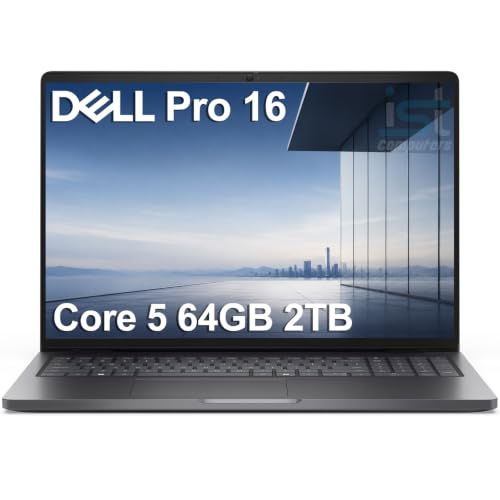
Dell Pro 16 Laptop with 64GB RAM and 2TB SSD
Best for: memory-heavy office tasks and multi-monitor setups
- Processor
- Intel Core 5 120U
- RAM Capacity
- 64GB
- Storage Capacity
- 2TB SSD
- Screen Size
- 16-inch
- Graphics Card
- Intel Graphics
- Display Resolution
- 1920×1200
The Dell Pro 16 offers a Windows alternative with an Intel Core 5 120U processor, 64GB of DDR5 memory, and a 2TB solid-state drive. Its 16-inch 1920×1200 anti-glare display gives you plenty of screen space for spreadsheets and code. This machine suits professionals who prioritize large memory capacity and multi-monitor output over premium display resolution.
- 64GB DDR5 memory handles demanding multitasking
- 2TB PCIe SSD provides substantial local storage
- Supports three external displays up to 4K resolution
- Wide port selection includes Thunderbolt 4, HDMI 2.1, and RJ45
- Display is limited to 1920×1200 resolution and 300 nits brightness
- Relies on integrated Intel Graphics rather than a discrete GPU
- Base factory warranty is one year with upgraded parts covered separately
- You need 64GB of system memory for virtual machines or large data sets.
- You run multiple external monitors directly from your laptop without a docking station.
- You need native wired Ethernet alongside modern Thunderbolt 4 connectivity.
- You require a dedicated graphics card for heavy 3D rendering or gaming.
- You need a high-density screen sharper than standard 1200p resolution.
Verdict: Dell Pro 16 Intel Core 5 Laptop delivers massive memory and extensive connectivity for business users managing large files. It serves spreadsheet analysts and developers who value capacity over display sharpness.
Specifications side by side
| Spec | Apple MacBook Pro 16 M4 Pro | Apple MacBook Pro 16 M1 Max | Acer Nitro V 16 RTX 5060 Gaming Laptop | Lenovo ThinkPad 16" Ryzen 7 Laptop | Lenovo ThinkPad 16 Core Ultra 7 Laptop | GIGABYTE A16 Pro 16" RTX 5080 Gaming Laptop | Dell Pro 16 Laptop with 64GB RAM and 2TB SSD |
|---|---|---|---|---|---|---|---|
| Processor | Apple M4 Pro | Apple M1 Max | Intel Core 7 240H | Ryzen 7 250 | Intel Core Ultra 7 258V | Intel Core Ultra 7 240H | Intel Core 5 120U |
| RAM Capacity | 24GB | 64GB | 32GB | 64GB | 32GB LPDDR5X | 32GB | 64GB |
| Storage Capacity | 512GB SSD | 4TB SSD | 2TB SSD | 1TB PCIe NVMe SSD | 512GB SSD | 1TB SSD | 2TB SSD |
| Screen Size | 16-inch | 16.2" | 16-inch | 16" | 16" | 16" | 16-inch |
| Graphics Card | – | 32-core GPU | NVIDIA GeForce RTX 5060 | AMD Radeon 780M | Intel HD Graphics | NVIDIA GeForce RTX 5080 | Intel Graphics |
| Display Resolution | – | – | 1920 x 1200 | 1920×1200 | 1920 x 1200 | 2560×1600 | 1920×1200 |
| Refresh Rate | – | 120Hz | 165Hz | – | – | 165Hz | – |
| Operating System | – | – | – | Windows 11 Pro | Windows 11 Pro | Windows 11 Home | Windows 11 Pro |
| Intended Use | – | – | Gaming | Business | – | Home, Gaming | Business |
| Resolution | – | – | WUXGA | Full HD | WUXGA | WQXGA | Full HD |
| Dimensions | 5.28 × 3.68 × 0.18 inches | 16 × 9.77 × 0.66 inches | 0.78 × 10.2 × 14 inches | 14 × 9.75 × 0.78 inches | 17 × 3 × 11 inches | 15.2 × 0.91 × 11.6 inches | 14.1 × 9.91 × 0.82 inches |
| Weight | 4.72 pounds | 4 pounds | 4.63 pounds | 4 pounds | 6 pounds | 5.07 pounds | 4.23 pounds |
| Size | 24GB RAM, 512GB SSD Storage | 64GB RAM, 4TB SSD Storage | – | 64GB RAM|1TB SSD | 32GB DDR5 | 512GB SSD | – | 64GB|2TB |
| Color | Space Black | Space Gray | Obsidian Black | Black | Black | Titanium Black | Platinum Silver |
| Model | MX2X3LL/A | Macbook Pro | – | – | Lenovo ThinkPad T16 Gen 4 | GAMING A16 PRO DYHG5USCC4SH | Dell pro 16 PC16250 |
Frequently asked questions
Which Windows alternatives offer dedicated graphics cards?
You can choose the Acer Nitro V 16 or the GIGABYTE A16 Pro for dedicated graphics. The Acer model includes a GeForce RTX 5060 paired with an Intel Core 7 processor. The GIGABYTE A16 Pro upgrades graphical capability with an RTX 5080 GPU for gaming and intensive tasks.
Which 16-inch Windows alternatives provide 64GB of RAM?
The Lenovo ThinkPad 16 with AMD Ryzen 7 and the Dell Pro 16 both include 64GB of RAM. The Lenovo ThinkPad pairs this memory with a 1TB SSD and Windows 11 Pro. The Dell Pro 16 pairs its 64GB capacity with an Intel Core Ultra 5 processor and 2TB SSD.
What display resolutions are available on these 16-inch alternatives?
Display resolutions across these machines range from Full HD to WQXGA. The Lenovo ThinkPad Ryzen 7 and Dell Pro 16 use Full HD panels. The Acer Nitro V 16 and Lenovo ThinkPad Core Ultra 7 feature WUXGA displays. The GIGABYTE A16 Pro provides the highest alternative resolution with a WQXGA screen.
Which laptop alternatives feature Intel Core Ultra processors?
You have two options featuring Intel Core Ultra hardware in this selection. The Lenovo ThinkPad T16 Gen 4 runs on an Intel Core Ultra 7 processor alongside 32GB DDR5 memory. Alternatively, the Dell Pro 16 includes an Intel Core Ultra 5 processor combined with 64GB of memory and Windows 11 Pro.
Which 16-inch laptops are the lightest to carry?
The Apple MacBook Pro 16 M1 Max and the Lenovo ThinkPad Ryzen 7 are the lightest options at 4 pounds each. If you need a Windows machine with a dedicated GPU, the Acer Nitro V 16 weighs 4.63 pounds. The heaviest model listed is the Lenovo ThinkPad T16 at 6 pounds.
What operating systems do these alternative laptops run?
Most of the non-Apple alternatives come preloaded with Windows 11 Pro, including both Lenovo ThinkPad models and the Dell Pro 16. If you prefer a consumer-focused build, the GIGABYTE A16 Pro ships with Windows 11 Home. Meanwhile, the Apple alternatives rely on macOS to run software.
See also
See the current listing on Amazon
Specifications on this page are read from the product listing. Scores are out of 10, based on listed specifications and buyer feedback.


